
goplcobjbaafmhoadgihbepeejbajbki

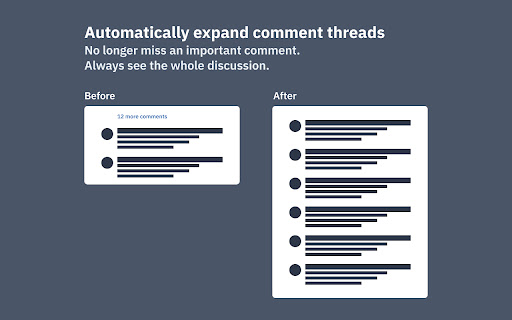
This Chrome extension is no longer maintained. Another developer stepped up and forked the code. You can find their extension here: https://chromewebstore.google.com/detail/asana-expander-v2/kjhnkemellgoedcmmmkfdfemaaechepf?pli=1 --- Do you also hate to click on those "See more" links in Asana, just to see the last sentence of a longer comment? Or did you also miss an important comment in a longer comment thread in an Asana Task? This extension solves this problem my automatically clicking on those links whenever you open a task with many comments or when a comment is longer than 300 characters. Note: The extension currently doesn't work in Asana's Inbox view.

Asana Expander v2
Automatically expands hidden content in Asana tasks and inbox Asana Expander removes the extra clicking needed to read full task and Inbox content. The extension automatically expands collapsed, hidden, and truncated content across Asana, including project fields, subtask lists, comment lists, long comments and notifications, so important information is visible right away. You can control exactly what runs from the popup by enabling or disabling individual features. If you use Asana heavily, this helps you scan updates faster and avoid missing context hidden behind collapsed sections. Note: This extension was originally created by Stefan Zweifel (https://chromewebstore.google.com/detail/asana-expander/goplcobjbaafmhoadgihbepeejbajbki) but is no longer being maintained. Development is now being continued again with this extension.

Asana Navigator
Enhance navigation for Asana -- less mouse moves and key presses. Update May 2022: - Migrated to manifest v3 - Convert task section feature is still not fully working - Asana tabs are no longer reloaded when the extension is updated to a newer version. Please manually reload Asana tabs when it doesn't work well This is an unofficial Google Chrome / Firefox extension to enhance navigation for Asana tasks. It has functionality to: - Search tasks in the currently open project or user (Advanced search - Tab+/ or Tab+;) - Go back to what you were doing before visiting Inbox (Tab+J) - Show arrows and jump to previous/next sibling subtasks (Shift+Tab+↑/↓) - Show drop-down list of all sibling subtasks to jump to them (Shift+Tab+→) - Add keyboard shortcuts to attach files (Tab+V and Tab+1/2/3/4/5) - Add keyboard shortcuts to open more actions (Tab+.) - Replace text in task description (Tab+E) - Convert to subtask (set new parent task) (Tab+G) - Convert task to section and vice versa (Tab+: or Shift+Tab+:) Not fully working - Show additional keyboard shortcuts in the list (only with Cmd/Ctrl+/) All done seamlessly in Asana UI, in your localized language, using the same CSS used by Asana (at least I try as much as possible). Each feature can be switched on/off in the extension options, which is accessible by going to chrome://extensions > Asana Navigator > Details > Extension options, or in Firefox, about:addons > Asana Navigator > Preferences. If this extension doesn't work well, please try reloading the Asana task page. This is an open source project and you can see the source code at: https://github.com/ShunSakurai/asana-navigator Firefox extension: https://addons.mozilla.org/en-US/firefox/addon/asana-navigator

Tab Search Pro
Search active tabs, highlight results, save search history, switch between the last two active tabs, navigate tabs chronologically. Introducing Tab Search Pro, the ultimate browser extension designed to revolutionize your web searching experience. Tired of juggling multiple tabs just to find the information you need? Tab Search Pro is here to make your browsing efficient, organized, and productive. *Now, with the new feature to duplicate the current tab, you can effortlessly create a copy of any tab you're working on, enhancing your browsing efficiency even further.* Now you can easily switch between the last two active tabs, and navigate tabs chronologically for efficient browsing. At its core, Tab Search Pro is all about simplifying the way you search for content within your open tabs. Say goodbye to the hassle of switching between tabs, wasting precious time in endless clicks. With Tab Search Pro, you can effortlessly search for text across all your active tabs without losing focus on your current page. Using Tab Search Pro is a breeze. Just highlight any text that you want to look up, and a world of possibilities opens up. Activate the search through convenient context menu options or by utilizing customizable keyboard shortcuts. Tab Search Pro will quickly scan your open tabs, seeking out the first tab where your desired content is found. Not only that, it will highlight all occurrences of the text throughout your open tabs, making it easy to locate the information you need at a glance. Available Shortcuts: Duplicate Current Tab and Activate It Alt+Shift+D (Mac) Alt+Shift+D (Windows/Linux) Switch between the last two active tabs Command+Q (Mac) Ctrl+Q (Windows/Linux) Switch to the previous tab in the order they were activated, maintaining the chronological sequence of tab activations Ctrl+Shift+Space (Mac) Command+Space (Windows/Linux) But what sets Tab Search Pro apart is its versatility. If Tab Search Pro doesn't find a match within your tabs, it has your back. Instead of leaving you empty-handed, the extension prompts you to conduct a Google search directly, ensuring that you never miss out on any relevant information. With this dynamic feature, you're never left without answers. We value your privacy and security, which is why Tab Search Pro is designed with minimal permissions, including activeTab, contextMenus, scripting, and tabs. Rest assured, your data stays within your browser, and you remain in complete control. Tab Search Pro is not just a simple search tool; it's a productivity powerhouse. Imagine the time and effort you'll save as you seamlessly navigate through your tabs, instantly finding the information you need. No more distractions, no more wasted clicks – just pure efficiency. Whether you're a researcher, student, or a professional seeking the latest news, Tab Search Pro empowers you to be in charge of your browsing. No more losing focus, no more disruptions – only smooth and targeted searches. With Tab Search Pro as your trusted companion, you can create an organized browsing environment, keeping track of your searches and creating a history for later usage. No more digging through browser history or bookmarks; your sought-after content is always just a click away. Don't settle for inefficient browsing. Upgrade to Tab Search Pro and unlock the full potential of your web searching capabilities. Embrace a new level of productivity, save time, and access information faster than ever before. Tab Search Pro is your ticket to a more streamlined, effortless, and enjoyable browsing experience. Install Tab Search Pro today and take the first step towards a smarter, more efficient web journey.

Asana
Easily create and search for Asana tasks from anywhere in your browser. This official Asana Chrome Extension enables you to easily create and search for Asana tasks from anywhere in Chrome. View, edit, and search for tasks alongside your work • Complete tasks • Add collaborators • Edit task details (assignee, due date, project, section, and description) • Search by task name, without switching tools From the small stuff to the big picture, Asana organizes work so teams know what to do, why it matters, and how to get it done. It’s free to get started, simple to use, and powerful enough to run your entire business. Learn more about Asana at www.asana.com.
