
ghllkaandaghmnhgldofdmollpjlefmj

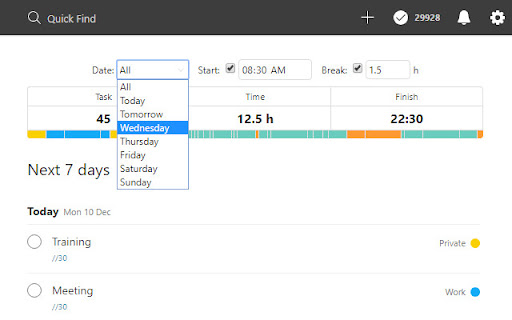


TodoistChute calculates the estimated time required to every tasks on Todoist, and shows the finish time. TodoistChute calculates the estimated time required to every tasks on Todoist, and shows the finish time. Enter the time in minutes as "//60" in label or text of task.

Fast Notion Chrome Extension
Fast Notion の Chrome 拡張機能 Fast Notion は Notion 上に素早くメモを取ることができるツールです。通常テキスト、ToDo、データベースの3種類の投稿モードを選ぶことが可能です。

TimeCrowd Browser Time Tracking Extension
TimeCrowd is a time management tool. Visualize your team's time by sharing past and present time.

UpNote Web Clipper
UpNote Web Clipper lets you quickly save all or part of a web page to UpNote app. UpNote is a clean and beautiful app for writing and organizing notes. It's easy to use with rich features and delightful experience. You can download UpNote for free on Mac, iOS, Windows and Android device. 2. Enable UpNote Web Clipper from the Chrome Browser. 3. Whenever you want to save a web page, simply click on the UpNote Web Clipper icon from the browser toolbar and open UpNote app. The web page will be saved automatically to your note. 4. If you want to save a part of the web page instead of the full web page, simply select the part you need, then click the UpNote Web Clipper icon to save into UpNote app. UpNote Web Clipper helps you quickly capture and organize all the articles, research and inspiration, and sync to all devices so you can access anytime, anywhere. Best of all, the web clipper automatically remove ads, navigation and noise so that you could focus on the content.

Clip To Workflowy
Workflowy Web Clipper lets you save pages, links, and highlighted text to Workflowy with a single click or a keyboard shortcut. Click the extension icon to instantly clip the current page - no popup required. Clip directly into your focused bullet in Workflowy with Cursor mode, or copy a ready-to-paste clip with Clipboard mode and place it anywhere in your account. The new Mixed format puts the page title on top, the link in the note, and highlighted selections as child bullets - great for research and saving context. If you clip the same page several times in a row, the clipper can append to the previous bullet so related captures stay together. Features - Click the toolbar icon to instantly clip the current page - Clip the current page or selected text - Insert clips directly under your focused bullet in Workflowy - Or copy a structured clip and paste it anywhere in Workflowy - New Mixed format: title on top, link in the note, selection as children - Repeated clips from the same page can append to the previous bullet - Choose whether clips are created as bullets or notes - Create named links - Choose whether the clip lands inside the focused bullet or at the same level - Open Workflowy automatically after clipping - Use keyboard shortcuts: Alt+C to clip to cursor, Alt+Shift+C to clipboard - Set custom keyboard shortcuts for clipping - Arrange Workflowy side-by-side with your browser for faster capture - See What's New again after updates - Built-in tutorial with dark mode support
