
dniglbfmfllnnkbjilhjignncgcadojn

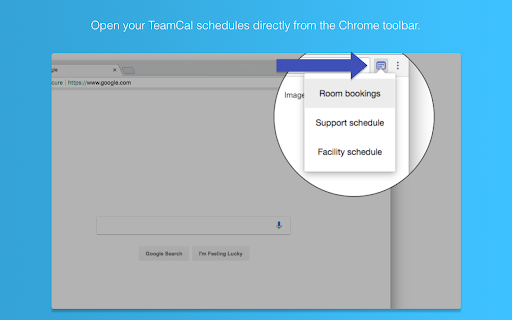
The missing schedule view for Google Calendar TeamCal provides a timeline view layout for Google Calendar that displays many calendars at once TeamCal transforms your Google Calendar into the perfect tool to schedule your employees, contractors, rooms, machinery, and resources. Google Calendar can become very cluttered when displaying multiple calendars. TeamCal will display your calendar data as a nice Gantt like “Schedule View”. The TeamCal schedule view is a new horizontal timeline view for Google Calendar that displays many calendars at once. See employee availability easily by comparing events on a horizontal Gantt like timeline view. With a glance, you can identify scheduling gaps and prevent overbooking. Perfect for scheduling staff rotations, on-call duty times, and team vacations. Stop switching between Google Calendar and other tools for scheduling your team. Because TeamCal uses your Google Calendar data, all information required for scheduling is available in a single place. Create new events or change existing ones directly within TeamCal. Share your schedule with employees and clients to keep everyone updated. With TeamCal, you can embed your schedule on a website, TV screen, or show it as a dashboard. You can export a PDF of your schedule, too. Print or send your planning results by email. Features: - Integrated & synced with Google Calendar - Customizable Scheduling view - Share, Print, and Export your schedules - Support for mobile and tablets - Multi-user functionality - And much more! Chrome Extension: This Chrome extension shows you all TeamCal schedules in a convenient drop down. Access your schedules directly from the Chrome toolbar.

Cal Merge for Google Calendar™
Chrome extension that visually merges the same event on multiple Google Calendars into one event. Visually merge the same event on multiple Google Calendars™ into one event. Do you view at the same time: - You work and personal calendar - Your team's shared calendar - A private calendar with loads of "Busy" blocks - Or some strange combination of events? These likely clutter up your calendar and if long titled are hard to read. This extension merges all those separate events into one event, and colours it with a user selected gradient style.

Checker Plus for Google Calendar™
See your next events, get meeting notifications and snooze events without opening the Google Calendar page! Stay on top of your schedule with powerful desktop and voice reminders, quick event creation, and deep Google Calendar integration — all without opening the calendar page. Why this extension? ⭐ 100x More Powerful than standard calendar extensions 🗣️ Voice + Desktop Notifications like Outlook 🖱️ Snooze Events, Add Quickly, and Customize Everything 🌍 Trusted developer of 1,000,000+ users worldwide 💬 Excellent support & fast responses ✅ Packed with Features: • Quick-add events multiple ways: • Type naturally (e.g. “Lunch with Mom 11am Sunday”) • Highlight text on any page and right-click to save it • Add from Gmail or websites with a right-click • Use the Chrome address bar with the keyword cal • Automatically import from Facebook event pages 🔔 Powerful Notifications: • Desktop popups like Outlook with snooze & voice alerts • Add timers like “Take out pizza!” • Great accessibility for the visually impaired 📅 Calendar Customization: • Popup views: month, week, day, agenda, year, or your own layout • Show current date, next event time, or countdown on icon • Drag and drop events in the calendar view • Offline reminders when you're not connected 🔧 Bonus Goodies: • Supports for Google Tasks and the side panel • Gray out past days or highlight weekends • Show Birthday and Family calendars • Extra features are available upon contributing any amount • I'll add your suggestions Click "Website" or visit jasonsavard.com for more info.

Clock for Google Chrome™
An analogue clock in the toolbar! This very simple extension places a small analogue clock next to the address box. You can add a digital clock, change the colours, add reminders with alerts and there is a full calendar to see if you click the clock, and a full screen clock too... ... or do none of those and simply use the clock as it is. The choice is yours. All your settings are securely synchronised to all the computers that you use this extension on. For help and support, take a look at the support pages at ab00a.github.io/clockforgooglechrome Clock for Google Chrome™ is available in lots of languages.

Google Calendar™ on new Tab
Displays your Calendar's weekly, or monthly schedules and agenda on new tabs This extension replaces the default new tab page with a customized Google Calendar page. You can view various calendar views, such as day, week, month, year, or agenda. Moreover, you have the flexibility to set a custom URL for the new page, which can even point to a different calendar web application. The extension directs the new tab to the specified URL, and that's it. Key Features: 1. Substitute the new tab with an external service of your choice. 2. Open the external service with a single click next to your current tab (using the action button). 3. Access common calendar views (day, week, month, year, or agenda) via a right-click context menu. 4. Access an account selector, allowing you to choose the logged-in account for displaying the calendar. 5. You can configure different pages for new tab and toolbar button click Legal Disclaimer: This extension is an open-source project that exclusively opens the official Google Calendar web application in a new tab. It is not affiliated with Google or the Google Calendar team in any way. Furthermore, this extension cannot access or modify your calendar or any other data.
