
cjghohmpcbkfadlcldfcjlnoacgggnoi
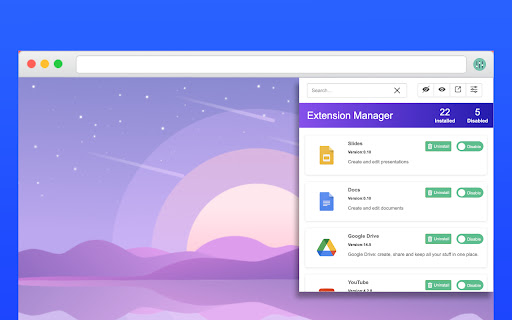


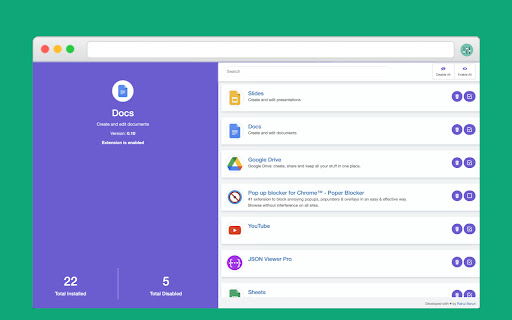
Manage and control your browser extensions more easily This extension helps you to manage your extensions more efficiently. It offers lot one click enable and disable features. ✅ Manage extensions efficiently ✅ One click enable or disable extensions ✅ Easier access to the extension manager ✅ Offers clean and great user experience

Extension Manager with Profiles
Disable unused extensions according to different profiles to free up their resource usage and to improve your privacy. The "Extension Manager with profiles" enables the user to have control over all the installed extensions in one place. You can define multiple profiles to disable or enable browser extensions in bulk to either free up space in the toolbar area or reduce background usage of the browser. It is even possible to improve your privacy by not running unnecessary extensions when visiting sensitive websites such as your bank account. Features: 1. Enable all extensions at once 2. Disable all extensions at once 3. Enable a set of extensions with just a single click (profile) 4. Has as many profiles as you would like to 5. Copy extensions information into the clipboard 6. Export profiles to a JSON file and import from it later or on a different machine Use Cases: [untrusted web] This extension can be used to browser, for instance, unsecured pages. In this case, popup blockers and adblocker extensions must be enabled. [trusted web] For normal web browsing, the CPU-intensive extensions (mainly content blocker extensions) can be switched off to improve the browser's speed. Note that each extension especially those dealing with adblocking, uses at least one network observer and by nature network observation makes your web browsing experience a bit slow.

Extension Manager
Let's keep it short and simple. This extension does not collect data. ★ No more grammar checker enabled all the time with access permissions to your webpages and clipboard, while you only need it when you write one of those important emails. ★ When you switch off an extension with Extension Manager, it is *effectively off*, unlike when using the "Disable" or "Pause" mode that some extensions are offering. You can always switch them back on very fast. You decide. - Add the ability to search through extensions - Add access to extensions options page - Settings icon is shown for active extensions which provide an option page - Redesign browser action icon - This is to avoid confusion with the informational popup related to extensions, introduced in Google Chrome version 83

Chrome Extension Manager | Master
Chrome extension manager chrome://extensions/, main extension name, extension list, delete extension, edit Chrome extension manager chrome://extensions/, main extension name, extension list, delete extension, edit Here's how to access and use the Chrome extension manager: Open Google Chrome: Launch the Google Chrome web browser on your computer. Click on the three vertical dots in the top-right corner of the Chrome window to open the menu. Hover your mouse over "Chrome Extension Manager logos" in the menu that appears. View and Manage Extensions: In the "Extensions" tab, you will see a list of all the extensions you have installed. You can enable or disable an extension by toggling the switch next to its name. Disabling an extension temporarily turns it off without uninstalling it. To remove an extension, click the "Remove" button under the extension you want to uninstall.

Easy Extension Manager
Effortlessly Manage Your Chrome Extensions Easy Extension Manager is your all-in-one tool for optimizing and organizing Chrome extensions. Easily search, sort, snapshot, export, and import your extension setups in JSON format—all with a user-friendly interface. ☆ Complete List: View all your installed extensions from a single popup. ☆ Snapshot: Save and load your extension setups with a single click. ☆ Export & Import: Backup or restore your extension configurations in JSON format ☆ Toggle Extensions: Easily enable or disable extensions to improve performance. ☆ Sort Options: Sort extensions alphabetically or by enabled/disabled status for quick access. ☆ Quick Search: Find specific extensions quickly and easily. ☆ Dark Mode: Switch between dark and light themes for better viewing. ☆ Context Menu: Right-click for powerful options ☆ Disable All Extensions to temporarily boost performance. ☆ Enable All Extensions with one click. Effortlessly back up and restore your extension snapshots in JSON format. Export & Import Highlights: ☆ Backup Snapshots: Export your extension setups as JSON files for safekeeping. ☆ Restore Setups: Import your saved configurations and apply them instantly. ☆ Auto Save Snapshots: Automatically back up your latest extension setup, ensuring it's always up to date. ============================== Why Choose Easy Extension Manager? Easy Extension Manager simplifies managing Chrome extensions. Stay organized, perform backups and restores easily, and streamline your workflow. With powerful search and sorting with features like Snapshots, Export & Import, and Auto Save, managing extensions has never been simpler. Take control of your extensions today with Easy Extension Manager—the smarter way to manage Chrome.
