
nddeiknmamlpagmnabfdlljlikeoanch
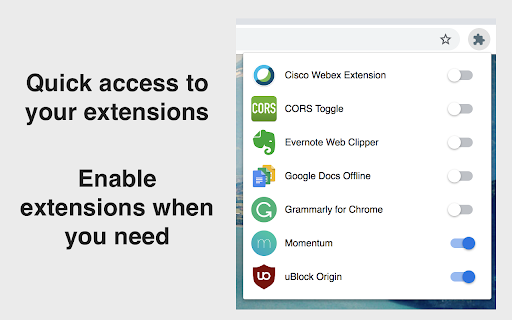

Let's keep it short and simple. This extension does not collect data. ★ No more grammar checker enabled all the time with access permissions to your webpages and clipboard, while you only need it when you write one of those important emails. ★ When you switch off an extension with Extension Manager, it is *effectively off*, unlike when using the "Disable" or "Pause" mode that some extensions are offering. You can always switch them back on very fast. You decide. - Add the ability to search through extensions - Add access to extensions options page - Settings icon is shown for active extensions which provide an option page - Redesign browser action icon - This is to avoid confusion with the informational popup related to extensions, introduced in Google Chrome version 83

Vaux Tab
Vaux Tab Manager and Window Organizer Vaux is an intuitive window manager with many robust features and simple interface. Perfect for tab management and window organization. Take your organizing skills to the max with Vaux! Latest feature: Share your saved windows with other Vaux users! Tab manager Window position recall Share windows with other Vaux users. Dark Theme Icon. Toggle icon from options page.

ExtManager
Manage the chrome extensions. One click to enable or disable extension. Group extensions and drag it. Sort extensions by drag it. You can easily enable, disable, and uninstall your extensions,applications and themes by "ExtManager". No need to enter the chrome own extensions page every time. Features: 1. Display enabled extensions on top. 2. Display enabled/group/all extensions simply. 3. Enable/disable extension by one click. 4. Group extensions and drag it into the group. 5. Sort extensions by drag it. 6. Uninstall extension simply when you confirm. Support text list, large icon list and small icon list of a variety of permutations, suitable for different expansion of the number of people. You can easily open the system pages, such as the download page, history page, page extensions, plug-ins page, chrome settings page, the search engine settings page, clear the browser cache pages, page content settings, font and encoding settings, language settings, reset the browser settings page and so on.

Custom Chrome - Extension Manager
A beautiful Google Chrome extension manager to turn on/off other extensions quickly and easily without leaving your current tab A beautiful Google Chrome extension manager to turn on/off other extensions quickly and easily without leaving your current tab. Make useful profiles which can turn on/off multiple extensions with one click. Have one for shopping which activates discount finding extensions or a profile for web developers who can activate colour palettes, debuggers, browser reloaders etc.

Extension Manager
Professional Chrome extension management tool. Quickly enable/disable extensions, set favorite extension mode, and search all your… 1. Manage extensions, disable/enable your extensions with one click 2. Set common extensions, you can open the common extension mode 3. Quickly search for your extensions and configure them 4. View extensions in the chrome app store 5. Open the expanded configuration page 6. Uninstall the extension 7. Added some shortcuts If you have a better UI design and function recommendations, please leave a message yo. Test phase, welcome to comment.
