
cfincihagpobgffcamhpeojhjbikifkh
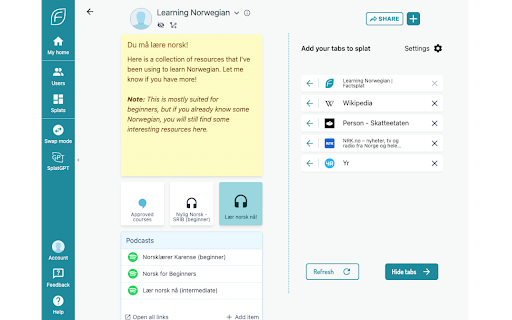
The Factsplat Tabs and Bookmarks Manager makes it easier than ever to find and organize your links and tabs! Note: Sign up with a free account on Factsplat.com to use this extension! Factsplat structures and simplifies your digital life. No more forgotten links, or long unreadable lists of tabs. Experience the satisfaction of closing all your tabs, knowing that Factsplat is keeping them safe. The Factsplat Tabs and Bookmarks Manager lets you swiftly save your tabs to Factsplat. Declutter your browser and move your tabs into organized dashboards. Use Factsplat to create visual dashboards with the links and information you use for all your different projects. Create dashboards for any purpose (your work, a project, a hobby etc.) and organize your related links and notes, and even share them with others. The Factsplat Tabs and Bookmarks Manager makes building your dashboards in Factsplat faster and easier than ever. With Factsplat as your new tab page, you can rest assured that all the information you need is easily available at any time. Download the Factsplat Tabs and Bookmarks Manager and register (or sign in) to Factsplat with extended superpowers! Get Factsplat as your new tab page: Get Factsplat right at your fingertips, and make your links and information available to you at any time. If you don’t want this, we also have a light version available Factsplat side panel for tab management: While on Factsplat, use the added side-panel to easily drag your current tabs right into Factsplat, and finally close down those 30+ open tabs. Import bookmarks: Got a bunch of bookmarks you want to get sorted out? The Factsplat extension let's you import your stored bookmarks directly into your splats with a single click Save your current tab: Save a link to the current tab on your Factsplat dashboards in just one click! Within your dashboards, you can then visually organize your links, drag them into collections, etc. Save text and links: Right-click interesting and important links and text you find online, and save it directly to one of your Factsplat dashboards. Feel free to contact our team at support@metaito.com and we’ll reply as soon as possible.

Pondr: Tab Manager & Bookmark Reminder
The extension that manages bookmarks and finds the best time to remind you to revisit. Bookmarks are meant to be consumed, not clog up your browser as an open tab. Save tabs and ACTUALLY remember to visit them. 💡 Simply save a tab and keep working See an interesting article or video suggestion while researching something? Queue the tab with Pondr and alleviate the pressure of having to remember to view it later. 💡 Relieve the mental toll of planning With the Google Calendar™ integration, all you need to do is pick the tab you want to save, we'll do find the time for you. No more combing through your schedule and setting an alarm/reminder. Nothing's worse than an endless list of bookmarks or too many tabs open at once. It's hard to look at and a pain to comb through. Pondr's clutter-free tab display gives you simple oversight of what matters. View tabs in a grid view or list view. 💡 An easier way to remember deadlines Have a job application or assignment deadline coming up? Queue the submission page to the specific date, and the tab will reappear on the day it's due! 💡 Save and view all corners of the internet Pondr can be accessed anywhere within the Chrome browser. From articles, videos and anything else under the (digital) sun. 💡 Stop emailing yourself links Access Pondr on any page just by opening the pop-up. Now you can spend more time doing work while queuing up all of your favorite articles to read later. Instead of keeping open tabs or making tons of bookmarks for tasks, you hope to do later, easily save articles, videos, or any webpage on your browser while simultaneously scheduling the reminder with only one click. Your tabs will miraculously appear when it's show time🕺! Get back to what's important and your tabs will be patiently waiting for you out of sight! For users with Google Calendar™, connecting with Pondr allows you to take reminders a step further by automatically finding the best time to remind you to revisit your bookmark. Pondr identifies the best time to remind you based off certain criteria in your calendar such as open time slots. ⚡ Automated bookmark reminders Simply hit the Pondr button on a tab you want to save for later and Pondr will find the best time to remind you via your Google Calendar 🎨Customizable Preset Reminders Have a frequent time you’re available? Simply turn it into a preset reminder time to assist your tab management 📌 Pinned Tabs Not all tabs are meant to be visited only once! Pondr lets you speed dial into the websites or apps you use on a daily basis. 🔍 Search for Tabs Get instant access to the tabs you need to get the job done. Pondr is able to search for any website inside your library, letting you find exactly what you’re looking for in seconds. 📅 Agenda View Get actionable oversight of what’s coming up today with Agenda View. You don’t need to be bombarded with every single bookmark you’ve queued just when you want to see whats upcoming. 🗓️ Reschedule Reminders Something come up? Seamlessly reschedule your tab for another day within your library. ⌨️ Keyboard Shortcuts Easily Pondr a tab without touching your mouse! ✅ Private Library Passcode-protected library for sensitive tabs and data Who is Pondr for?: ✓ Students ✓ Help Desk & Customer Support ✓ Sales CRM ✓ Sales Representatives ✓ Task Management ✓ Finance ✓ Operations ✓ Human Resources and Recruiting ✓ Project Management ✓ Onboarding ✓ Marketing ✓ Remote Work ✓ Those with too many tabs!! HELP & SUGGESTIONS Help Center Email: support@pondr.app Suggestions: https://pondr.canny.io/feature-requests If you have any problems or find a bug - please write to us at pondr.extension@gmail.com. We will definitely help! PRIVACY AND PERMISSIONS https://www.pondr.app/privacy-policy DISCLAIMER Please note Pondr is not made by Google™ or affiliated with Google™. Google™, Google Calendar™, and Google Chrome™ is trademarks of Google Inc. Use of this trademark is subject to Google Permissions. to be temporary, not clog up space on your browser.

myReach Web Clipper
Save the things that matter on the web in an interconnected network Introducing myReach: Unleash Your Productivity with AI-Powered Superpowers Discover the browser extension that revolutionizes how you save, organize, and access your digital knowledge. myReach is your second brain, seamlessly integrating with your browser to empower you with AI-driven intelligence and effortless retrieval of information. 📚 Save Anything, Find Everything: Capture websites, files, images, notes, and contacts effortlessly, and connect them to relevant tags. No more struggling to remember where you saved that important document or the name of a website – myReach lets you search based on your personal context, empowering you to find what you need quickly and effortlessly. 💡 AI-Assistant at Your Fingertips: Meet your smart AI-Assistant powered by myReach. Simply ask any question about your saved items, and it will instantly provide answers. Whether you need contract details, summarized articles, or reminders from your past conversations, it has the knowledge to assist you effortlessly. No more tedious searching or reading through endless pages – just ask and get instant answers. 🗂️ Organize Your Way: Say goodbye to traditional folders and embrace the freedom of myReach’s flexible workspaces. Create customized workspaces to separate business and personal matters, ensuring efficient organization and effortless collaboration for teams. With myReach, everyone can find the same document using their own context, eliminating the need for extensive training or navigating complex folder structures. 🔍 Intelligent Search, Even in Images: Extracted text from images and files makes every piece of content searchable, delivering unparalleled convenience and efficiency. Locate information buried within images effortlessly, saving you time and frustration. ⚡️ Enhance and Integrate: Customize your saved items with properties like rating, description, cost, and more, allowing for deeper organization and personalization. Seamlessly integrate myReach with your favorite tools, including Evernote, Zapier, Twitter, Google Maps, and more, expanding its capabilities and streamlining your workflow. Welcome to your personal knowledge hub, designed to boost productivity and streamline information retrieval. With myReach, your browser gains superpowers, empowering you to save, connect, and access your digital world effortlessly. Embrace the future of intelligent organization and download myReach today. Get myReach, and unlock a world of limitless knowledge at your fingertips

Pau | Bookmark Manager
Organize your bookmarks fast and easy with Pau bookmark manager A powerful browser extension to boots your productivity on your day-to-day, it's the easiest way to save, access, organize and manage your most used links and bookmarks Group your bookmarks by collections Create collections by context to stay organized. - set it once and forget about it. Multiple Layouts Customize the layout to make it work the way you want it to. - take advantage from each one. Share Collections Share your collection easily with your team/clients. - it's like givint them the whole context Use the theme that fits you Choose the best theme that better fits your personality. - try out the featured ones! Check out trending themes in here: https://www.pauapp.com/themes

Bookee - Instant Bookmark Manager
Browse, search and share your Bookmarks with screenshots and thumbnails! Here are a few things that Bookee does to make your life easier: - ⚡️ Loads instantly on any tab as you browse - 🔎 Shows better search results - 🏞 Shows you a thumbnail of each bookmark - ⌨️ Adds shortcut keys (like "Command + e" to edit a bookmark) - 🍿 Let's you watch any YouTube bookmarked videos right away - 🤝 Share your bookmarks and folders with your team (coming soon) - 🔗 Add collections of links for quick access (coming soon) We all use our Bookmarks and Bookmarks Tab. But it can get super-busy: too many bookmarks, and losing track of what we've bookmarked. Bookee was designed to access and search through your bookmarks instantly: just press the "Command + Shift + k" shortcut, and Bookee will pop right up. Start typing to instantly search through your bookmarks, and then press the Enter key to open that bookmark in a new tab. Here's what Bookee will *not* do: - 🚫 It will *not* share your data with any third party sites - 🚫 It will *not* export your bookmarks to any servers - 🚫 It will *not* be a closed system. We will be open sourcing it soon 🙂
