
oiblkeiiodficdoblmjihonngeejcmbo
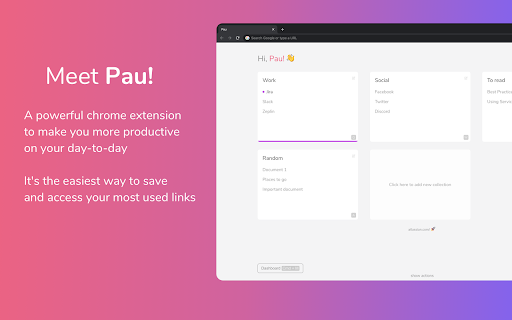
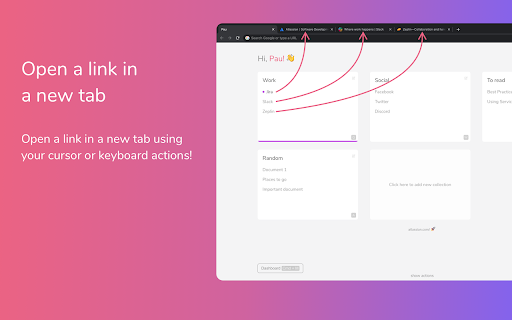

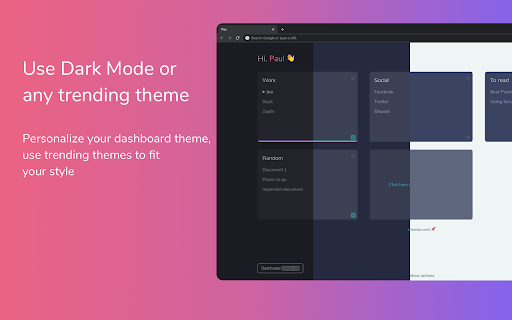
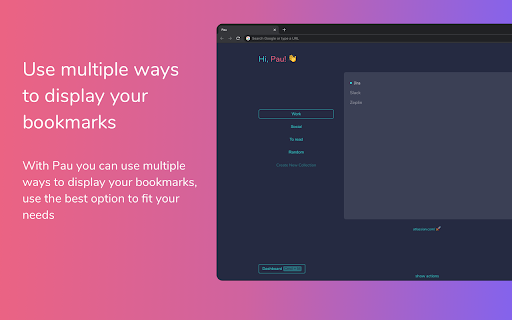
Organize your bookmarks fast and easy with Pau bookmark manager A powerful browser extension to boots your productivity on your day-to-day, it's the easiest way to save, access, organize and manage your most used links and bookmarks Group your bookmarks by collections Create collections by context to stay organized. - set it once and forget about it. Multiple Layouts Customize the layout to make it work the way you want it to. - take advantage from each one. Share Collections Share your collection easily with your team/clients. - it's like givint them the whole context Use the theme that fits you Choose the best theme that better fits your personality. - try out the featured ones! Check out trending themes in here: https://www.pauapp.com/themes

Tabme — Tab & Bookmark Manager | Save, Organize & Sync Tabs
The easiest way to save, organize & sync your tabs. Tired of tab clutter? Tabme turns your new tab page into a powerful but easy-to-use bookmark dashboard. Save open tabs instantly with drag-and-drop, organize them into color-coded folders, and find anything with fast search. No registration needed! Try as a guest for free with an unlimited number of saved bookmarks. 👆 Save Tabs With Drag-and-Drop Drag tabs and tab groups from the sidebar into any folder to save. 📦 Stash & Restore Tab Sessions Save all open tabs into a folder with one click. Reopen an entire session just as easily. 🗂 Spaces — Organize by Project or Topic (Pro) Create separate workspaces for different projects. Share spaces with your team. 📱 Sync Across Devices (Pro) Access your saved tabs from any device. No extension needed — use https://gettabme.com/app/ 📐 Vertical Tabs & Side Panel Manage your tabs in the Chrome Side Panel for a vertical Tabs (like in Arc browser) experience. 🌈 Color Coding & Visual Layout Categorize folders with colors and arrange them spatially for quick visual access. 🧹 Close Duplicate Tabs Detect and close duplicate tabs with a single click. 🌙 Dark Mode Switch to dark mode for a comfortable, easy-on-the-eyes interface whenever you prefer it. ⌨️ Keyboard Shortcuts Navigate and manage everything without touching the mouse. ✍️ Sticky Notes Jot down ideas and to-dos right on your new tab page. 📥 Import & Export Import from Chrome bookmarks, HTML, TXT, CSV, or JSON files. Export anytime for backup or migration. WHO IS TABME FOR? • Managers organizing project docs and references • Researchers managing tabs across multiple topics • Students collecting study materials • Anyone drowning in open tabs • Teams sharing curated link collections (Pro) ⭐️ PREFER YOUR DEFAULT NEW TAB? Try "Tabme Mini" — all the same features, without replacing your new tab page: https://chromewebstore.google.com/detail/tabme-%E2%80%94-organize-tabs-and/jjdbikbbknmhkknpfnlhgpcikbfjldee Tabme 100% privacy guarantee means: 1. We respect your privacy. 2. Any usage analytics are fully anonymous. 3. We never share your data with anyone. • Install Tabme (accept replacing the New Tab page) • Pin the Tabme popup extension to save tabs from any website • Drag tabs from the sidebar into folders to save and organize them

Bookmark Manager
Powerful bookmark manager: Easily and quickly manage your browser bookmarks 🚀Find any bookmark in seconds — even if you forgot its name. 📚Turn your bookmarks into a clean, visual and smart knowledge hub. Bookmark Manager is more than just folders and lists. It’s a faster, smarter and more visual way to organize everything you save online. ⚡ Instant search Quickly find any bookmark with powerful full-text search. No more digging through folders. 🧠 Smart organization Organize bookmarks with collections and tags — or let them structure naturally as your personal knowledge base. 🎨 Visual experience Browse your bookmarks as a clean and intuitive interface designed for clarity and focus. 🧩 Your knowledge hub Save, group and rediscover useful content — articles, tools, resources — all in one place. 🧘 Minimal and distraction-free No clutter. No unnecessary complexity. Just a fast and focused bookmarking experience. 🎉 Meet this advanced bookmark manager, a powerful chrome extension designed to help you manage bookmarks with ease. The manager offers a efficient and modern way to keep your bookmarks organised, and always accessible 💡 With this manager-focused tool, you can easily: 📌 sort and filter 📌 rename and move items 📌 add tags and find pages instantly If you’ve ever wished saving pages felt simpler, cleaner, and more intuitive, this manager gives you exactly that experience. 🚀 Getting started is quick and simple: 1️⃣ Install the extension from the Web Store. 2️⃣ Open the bookmark manager chrome button in your toolbar. 3️⃣ Save links instantly using the built-in bookmark saver. 4️⃣ Organise your collections into folders or categories. 5️⃣ Enjoy smoother navigation with full manage bookmarks functionality. 📂 The improved panel blends naturally into your browser, giving the manager a clean, lightweight layout that keeps your workspace uncluttered. It feels modern, responsive, and efficient. 🔁 The interface works like an upgraded version of the google bookmark manager, offering more flexibility, more control, and a more refined workflow overall. 🧭 Key capabilities include: • Fast search to help you find items instantly • Smart auto-sorting for cleaner organisation • Seamless access to online bookmarks across your devices • One-click cleanup for duplicates or outdated pages • A flexible chrome bookmarks manager dashboard for full control 🔧 Use this extension it as your personal organizer — a streamlined manager where you store, edit, refine, and manage collections effortlessly. 💡 Additional features that make this manager stand out: ➤ custom folder options ➤ drag-and-drop organisation ➤ visual tag-style grouping ➤ advanced filtering tools ➤ reliable tools for everyday use Whether you need to manage bookmarks, reorganise large sets of saved pages, or refresh older collections, this manager handles everything smoothly. 📌 Common use cases: 1️⃣ Save articles quickly with bookmark saver 2️⃣ Build structured libraries using a bookmark organizer for chrome 3️⃣ Keep work and personal items separate 4️⃣ Boost workflow with the chrome bookmark addon 5️⃣ Maintain cleaner folders with bookmarking in chrome automation 🎓 Students appreciate the manager because it helps: ➤ organise study materials ➤ return to useful resources instantly ➤ speed up research navigation ➤ simplify managing large collections during long-term projects 💼 Professionals rely on the manager to: ➤ build structured link libraries ➤ gather online resources for planning ➤ maintain organised content hubs ➤ save time using manage bookmarks chrome features ✨ Users who handle large amounts of information enjoy a balanced system combining simplicity with powerful structure. The manager avoids clutter while offering full flexibility. 📚 Everyday users also benefit: ➤ save recipes and guides ➤ organise tutorials or project ideas ➤ keep inspiration boards tidy ➤ access content faster through clean shortcuts ❓ Frequently Asked Questions 💡 How do I organise links? Use the built-in panel to drag, drop, rename, and structure folders. The bookmarks manager chrome interface keeps everything simple. 💡 Can I find pages quickly? Yes — the smart search enhances managing bookmarks and helps you locate items in seconds. 💡 Does the extension replace the default system? It upgrades your workflow while remaining compatible with the original chrome bookmark manager. 💡 Do I need an account? No, the manager works immediately after installation. 💡 Is it safe? Absolutely. It never accesses personal data and simply helps you organise and manage saved content. 🥇 Try the improved bookmark manager today and enjoy a cleaner, more structured, and more productive browsing experience! 🚀 Update for version 1.0.5: 🎨 Collection Color Labels You can now assign a color to each collection. A colored indicator strip is displayed on the left side of the collection card — both in the sidebar and in the Quick Access panel. Colors are set when creating a new collection or through the collection settings at any time. Existing collections without a color assigned are not affected and continue to look the same as before. 🔍 Improved Search: Full-Text Search Search now works across both tags and bookmark titles. Simply type any word in the search bar — the extension will instantly find all matching bookmarks by title or URL across all your collections. Tag-based filtering continues to work alongside text input. 🗂️ Improved Search Results Interface When search is active, the main panel now displays a dedicated Search Results page that groups matching bookmarks by collection. Each group shows the collection name and icon at the top, followed by the matching bookmarks below. This gives you a clear picture of where each result belongs. The search results page is triggered automatically when you type in the search bar from any section of the app. 🖱️ Browser Context Menu Integration Right-click on any webpage and select "Add to collection" to instantly save the current page to one of your collections — without opening the extension. A submenu lists all your collections. After saving, a brief notification confirms the action. The context menu updates automatically when you create, rename, or delete collections. Works on both page background and links. 🚀 Update for version 1.0.6: 🎨 Color picker in "Add to collection" modal When adding a tab to a collection directly from the "This Browser" section, you can now choose a color for a newly created collection — same as when creating collections from the main settings screen. 🔍 Improved search — now searches by URL The search bar now matches bookmarks by URL in addition to title and tags. For example, typing github or docs.google will find all matching bookmarks across all collections. Works in both the main panel and the side panel. 🔤 Updated search placeholder The search field now clearly shows its full scope: "Search by tags, title or URL..." 💾 Export & Import collections as JSON Back up your collections by exporting them to a .json file — click the download icon next to "Collections" in the sidebar. Restore or transfer your data at any time by importing the file back via "Move My Bookmarks" → "Import from file".

Bookmark Navigator
Fast and simple bookmark navigation Fast and simple plugin that helps with manage and explore your bookmarks

Tagpacker's "Pack It" Button
Organize bookmarks your way. Faster than ever with the "Pack it" button. Use the "Pack it" button to quickly save bookmarks side-by-side while browsing. Whenever you find an interesting website that you want in your collection, just click on the blue Tagpacker icon. Once you click it, a sidebar will open where you can tag and comment on your bookmark before saving it. To save bookmarks you can *use the keyboard shortcut Ctrl + Shift + Z or *right-click website elements (like videos or links) To easily find bookmarks you saved on Tagpacker just type 'tp ' in your browser address bar A complete list with all features is available at https://tagpacker.com/features
