
bpjdkodgnbfalgghnbeggfbfjpcfamkf
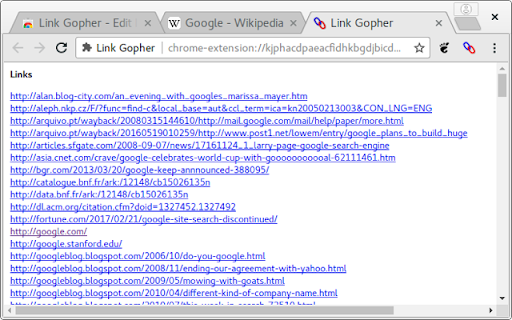
Extracts and collates links from web pages Extracts all links from web page, sorts them, removes duplicates, and displays them in a new tab for copy and paste into other systems.

Link Grabber
An easy to use extractor or grabber for hyperlinks on an HTML page Extract links from an HTML page and display them in another tab. Permissions Required: Link Grabber requires permission to copy links to the clipboard. No other special permissions are required. Features: * No usage information / analytics are collected from you * Use either browser action button or context menu item to activate * Configurable list of blocked domains * Filter links by substring match * Copy links to clipboard * Show/hide links that appear more than once on the page * Show/hide links to the same origin as the source page * Group links by domain

Link Grabber
🚀 Welcome to Link Grabber: Your Ultimate Tool for Effortless Link Extraction! 🚀 Are you tired of manually sifting through web pages to find the urls you need? Say goodbye to tedious tasks and hello to Link Grabber, the ultimate extension grabber designed to make your life easier. You can effortlessly extract all links from a webpage and streamline your online research or data collection process. 🌟 Why Choose it? 🌟 It is not just another url extractor chrome tool; it's a comprehensive solution for anyone looking to download all urls from a website quickly and efficiently. Whether you're a digital marketer, researcher, or just someone who needs to extract urls from page after page, Link Grabber is your go-to extension. 🔹 Key Features 🔹 1️⃣ Extract All Links from a Webpage: With just a click, extract all links from a webpage and save valuable time. 2️⃣ Download All Links from Webpage: Need to download all links from a website? It makes it a breeze. 3️⃣ Video Link Grabber Extension: Easily extract videos from webpage content without hassle. 4️⃣ Image Grabber: Find and download images effortlessly. 5️⃣ User-Friendly Interface: Intuitive design ensures that even beginners can use the link grabber extension with ease. 💡 How Does itWork? 💡 Using it is as simple as 1-2-3: 1. Install the Extension: Add the url extractor extension to your Chrome browser. 2. Navigate to Your Desired Page: Open the webpage from which you want to extract links. 3. Click and Extract: Hit the Grabber icon, and watch as it extracts all urls from a website in seconds. 📈 Benefits of Using 📈 ✔️ Efficiency: Save time by automating the process to extract urls from website pages. ✔️ Accuracy: Ensure you get all the information from a website without missing any crucial URLs. ✔️ Versatility: Whether you need to extract urls, find all links on a site, or grab download lnks from page, it has you covered. 🌐 Who Can Benefit from the extractor? 🌐 It is perfect for: 🔸 Digital Marketers: Quickly extract urls for backlink analysis or competitor research. 🔸 Researchers: Gather data by extracting urls from page sources for academic or professional projects. 🔸 Content Creators: Use the image urls extractor to find visual assets for your content. 🔸 Web Developers: Test and verify data on your site with ease using the linkextractor. 🎯 Advanced Features for Power Users 🎯 For those who need more than just basic extraction, it offers advanced features: ➤ Filter Options: Customize your extraction process by filtering specific types of data. ➤ Batch Processing: Extract all links from a webpage across multiple tabs simultaneously. ➤ Export Functionality: Easily export extracted uris to CSV or other formats for further analysis. 💎 Why URL Extractor Stands Out 💎 Unlike other tools, it is a dedicated link extractor chrome extension that focuses solely on providing the best url extraction experience. Its robust functionality and ease of use make it the preferred choice for professionals and casual users alike. 🔥 Get Started with it Today! 🔥 Don't let manual url extraction slow you down. Download Grabber now and experience the power of efficient url extraction. Whether you need to extract video links from webpage content or find all urls for a domain, it is the tool you need. 📌 Join Thousands of Satisfied Users 📌 Join the growing community of users who have transformed their workflow with this powerful web url extractor. Discover why it's the top choice for anyone needing a reliable url graber. ✨ Conclusion: Your Go-To Extraction Tool ✨ In a digital world where time is money, it is the ultimate solution for anyone looking to get all the URI from a website quickly and efficiently. With its user-friendly interface and powerful features, it's the URI extractor you've been waiting for. Download Grabber today and take the first step towards a more efficient and productive online experience. Whether you're looking to extract URI from website pages or need a reliable grabber URI tool, Grabber is here to help.

Image Link Grabber
Extract image links from webpage with a single click. Just open the page and click on app icon, voila you got the links. Update 0.4 Extension requires API Key after 10 free runs.

Web Content Copier
Copy headings and paragraphs from the current webpage. Introducing the 'Web Content Copier' Chrome Extension This Chrome extension simplifies the task of copying website content. With just one click, you can extract relevant text from any website (including ChatGPT) without manually selecting and copying each element. Here's what it offers: – One-Click Content Copying: Easily extract all necessary text, including all headings (H1-H6) and paragraphs (P), from any website with a single click. – Intelligent Text Selection: The extension excludes content in the navigation and footer of the website, ensuring you only get the content that matters. – ChatGPT Conversation History Extraction: Perfect for frequent ChatGPT users, it allows you to copy and extract your entire conversation history in one go. – Ideal for Students, Researchers, and Professionals: It simplifies the process of collecting information from various websites quickly and efficiently. – Saves Time and Effort: Avoid manually selecting each element and navigating through a cluttered web page. – Prevents Accidental Copying: Eliminate the risk of accidentally copying unnecessary content, saving precious time. – Effective for Note-Taking and Analysis: It's especially useful for those who wish to save their ChatGPT conversation history for further analysis or note-taking. In essence, the 'Web Content Copier' is an essential Chrome extension for anyone who values speed, efficiency, and accuracy in online research and information gathering. Download now for a hassle-free content copying experience!
