
kclanalaafbcibcojcadccipafbdmoin
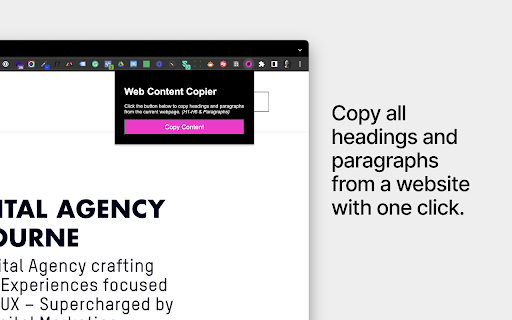
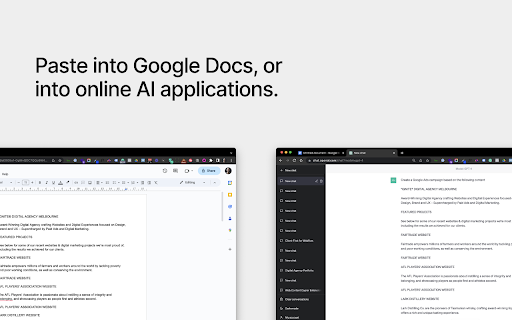

Copy headings and paragraphs from the current webpage. Introducing the 'Web Content Copier' Chrome Extension This Chrome extension simplifies the task of copying website content. With just one click, you can extract relevant text from any website (including ChatGPT) without manually selecting and copying each element. Here's what it offers: – One-Click Content Copying: Easily extract all necessary text, including all headings (H1-H6) and paragraphs (P), from any website with a single click. – Intelligent Text Selection: The extension excludes content in the navigation and footer of the website, ensuring you only get the content that matters. – ChatGPT Conversation History Extraction: Perfect for frequent ChatGPT users, it allows you to copy and extract your entire conversation history in one go. – Ideal for Students, Researchers, and Professionals: It simplifies the process of collecting information from various websites quickly and efficiently. – Saves Time and Effort: Avoid manually selecting each element and navigating through a cluttered web page. – Prevents Accidental Copying: Eliminate the risk of accidentally copying unnecessary content, saving precious time. – Effective for Note-Taking and Analysis: It's especially useful for those who wish to save their ChatGPT conversation history for further analysis or note-taking. In essence, the 'Web Content Copier' is an essential Chrome extension for anyone who values speed, efficiency, and accuracy in online research and information gathering. Download now for a hassle-free content copying experience!

Copy HTML
Easily copy any page's HTML element to the clipboard with the press of a button or keyboard shortcut. Button method: 1. Click the page 2. Click the extension icon 3. HTML is copied to clipboard Keyboard shortcut method: 1. Open Manage Extensions › Keyboard Shortcuts and configure a shortcut 2. Open page and press the keyboard shortcut 3. HTML is copied to clipboard Quick, simple, and easy!

HTML Content Extractor
Extract and display the main content from web pages with a single click. Web Content Extractor is a user-friendly Chrome extension… Extract and display the main content from web pages with a single click. Web Content Extractor is a user-friendly Chrome extension designed to help you easily extract and display the main content of web pages. With just a single click, you can access the most relevant information from articles, blog posts, and other text-based web content without the clutter of ads, sidebars, and unnecessary elements.

Webpage Code Extractor
Extract, view, copy, and download HTML/CSS/JS code from any webpage. Full-page screenshots, Monaco editor, customizable settings. A powerful Chrome extension for developers, designers, and learners to extract, view, and analyze webpage code with professional-grade tools. 1. Advanced Code Extraction • Extract HTML, CSS, and JavaScript separately or together • Multiple extraction modes: Raw, Prettified, and MRE (Minimal Reproducible Example) • Smart element selector – click any element to extract its HTML and CSS • Automatic code formatting and optimization 2. Professional Code Editor • Monaco Editor integration (same editor as VS Code) • Syntax highlighting for HTML, CSS, and JavaScript • Find & replace, word wrap, and multiple editor themes • Real-time code statistics (lines, characters, file size) 3. Full-Page Screenshots • Capture entire web pages with automatic scrolling • Smart detection of sticky/fixed elements • Handles pages of any length with split-image support • Customizable scroll delay for perfect captures 4. Flexible Export Options • Download individual HTML, CSS, or JS files • Export complete ZIP package with manifest • Choose combined or separate file downloads • Organized file structure for easy integration 5. Smart Profiles • Default, Audit, Snapshot, MRE, and Design Review modes • Pre-configured extraction settings for various workflows • Instantly switch between profiles 6. Developer-Friendly Tools • Keyboard shortcuts for quick actions • Customizable editor themes (dark, light, high contrast) • Adjustable font size and formatting options • Built-in code statistics and analysis PERFECT FOR • Web developers learning from existing sites • Designers analyzing layout and style • Educators and students in web development • QA teams performing code audits • Creating minimal reproducible examples for debugging • Archiving web content for offline reference PRIVACY FIRST • All processing happens locally on your device • No data is sent to external servers • No tracking or analytics • Your code stays private EASY TO USE 1. Click the extension icon 2. Choose your extraction mode 3. Extract HTML, CSS, or JavaScript 4. View in the integrated editor or download Transform your browser into a powerful web development toolkit for learning, debugging, and building your next project. Click "Add to Chrome" and start extracting code like a pro!

DivMagic - Copy Style from any website
Unleash the power of effortless web element conversion with DivMagic. With just a click, you can capture any element from any website, seamlessly transforming it into clean, reusable CSS or Tailwind CSS code. Beyond that, DivMagic empowers you to convert elements into React/JSX components, and effortlessly switch between HTML and React/JSX. Experience the convenience of: - One-click design, style, and element copy and conversion - Ability to copy style as CSS or Tailwind CSS (including colors) - Conversion of any element from HTML to React/JSX and vice versa - Generation of minimalistic, reusable output - Seamless copying of styles, even through iframes Save time, streamline your workflow, and unlock your creative potential with DivMagic. Try DivMagic now and revolutionize your web development workflow! (Note: DivMagic is a paid subscription-based product, but you can try it for free.)
