
indfogjkdbmkihaohndcnkoaheopbhjf
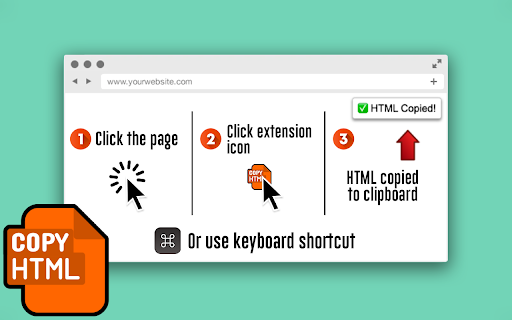
Easily copy any page's HTML element to the clipboard with the press of a button or keyboard shortcut. Button method: 1. Click the page 2. Click the extension icon 3. HTML is copied to clipboard Keyboard shortcut method: 1. Open Manage Extensions › Keyboard Shortcuts and configure a shortcut 2. Open page and press the keyboard shortcut 3. HTML is copied to clipboard Quick, simple, and easy!

Link Grabber
An easy to use extractor or grabber for hyperlinks on an HTML page Extract links from an HTML page and display them in another tab. Permissions Required: Link Grabber requires permission to copy links to the clipboard. No other special permissions are required. Features: * No usage information / analytics are collected from you * Use either browser action button or context menu item to activate * Configurable list of blocked domains * Filter links by substring match * Copy links to clipboard * Show/hide links that appear more than once on the page * Show/hide links to the same origin as the source page * Group links by domain

HTML to PDF
Convert webpage to pdf file online easily. Save and transform any links and sites with just one click using our HTML to PDF app. ✨ Transform your HTML to PDF with ease without any help or unnecessary steps. 🔄 Need to html convert to pdf quickly and efficiently? Our Chrome extension is perfect for you! Whether you’re - saving a webpage for offline reading, - sharing a document, - or archiving important content, this tool makes it easy to convert html to pdf with just a few clicks. 🌐 You can easily internet page to pdf and save important documents in a professional, easy-to-share format. ⏱️ In today's digital world, having the ability to quickly and efficiently convert html documents into pdfs is essential. Our extension is not only user-friendly but also packed with features that enhance your productivity. 🏆 Why choose our html to pdf converter? 1️⃣ Versatile: works with files, webpages, even entire websites. 2️⃣ Fast and Reliable: You can convert a link to pdf in seconds without compromising quality. 3️⃣ Easy to Use: No technical skills required—just install and start converting. 4️⃣ High-Quality Output: Preserve the layout, formatting, and images of your documents. 5️⃣ Browser-Based: Convert directly in your Chrome browser—no additional software needed. 💻 With just a few clicks, you can transform site to pdf professional-looking that are perfect for - sharing, - printing, - or archiving. 🛠️ How to convert html using pdf generator online effortlessly? It’s simpler than you think. ➤ Install our extension for transform chrome html document to pdf. ➤ Open the webpage you want to convert. ➤ Click the convert button and let the tool work its magic. ➤ Download your newly created file instantly. 🔑 Key features of our html to pdf file converter ▸ Batch Conversion: Convert multiple html file to pdf or webpages at once. ▸ Customizable Settings: Adjust margins, orientation, and page size. ▸ Secure Processing: Your files are processed locally, ensuring complete privacy. ▸ Lightweight Design: Doesn’t slow down your browser or device. ▸ User-Friendly Interface: Designed for both beginners and professionals. 🌟 Benefits of converting html documents • Save webpages for offline reading or archiving. • Share documents in a universally accepted format. • Preserve the original layout and formatting of your HTML files. • Print web content easily without losing quality. • Simplify your workflow with a single-click conversion tool. 🤔 Who can benefit from this html en pdf converter? 1. Students. 2. Professionals. 3. Web developers. 4. Bloggers and content creators. 5. Anyone. 🛠️ How to change html to pdf? The process is straightforward. 📌 Upload your html file or enter the URL of the webpage you want to convert. 📌 The tool html in pdf format automatically processes and converts the content. 📌 Download your newly created file to your device. 📌 Enjoy your hassle-free, high-quality document! 🤷♂️ Why convert html file to pdf? They are great for web content, but they’re not always ideal for sharing or printing. By using our app, you can: ✔ Ensure your documents are accessible on all devices. ✔ Avoid compatibility issues with different browsers or software. ✔ Create professional-looking PDFs for presentations or reports. ✔ Save time by simplifying the conversion process. 💬 Frequently Asked Questions (FAQ) ❓ How to transformar html a pdf? 💡 Simply install our Chrome extension, upload your file or enter a URL, and let the tool do the rest. ❓ Can I convert multiple files or webpages at once? 💡 Yes, our extension supports batch conversion for your convenience. ❓ Is the conversion process secure? 💡 Absolutely! Your files are processed locally, and no data is stored on our servers. Don’t miss out on the opportunity to simplify your conversion process. You can convert a webpage to pdf and another. With our generator online, you can easily convert and save page as pdf, and more. 🎉 Conclusion Say goodbye to the hassle of sharing or archiving html files and hello to seamless document conversion with our Chrome extension. Whether for personal, academic, or professional use, html to pdf delivers high-quality results every time. 📝 Whether you need a quick way to save an article or want to compile multiple pages into a single PDF document, this is your excellent solution. 🚀 Our powerful pages to pdf converter is specifically designed for users who need a straightforward solution for converting web content. Install it today and experience the convenience of translate html to pdf in just a few clicks! This extension contains ads for our other products. They do not interfere with your experience or limit any features — you can continue using all the functionality in full.

Focus input element
Focuses on the next or previous HTML input element when the shortcut key is pressed. Overview: Pressing the shortcut key moves the cursor to the text box on the Web page. The default shortcut keys: - Next input box: F2 - Previous input box: Shift+F2 - Unfocus: F4 - First input box: Default unspecified - Last input box: Default unspecified Features: - Press the key repeatedly to move to the next or previous input box. - Focus is available on the nearest input box in the active area of the scrolled page. - Markers allow you to locate the input box. - These settings can be changed on the Options page.

HTML to Framer
Bring your own website into Framer with a few clicks. Simply copy and paste web elements and edit them directly in Framer. Once you have installed the extension, simply hover over any element such as text, images, buttons, or entire layouts. Click to copy, then go to Framer and press ⌘V (or Ctrl V on Windows) to paste. Your elements will be pasted with a clean layer hierarchy, ready to be further edited or published immediately within Framer. Pro tip: Hold Shift to copy multiple items for even greater speed. To select a parent element of a site item, press Esc while hovering over it. Framer is where teams design and publish stunning sites. Try it for free today at framer.com
