
bpbhkhahapjmpnhmniafkbpcakihjckl
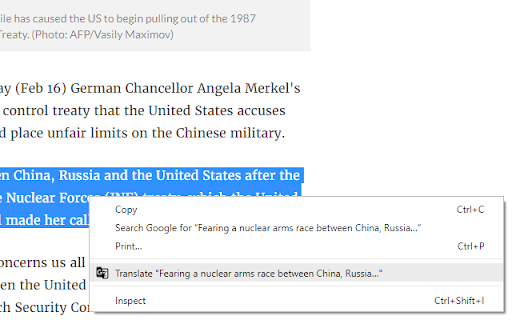
Translator Helper provides an easier and less distractive way to translate during browsing web pages. This extension will not and has no permission to access your page! This extension adds a new "Translate" option on the right-click menu when you have selected some texts on the page. Click on the new option will simply opens Google Translate page in a window pop-up, with the selected content automatically loaded in Google Translate page. The window will by default appear on top left side of your screen, you can move or resize it for your preferences. The extension will translate next item on the same window if you do not close it. The extension simplifies the process to translate some text during view websites, as opening a new tab and copy-paste it is time wasting and interruptive.

Simple Translate
Quickly translate selected or typed text on web pages. Supports Google Translate and DeepL API. When you select text, the translation button pops up and the translation is displayed instantly. If you enable "Do not display the button if translation is not required" option, you will not get frustrated by the button appearing when it is not necessary. In the toolbar popup, translate the input text in real time. If you enable "Automatically switch to the second language" option, you can do : When English is input, it is translated into Japanese, and when Japanese is input, it is translated into English. You can also translate from the context menu. You can select "Translate this page", "Translate selected text", and "Translate selected link" from the menu on the page or tab. Supports Google Translate and DeepL API.

Google Translate
View translations easily as you browse the web. By the Google Translate team. Highlight or right-click on a section of text and click on Translate icon next to it to translate it to your language. By installing this extension, you agree to the Google Terms of Service and Privacy Policy at https://www.google.com/intl/en/policies. UPDATE (v.2.0): Now you can highlight or right-click a text and translate it vs. translate the entire page. You can also change extension options to automatically show translation every time you highlight text. UPDATE (v.2.14+): Page translation is now supported natively in Chrome browsers and is no longer supported in the Google Translate extension. See https://support.google.com/chrome/answer/173424 to learn how to use it.

The Easy Translator
The very easy in use translator. The Easy Translator is very easy in use translator from any language supported by the Google Translator to your language. On the options page you can choose either autodetect or particular language from which you would like a selected on a page word or text be translated and select the language to which to translate. Enjoy the Easy Translator!

Tab Translate
Easily translate selected text from one language to another and improve your language skills. This extension brings together best practices for using language translators in both business and educational contexts. The translator tools provided by the extension help users overcome language barriers and communicate more effectively across different languages. Modes: • Pop-up translation: Opens a pop-up window with the translated text. • Split screen: Splits the screen between the browser and the language translator. • One tab: Uses a single tab for translations. Use the Text-to-Speech (TTS) feature to learn correct pronunciation. You can also translate web pages into your preferred language with just one click. The Tab Translate extension is powered by the Google Translate API and provides unique features and benefits beyond standard translators. Benefits: ✓ Fast and responsive: Experience quick response times and smooth operation. ✓ Versatile modes: Access multiple modes to accommodate different translation needs. ✓ Compatibility with various content types: Easily work with web content, local documents, PDF files, and common tabs. ✓ Ideal for study: Perfect for students who need to translate documents or study materials, making language learning more accessible and efficient. ✓ User-friendly: Designed with a clear and intuitive interface. This extension automatically detects your primary language and is ready to use immediately after installation. Technical support: Please report any bugs or submit feature suggestions here: https://tabtranslate.com/feedback.html Localization of the user interface will be introduced gradually. Note: All copyrights belong to their respective owners. This extension is not owned, licensed, or sponsored by Google Inc., and Google does not provide support for it.
