
aapbdbdomjkkjkaonfhkkikfgjllcleb
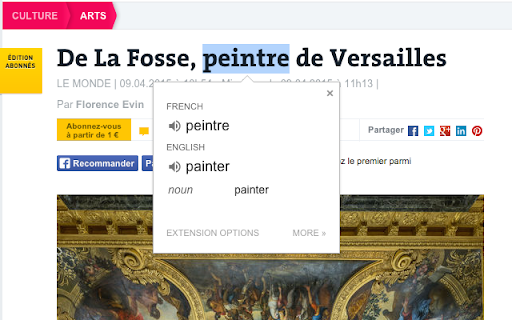


View translations easily as you browse the web. By the Google Translate team. Highlight or right-click on a section of text and click on Translate icon next to it to translate it to your language. By installing this extension, you agree to the Google Terms of Service and Privacy Policy at https://www.google.com/intl/en/policies. UPDATE (v.2.0): Now you can highlight or right-click a text and translate it vs. translate the entire page. You can also change extension options to automatically show translation every time you highlight text. UPDATE (v.2.14+): Page translation is now supported natively in Chrome browsers and is no longer supported in the Google Translate extension. See https://support.google.com/chrome/answer/173424 to learn how to use it.

Linguist - web page translator
Web page translation, text translation, dictionary, history, custom translators, all you need to break language barriers Translate web pages, highlighted text, Netflix subtitles, private messages, speak the text, and save important translations to your personal dictionary to learn words in over 130 languages. Encountering unfamiliar words while reading an online article? Just select text on the page and click the button to translate it. You can speak the translated and original text, and save the translation to your dictionary. If you need to input text and translate it, you can just click the Linguist button to open the pop-up window. Full-page translation With Linguist, you can conveniently translate entire web pages with just one click. All you need to do is select "Translate page" from the context menu on any webpage, and it will be instantly translated into your preferred language. Make your own personal knowledge base with Linguist! Any translated text is saved in the history, and you can add your favorite translations to your dictionary. You can search for translations in both your dictionary and history, and even filter your translations by language. The dictionary feature is available even when you are offline, making it an ideal tool for language learners or travelers who require constant access to their word lists. Offline translation and privacy Linguist can translate texts even without the internet - a feature that no other extension has. The offline translator allows you to translate texts on your device without sending any private messages over the internet, ensuring your privacy. Simply enable the feature on the options page to maintain your privacy while translating work emails and personal messages. Customize Linguist as you wish Unlike other browser extensions, Linguist is not just a wrapper over the Google Translator Widget; it's a complete and independent translation system. This is why Linguist is not limited in what features may be implemented. Linguist is the leading extension for translating pages. Join Linguist and start using the most advanced features now and always stay at the forefront of technological progress in the future. You have complete control over your data and how Linguist works for you: - Control web pages auto-translation by language and domain name - Choose a service that will translate your texts - You may use popular services like Google, Yandex, Bing, DeepL, Reverso - You may use an offline translator that will translate texts on your device (not sent to the internet at all) - You may use custom translator modules to use your own translation service. Read more: https://github.com/translate-tools/linguist/blob/master/docs/CustomTranslator.md - Choose a service to speak texts - Customize the user interface and available features Privacy Linguist is free, open-source, and never collects your personal data. If you want to report a bug, suggest a feature, or donate, visit GitHub: https://github.com/translate-tools/linguist

Simple Translate
Quickly translate selected or typed text on web pages. Supports Google Translate and DeepL API. When you select text, the translation button pops up and the translation is displayed instantly. If you enable "Do not display the button if translation is not required" option, you will not get frustrated by the button appearing when it is not necessary. In the toolbar popup, translate the input text in real time. If you enable "Automatically switch to the second language" option, you can do : When English is input, it is translated into Japanese, and when Japanese is input, it is translated into English. You can also translate from the context menu. You can select "Translate this page", "Translate selected text", and "Translate selected link" from the menu on the page or tab. Supports Google Translate and DeepL API.

Google Translate Assistant – Side-by-side Translation | PDF Translation
Provides functions such as web page translation, image translation, etc., and adds new AI function processing information. Google Translate Assistant - Your All-in-One Translation Partner Google Translate Assistant is a professional translation extension integrating cutting-edge engine technologies such as Baidu Translate, Google Translate, DeepL, DeepSeek, and Gemini, providing you with unparalleled translation services. 🔥Here are the main features of Google Translate Assistant: 📌Bilingual Webpage Translation: One-click translation of foreign language webpages, providing bilingual comparison, high accuracy, and a beautiful interface for an ultimate browsing experience. 📌Document Translation: Supports academic PDF translation, preserving the original layout without format conversion, providing a perfect experience. 📌Cross-border E-commerce Image Translation: Click "Translate this image" to quickly get the translation results, supporting copying and downloading, making it an essential tool for cross-border e-commerce. 📌Bilingual Subtitle Translation: Compatible with mainstream video websites, enabling real-time subtitle translation. Adapted to 20+ mainstream video websites including YouTube. 📌New AI Functionality: Integrates AI webpage summarization and AI video summarization functions to assist in the efficient summarization and processing of webpage information and video content. 📌Online Translation: Supports hundreds of languages with Google Translate and Baidu Translate, retains translation history, and is convenient and efficient. 📌Account Sync Across Three Platforms! Supports client, app, and plugin. Google Translate Assistant is dedicated to providing you with efficient translation services so you can easily browse web pages and read documents. Whether you use Baidu Translate or Google Translate, we can meet your needs. Choose Google Translate Assistant and experience borderless communication and exploration. If you like our service, please leave a five-star review; your support is our motivation!

Quick Translate
This extension provides quick translation of selected texts Important notes: - The shortcut for in page translate is shift button. - The default shortcut for browseraction is CTRL + Q (you can change that later on "chrome://extensions/configureCommands") - If there were opened tabs before you install the extension, you must refresh those tabs in order to activate extension. This extensions allows you to translate the text selection using Google Translate whenever you want. When the extension is installed select some text from a website, then press "shift" button to show translation. This extension is lightweight and does what it says. Translates texts quickly. There is two options in options page. One for source language, and another for destination language. You just have to set the destination language and feel free to use it. There is another option which can you use to force translation source language. Changing source language from auto detect to something is not recommended. ------2.5----- bugfix, background page converted persistent ------2.3----- New feature : memorize words. ------2.0----- Option to keyboard shortcuts on inputs (textarea, input). Defaults to true ------1.9----- added text to speech for spelling ------1.8----- added ctrl+q shortcut for browser action ------1.7----- added browser action button ------1.5----- bugfix about options ------1.4----- improved content html ------1.3----- positioning improved ------1.2----- positioning bugfix
