
bnflpfmabekpcajlpohgdofgdgonfafj
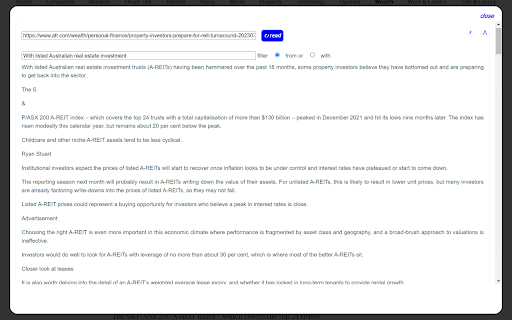
Read Clean Text strips non text from a web page and displays clean text for reading and copying. Read Clean Text allows you to view the underlying text of a web page striping out non text items including most blocking scripts. It provides a text only version of the web page. All interactive content is removed including adds and blocking scripts. It works on most web pages including news and article pages. Read Clean Text can run as a browser extension or a standalone web page. When run as an extension on the web page to read highlight a few words of text to start reading from and then from the extensions tool click the Read Clean Text icon Read Clean Text icon. Use filter from or with to display required clean text. Click on a clean text block to copy. From the top right you can ? goto help, ⋀ scroll to top, and when used as an extension Close.

Page Plain Text
Chrome extension that shows page plain text and allows you to edit or download the text [Features] - Shows page plain text (keyboard shortcut: Ctrl + Shift + 1) - Extracts text from the selection on the page - Text editing - Download page plain text (keyboard shortcut: Ctrl + Shift + 2) - Removes all formatting from text - Removes all advertising to focus only on the content of the text - Copy text to use it in other documents (keyboard shortcut: Ctrl + Shift + 3) - Zoom In and Zoom Out text to improve legibility (keyboard shortcut: Ctrl + ➕ / Ctrl + ➖) - Contextual menu to quickly copy or download the plain text of the current page - Dark Mode color scheme [Keyboard Shortcuts] To change the keyboard shortcuts of the extensions you can go here: chrome://extensions/shortcuts [Links] - My Home page: https://www.vincenzodevivo.com/ - My GitHub: https://github.com/deltavi ... or you can buy my books on Amazon 📚 www.amazon.it/Vincenzo-De-Vivo/e/B09MPTBBFY

Clean Reader - Read without distractions
An essential reading assistant tool that ensures ad free and enjoyable reading experience This extension ensures the ad free and distraction free reading experience. Users can concentrate on reading without being distracted by annoying ads, popups and banners. Main features: - Creates the Ad free, distraction free a clean article or blog post - Users can configure text such as font family, font size and alignment - Both Light and dark theme are supported based on the users preference - Offers text highlighting with different colours - Clean User interface and Typography - We are working on bringing some exciting features in upcoming days

Minimal Reader Mode
Transform any webpage into a clean, distraction-free reading experience with Minimal Reader Mode, easy to use and focused in the… Transform any webpage into a clean, distraction-free reading experience with Minimal Reader Mode, easy to use and focused in the content Tired of web clutter? "Minimal Reader Mode" is your ultimate solution for focused, distraction-free online reading. With a single click, this extension transforms complex, ad-heavy articles into a clean, readable, and customizable format, much like reading a book. 1. Distraction-Free Reading: Removes ads, sidebars, pop-ups, and unnecessary elements, leaving only the essential article content. 2. Customizable Reading Experience: Adapt the reader mode to your visual preferences: - Themes: Choose between Light, Sepia, Dark, and Black modes to reduce eye strain in any environment. - Font Types: Select your ideal font from a variety of options to enhance reading comfort. - Text Zoom: Adjust the text size to be perfectly legible for your eyes. 3. One-Click Activation: Instantly activate reader mode from the extension icon in your toolbar. 4. Smart Optimization: Uses an advanced algorithm to extract the main article content, ensuring you get what you truly want to read. Why should you install it? - Boost Your Focus: Eliminate distractions and fully immerse yourself in the content that matters. - Improve Readability: Customize the text appearance for a more comfortable and enjoyable -reading experience, especially during long sessions. - Save Time: No more sifting through superfluous content; get straight to the point. - Intuitive Design: Easy to use, with clear options to personalize your reading.

Only Read
A feature Packed, customizable reader extension! You can open any website or online document in a straightforward and uncluttered environment called Only Read thanks to the lightweight, multi-browser Only Read add-on. The Only Read UI can be accessed by simply clicking the toolbar button. A plain version of the current page (active tab) will be reloaded. When the Only Read UI is active, a toolbar can be seen in the upper left corner. The close button is the first button down from the top. This button will reload the page in the default view when you click it. To access the settings popup, select the second button from the top. For Only Read, three themes are available. Features + Using the toolbar popup UI, access any website directly in reader view. + has a indigo, indRed, hotPink, teal, sepia, light, or dark mode. + has a font size, line height, or page width adjustment option. + Very lite and easy to use Extension.
