
fbbblgepbhmkagmjjfcjgpnganceebch
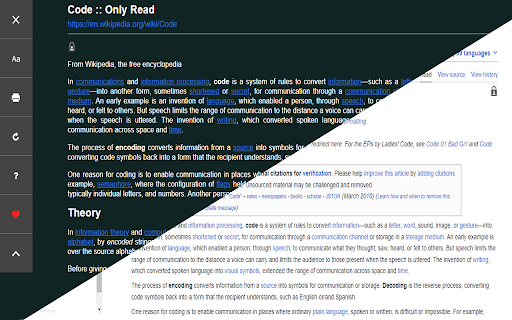


A feature Packed, customizable reader extension! You can open any website or online document in a straightforward and uncluttered environment called Only Read thanks to the lightweight, multi-browser Only Read add-on. The Only Read UI can be accessed by simply clicking the toolbar button. A plain version of the current page (active tab) will be reloaded. When the Only Read UI is active, a toolbar can be seen in the upper left corner. The close button is the first button down from the top. This button will reload the page in the default view when you click it. To access the settings popup, select the second button from the top. For Only Read, three themes are available. Features + Using the toolbar popup UI, access any website directly in reader view. + has a indigo, indRed, hotPink, teal, sepia, light, or dark mode. + has a font size, line height, or page width adjustment option. + Very lite and easy to use Extension.

Reader View
Strips away clutter like buttons, background images, and changes the page's text size, contrast and layout for better readability Reader View extension removes clutter from web pages to enhance their readability. The extension uses Mozilla's Readability library as the engine to provide similar experience from what you get if you are on the Firefox browser. After installation, a button is added to your Chrome toolbar area or Opera's address bar. Pressing this button once opens the current page in the "Reader View" mode. You will notice the button's color will be changed to orange while you are in the reader view mode. Clicking on this orange button or pressing the back button of your browser closes the "Reader View" mode and restores the normal rendering mode. Since the extension uses history API, the page scroll position and the entire session is restored when "Reader View" mode is terminated. ✔ Open website directly in reader view ✔ Open website's links directly in the reader view ✔ Access the reader view button from a page action button ✔ Fullscreen reading ✔ Advertisement removing ✔ Save in HTML format ✔ Text to Speech (TTS) ✔ Move to the next and previous pages ✔ Keyboard shortcuts for almost all actions Try our software now. Its 100% free to use, and you can access the test results onto your hard drive or Google Drive.

Reading Mode
Have you ever visited a website where the layout was rather ugly and you found it difficult to focus on finding what you were looking for due to unnecessary sidebars, ad columns and too many buttons? This extension will solve these problems for you and provide you with a smoother and clearer reading experience. This plug-in currently supports displaying the main content of the page and hiding non-main information such as sidebars and advertising columns. *** Enter the reading mode shortcut key Shift+ArrowUp, and exit by Esc key. ***

Reader Mode - Immersive Reading & AI Summary
One-click to extract web articles, remove ads, and enjoy a clean reading experience. Supports AI summaries and text translation. A Better Reading Experience for Web Articles | Immersive Reading · Smart Ad Blocker · AI Summary · Web Translation · Export PDF Reading should be a pure enjoyment. This Reader Mode extension extracts the main content of web pages with one click, removes annoying ads and pop-ups, and creates an extremely clean and immersive reading environment. Combined with the AI smart summary and multilingual translation capabilities of DeepSeek/ChatGPT, it makes your knowledge acquisition much more efficient! 👨💻 Who needs this extension? * Deep Readers: Remove distractions, customize fonts and typography, support dark mode, and protect your eyesight. * Students & Researchers: One-click article outline generation, multi-color highlighting for notes, and offline PDF export for archiving. * Language Learners: Powerful selection translation and immersive full-page bilingual translation for barrier-free cross-language reading. * Developers & Geeks: Auto syntax highlighting for code blocks, and one-click copy to Markdown format. 🔒 Privacy Promise: Pure local execution, 0 data theft. Your browsing history and API Keys are stored locally on your device only. 📖 Core Reading & Typography * Smart content extraction to precisely remove ads and irrelevant clutter * Learns your reading habits to auto-enable reader mode on frequent sites (with whitelist management) * Bypasses restrictions to extract hidden text (like content in textareas) * Freely customize reading area width, font size, line spacing, and paragraph spacing * Supports custom system fonts for a personalized reading experience * Smart typography optimization: Auto-spacing between text characters * Developer-friendly: Auto syntax highlighting for code blocks with FiraCode font * Theme switching: Auto-switch between light and dark modes, with 5 customizable background colors per theme 🛠️ Reading Assistant Tools * Auto-generate article outline with reading progress bar and current position highlight * Immersive image mode: Double-click to zoom, use arrow keys to navigate images * Powerful selection bubble: Copy, search, open links, quick translate, with customizable quick search/shortcuts for various platforms in settings * Highlighter pen: Multi-color highlighting for marking key content * Quick copy: One-click copy article content to Markdown format * Offline save: One-click generate and download beautifully formatted PDF files * Global availability: Selection action bubble and AI chat button are available even on original pages outside reader mode * Reading completion effect: Triggers a celebration effect when reaching the bottom of the article 🤖 AI & Multilingual Translation * AI Summary: Configure API Key for one-click article summaries (supports DeepSeek / OpenAI model switching) * AI Outline & Quotes: AI intelligently extracts article structure outlines and high-value quotes * AI Chat: Smart Q&A chat assistant based on the current article content * Selection translation: Instantly call large models for precise translation of selected text * Full-text translation: Supports large models or Chrome's native translation for immersive full-page translation * Internationalization: UI supports 11 languages including English, Chinese, Japanese, Korean, French, German, etc. * Cloud sync: Reading settings, whitelist configs, and saved articles auto-sync across devices via Chrome account 🌟 Collection & Management * Article collection: One-click star button to save high-quality articles while reading * Highlight notes: Use multi-color highlighter pens to mark core content * Personal center: Independent dashboard to review your collections and highlight notes via timeline or grid view * Article recommendation: One-click recommend and share high-quality articles to the community 🛡️ Security & Privacy * Pure local execution: Core reading mode extraction and functions run entirely locally without uploading article data to servers * Key security: API Keys and sensitive configs for AI features are encrypted and stored locally * Backup management: Real-time export backup and local import recovery for reading settings, whitelists, collections, and highlight data 💖 Your support is important to us If this extension has improved your reading experience, please give us a 5-star review ⭐⭐⭐⭐⭐ in the Chrome Web Store! For any suggestions or help, welcome to join our Telegram community: https://t.me/aitopm

Reader View 2.0
1. Install and pin 📌 the extension. 2. Click on the extension on any page to enter the reader's view of the page. 3. Or you can select any part of the page and click on the extension to enter into the reader view with only that reader. 1. Fullscreen reader mode. 📖 2. Blocks 🚫 the ads and hides the additional links. 3. Adjusts the text size, formatting, navigation, and theme. 🔖 Enjoy your favorite articles without distractions and without having to exit your browser!
