
mnnpfhjejkachmmicoopefojjpfppiao



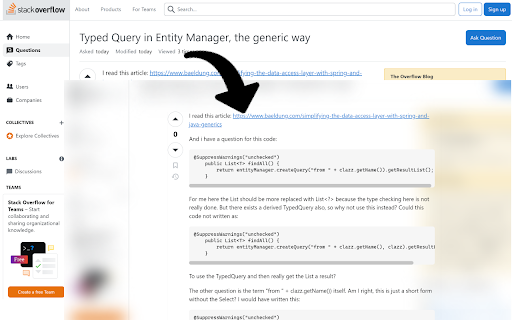
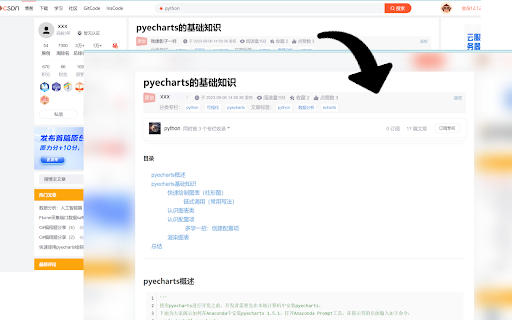
Have you ever visited a website where the layout was rather ugly and you found it difficult to focus on finding what you were looking for due to unnecessary sidebars, ad columns and too many buttons? This extension will solve these problems for you and provide you with a smoother and clearer reading experience. This plug-in currently supports displaying the main content of the page and hiding non-main information such as sidebars and advertising columns. *** Enter the reading mode shortcut key Shift+ArrowUp, and exit by Esc key. ***

Only Read
A feature Packed, customizable reader extension! You can open any website or online document in a straightforward and uncluttered environment called Only Read thanks to the lightweight, multi-browser Only Read add-on. The Only Read UI can be accessed by simply clicking the toolbar button. A plain version of the current page (active tab) will be reloaded. When the Only Read UI is active, a toolbar can be seen in the upper left corner. The close button is the first button down from the top. This button will reload the page in the default view when you click it. To access the settings popup, select the second button from the top. For Only Read, three themes are available. Features + Using the toolbar popup UI, access any website directly in reader view. + has a indigo, indRed, hotPink, teal, sepia, light, or dark mode. + has a font size, line height, or page width adjustment option. + Very lite and easy to use Extension.

Easy Reader
Focus on the content; as little or as much as you'd like. This extension acts as a digital reading ruler. It allows you to stay focused by blocking distractions while reading online.

RSI Reading Mode
Makes the legacy long-form posts on the RSI website more readable. Also estimates the time it would take to read the article. We love to dive deep into the lore of Star Citizen, unfortunately the design choices CIG made on their platform aren't doing their posts a favour in terms of readability. This extension gets rid of the fluff and makes the legacy long-form posts (like Whitley's Guide and the serialized fiction posts) on the RSI-website more readable. It does that by changing the font size, color and line-height. Additionally it removes some of the background patterns.

Chrome Reader Mode
Reader Mode Chrome extension offers distraction-free reading. It removes clutter, ads allowing users to focus on the content The Chrome Reader Mode extension provides a clean, ad-free reading Chrome environment, allowing users to focus solely on content. Perfect for reading articles, blog posts, and text-heavy websites, this extension removes distractions and improves readability, making web pages simpler and more comfortable to navigate. Ad-Free, Clutter-Free Reading: Eliminate distracting elements like ads, sidebars, and pop-ups for a smooth reading experience. Enjoy a clutter-free webpage reading that enhances your focus. Offline Access: Save web pages offline for later reading, so you can access your saved articles even without an internet connection. Highlight & Annotate: Mark important sections and add notes directly on web pages to make your reading interactive and retain key information. This is part of the note-taking reader mode extension feature. Focus Tool: Utilize the built-in reading ruler to guide your focus and make reading easier on the eyes with the focus reading tool for Chrome in 2025. Install the Chrome Reader Mode extension from the Chrome Web Store. Visit any web page or article you wish to read in a simplified format with reader mode extension for Chrome. Click the Reader Mode icon in your Chrome toolbar. Read in a simplified reading experience, with options to highlight, annotate, and save for offline access. User-Friendly and Privacy-Focused With Chrome web reader, you don’t need to worry about intrusive ads or tracking; this extension prioritizes your reading experience and privacy. It’s a privacy-focused reader extension designed to provide a smooth and privacy-friendly ad blocker reader experience. Start your focused reading journey in 2025 by installing Chrome Reader Mode today!
