
eppinjigfiplgigdmgkjkhgkkpddcofa
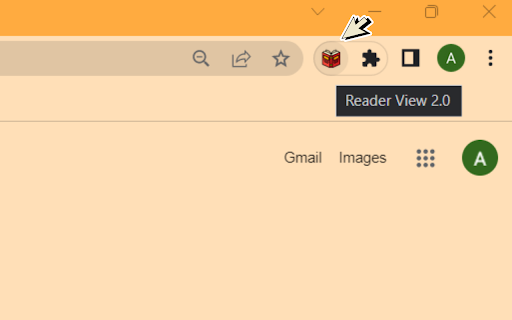

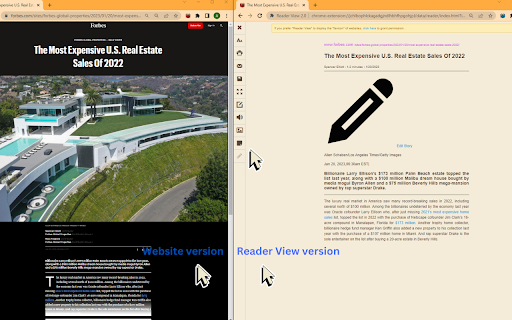
1. Install and pin 📌 the extension. 2. Click on the extension on any page to enter the reader's view of the page. 3. Or you can select any part of the page and click on the extension to enter into the reader view with only that reader. 1. Fullscreen reader mode. 📖 2. Blocks 🚫 the ads and hides the additional links. 3. Adjusts the text size, formatting, navigation, and theme. 🔖 Enjoy your favorite articles without distractions and without having to exit your browser!

Chrome Reader Mode
Try Chrome Reader Mode – the easiest-to-use website reader. Enjoy comfortable reading with our eco-friendly reader mode. 📖 What is Reader Mode in Chrome? Many users ask: ➤ What is reading mode in Chrome? It’s a feature that allows users to convert web pages into an easy-to-read format by stripping away distractions. ➤ How to turn on reader mode in Chrome? Simply install our google chrome reader mode extension, click the icon, and enjoy a streamlined reading experience. ➤ How to enable reader mode in Chrome? One-click activation ensures a smooth and comfortable reading session. ➤ Does Chrome have a reader mode? Yes, but it's limited – our extension offers far more features and flexibility. 🌟 Why Choose Our Tool? ✔ Decluttered Web Pages – removes ads, banners, and unnecessary elements. ✔ Customizable reading mode in Chrome – adjust font size, background color, and text alignment. ✔ Eco-friendly mode reader mode Chrome – Lighter web pages mean faster loading and lower energy consumption. Make a sustainable choice with reader mode eco-mode! 🌱 📌 Key Features 🔹 Google Chrome reading view – read websites with ease, eliminating clutter. 🔹 Chrome reading mode full screen – expand your reading experience to a full screen. 🔹 Text mode – display only essential text without distracting visuals. 🔹 Google Chrome text reader – improve readability and focus. 🔹 Website reader – works on any webpage, providing a consistent experience. 🔹 Reader plugin Chrome – lightweight, fast, and efficient extension. 🔹 Chrome reader mode shortcut – quickly switch to chrome read mode without extra steps. Struggling to read cluttered web pages? Transform your browsing experience by stripping away ads, sidebars, and unnecessary elements, giving you a clean and readable interface. Whether you're reading articles, researching, or studying, our extension helps you focus, improving both productivity and comfort. 📖 Who Can Benefit from Chrome Reader Mode? This extension is perfect for anyone who wants a seamless reading: ▸ Students & researchers – read articles and academic papers without interruptions. ▸ Writers & editors – focus on content without formatting issues. ▸ Professionals – review reports and important documents efficiently. ▸ Casual readers – enjoy blogs, news, and articles in reader mode in Chrome. 🚀 Boost Your Focus & Productivity - Convert long articles into concise, digestible formats. - Quickly locate key points without scrolling through distractions. - Stay fully engaged while reading research papers, case studies, and in-depth analyses. 🌍 A Tool Designed for Accessibility Reading difficulties? Small fonts? Poor contrast? This tool adapts to your needs with easy-to-read typography, high-contrast themes, and seamless text adjustments. 🔥 ⚡ Faster, Lighter, More Efficient Tired of web pages loading slowly? A stripped-down format means less data usage, faster load times, and a more responsive browsing experience—perfect for those working with limited bandwidth or on-the-go reading. 💻 Perfect for Any Device This tool is fully compatible with Chromebooks, making it a must-have for students and professionals alike. ♦️ Works seamlessly on Chromebooks, laptops, and desktops. ♦️ Enhances productivity by providing an optimized reading environment. ♦️ Reduces eye strain with features like dark mode. 🔎 How to Use Reader Mode in Chrome? Using reader mode in Chrome is simple and intuitive: 1️⃣ Install the Chrome Reader Mode extension from the CWS. 2️⃣ Click the Chrome Reader Mode icon in your toolbar. 3️⃣ Customize your chrome reader view with adjustable text size, font, and color schemes. 📩 Try our tool now and transform your reading experience! Say goodbye to digital noise! 🎉

Minimal Reader Mode
Transform any webpage into a clean, distraction-free reading experience with Minimal Reader Mode, easy to use and focused in the… Transform any webpage into a clean, distraction-free reading experience with Minimal Reader Mode, easy to use and focused in the content Tired of web clutter? "Minimal Reader Mode" is your ultimate solution for focused, distraction-free online reading. With a single click, this extension transforms complex, ad-heavy articles into a clean, readable, and customizable format, much like reading a book. 1. Distraction-Free Reading: Removes ads, sidebars, pop-ups, and unnecessary elements, leaving only the essential article content. 2. Customizable Reading Experience: Adapt the reader mode to your visual preferences: - Themes: Choose between Light, Sepia, Dark, and Black modes to reduce eye strain in any environment. - Font Types: Select your ideal font from a variety of options to enhance reading comfort. - Text Zoom: Adjust the text size to be perfectly legible for your eyes. 3. One-Click Activation: Instantly activate reader mode from the extension icon in your toolbar. 4. Smart Optimization: Uses an advanced algorithm to extract the main article content, ensuring you get what you truly want to read. Why should you install it? - Boost Your Focus: Eliminate distractions and fully immerse yourself in the content that matters. - Improve Readability: Customize the text appearance for a more comfortable and enjoyable -reading experience, especially during long sessions. - Save Time: No more sifting through superfluous content; get straight to the point. - Intuitive Design: Easy to use, with clear options to personalize your reading.

Reader View
Strips away clutter like buttons, background images, and changes the page's text size, contrast and layout for better readability Reader View extension removes clutter from web pages to enhance their readability. The extension uses Mozilla's Readability library as the engine to provide similar experience from what you get if you are on the Firefox browser. After installation, a button is added to your Chrome toolbar area or Opera's address bar. Pressing this button once opens the current page in the "Reader View" mode. You will notice the button's color will be changed to orange while you are in the reader view mode. Clicking on this orange button or pressing the back button of your browser closes the "Reader View" mode and restores the normal rendering mode. Since the extension uses history API, the page scroll position and the entire session is restored when "Reader View" mode is terminated. ✔ Open website directly in reader view ✔ Open website's links directly in the reader view ✔ Access the reader view button from a page action button ✔ Fullscreen reading ✔ Advertisement removing ✔ Save in HTML format ✔ Text to Speech (TTS) ✔ Move to the next and previous pages ✔ Keyboard shortcuts for almost all actions Try our software now. Its 100% free to use, and you can access the test results onto your hard drive or Google Drive.

Reader View
Open any page in reader view mode; light, dark or sepia and clutter free. Reader View extension enables you to open any website in a simple and clutter-free environment. Simply click on the toolbar button to open the reader view UI. The current page will be reloaded in a plain format. Once the reader view interface is open, you can see a toolbar in the top left corner. Click on the second button from the top to open the settings view. There are three themes available for the reader view. The default theme is the - Light - color. But you can choose, Dark or Sepia options as well. Moreover, font size, line height, and page width can also be adjusted in the settings popup. The reader view is a format with minimal distractions. No, buttons, toolbars, background images, ads, or banners are allowed in reader view. It is much easier on your eyes and reduces eye strain if you spend a long time surfing the web. Please note that all changes are auto-saved to the memory in the add-on. Note 1: There are a few options available to open the reader view interface. Please right-click the toolbar button to see all the choices. By default, the reader view opens in the same-tab. Please note that, if you opt for the popup or sidebar view, the first time you access the reader view for a particular page, you will need to press the toolbar button twice to open the interface. Note 2: The reader view extension uses the Readability open-source library to render the page in a simple format. You can get more info about this library here: https://github.com/mozilla/readability To report bugs, please fill out the bug report form on the addon's homepage: https://mybrowseraddon.com/reader-view.html
