
cfgmcamlcehdcoegmngjofiafnglhkgo

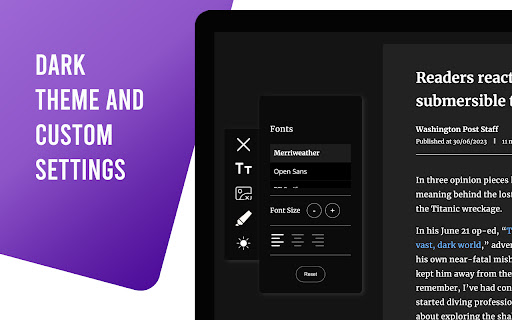
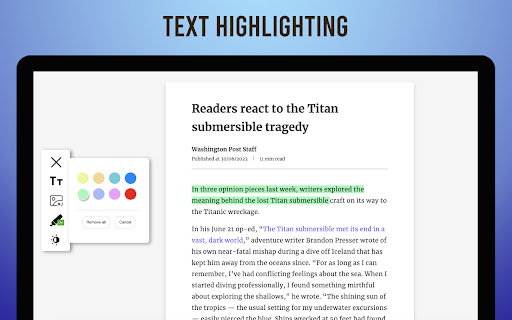
An essential reading assistant tool that ensures ad free and enjoyable reading experience This extension ensures the ad free and distraction free reading experience. Users can concentrate on reading without being distracted by annoying ads, popups and banners. Main features: - Creates the Ad free, distraction free a clean article or blog post - Users can configure text such as font family, font size and alignment - Both Light and dark theme are supported based on the users preference - Offers text highlighting with different colours - Clean User interface and Typography - We are working on bringing some exciting features in upcoming days

Clearly Reader - Your AI Reading Assistant
A browser extension with reader mode for optimal experience. Features copy, translate, speech, and PDF and Markdown export. Clearly Reader - Redefine Your Web Reading Experience 【Key Features】 ✦ One-Click Reader Mode (Shortcut: Alt/Option + R) ✦ AI Article Assistant: Summarize/Translate/Chat With Article ✦ TTS: Read any article text to speech ✦ Cross-Device Sync & Cloud Storage ✦ Export Article to PDF, Word, and Markdown, etc. ✦ Add Article to: Pocket/Craft/Raindrop/Instapaper/Obsidian etc. 1️⃣ Ultimate Reading Experience • Remove ads, popups and distractions intelligently • Support dark mode & custom themes • Adjustable font, line height & page width • System fonts & custom CSS support • Unique book layout mode

Zen Reader
Minimal distraction-free reading mode for clean and focused browsing. Tired of intrusive ads, chaotic sidebars, and eye-straining layouts? Zen Reader instantly extracts the core content of any article and presents it in a professional, customizable interface designed for deep focus. Features you’ll love: • High-Fidelity PDF Export: Save any article as a clean, professional PDF document. • Custom Themes: Choose from Paper, Sepia, Night, and Aesthetic palettes. • Premium Typography: Adjust font scales, line heights, and spacing to your preference. • Developer Tools: Enhanced code snippets with built-in "Wrap" and "Copy" buttons. • Stay Productive: Use the integrated Pomodoro timer to manage your reading sessions. • Founding Member Rewards: Join as an early adopter today and secure a permanent "Early Adopter" status for future premium features! Zen Reader is built for students, researchers, and long-form readers who value a premium reading experience. Use it anonymously or sign in to secure your legacy rewards—just you and the text.

Reeader - Minimal reader with speed reading
A simple and minimal way to read articles faster. Reeder - a minimal and open source reader extension for Google Chrome UPDATE: Now featuring a unique stop word fading feature to help you skim through articles faster. Skip the stop words while reading, allowing you to read less and absorb more information efficiently. Distraction-Free Reading Mode: Read any article in a distraction-free mode with a clean, ad-free layout. With just one click, open the reading view on top of any website, ensuring you stay focused on the content that matters. Customizable Themes and Fonts: Quickly toggle between white, yellow, and dark themes to suit your reading preferences. Improve your reading experience by easily adjusting the font size and line height to match your comfort level. Speed Reading Mode: Activate the speed reading mode for faster reading. Learn how it works and how you can enhance your reading speed by watching this informative video by Tim Ferriss: Speed Reading Video. Open Source and Developer-Friendly: The source code of Reeder is open source. If you are a developer interested in contributing, feel free to send a pull request. Join our community and help improve the extension. Distraction-Free Reading: Enjoy a clean, ad-free reading experience. Stop Word Fading: Skim through articles faster by fading out stop words. Customizable Themes: Switch between white, yellow, and dark themes. Adjustable Fonts: Modify font size and line height for optimal reading comfort. Speed Reading Mode: Enhance your reading speed with our speed reading feature. Open Source: Contribute to the development of Reeder on GitHub. Reeder is designed to help you minimize distractions and focus on the content that matters. Whether you’re reading for work, study, or leisure, Reeder provides a seamless and enjoyable reading experience. If you want a specific feature in the extension or just want to say hey, feel free to tweet me @paritosh_pundir.

Readsy
Readsy parses text on webpages to determine each text item's part-of-speech and then adds user directed background highlighting or font color shading around each word based on its classification type. The aim is to allow users to skim through material faster than normal by emphasizing parts-of-speech such as nouns, verbs, and adjectives, while de-emphasizing parts-of-speech such as prepositions and conjuctions. Users can change which parts-of-speech are highlighted, change the color of the highlights, and save their own color templates. Readsy does not run automatically. Instead, a floating button is added to the browser window in the top left corner which a user can click on to execute the part-of-speech parsing. This takes all the text on the page and sends it to an API which parses through all of the text and sends back a data-object containing each word and its classification. Readsy then takes this data-object, parses through the page HTML and encapsulates each text-item with the appropriate classification.
