
nopgbkabhipfhbciolfjhmkflphjfkca
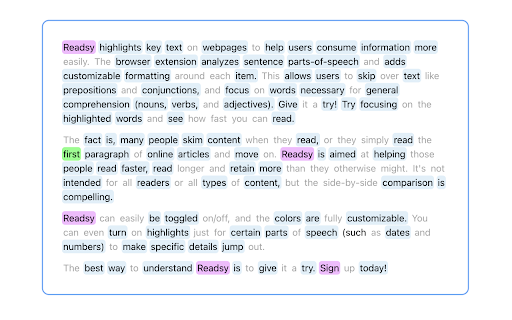


Readsy parses text on webpages to determine each text item's part-of-speech and then adds user directed background highlighting or font color shading around each word based on its classification type. The aim is to allow users to skim through material faster than normal by emphasizing parts-of-speech such as nouns, verbs, and adjectives, while de-emphasizing parts-of-speech such as prepositions and conjuctions. Users can change which parts-of-speech are highlighted, change the color of the highlights, and save their own color templates. Readsy does not run automatically. Instead, a floating button is added to the browser window in the top left corner which a user can click on to execute the part-of-speech parsing. This takes all the text on the page and sends it to an API which parses through all of the text and sends back a data-object containing each word and its classification. Readsy then takes this data-object, parses through the page HTML and encapsulates each text-item with the appropriate classification.

myReach Web Clipper
Save the things that matter on the web in an interconnected network Introducing myReach: Unleash Your Productivity with AI-Powered Superpowers Discover the browser extension that revolutionizes how you save, organize, and access your digital knowledge. myReach is your second brain, seamlessly integrating with your browser to empower you with AI-driven intelligence and effortless retrieval of information. 📚 Save Anything, Find Everything: Capture websites, files, images, notes, and contacts effortlessly, and connect them to relevant tags. No more struggling to remember where you saved that important document or the name of a website – myReach lets you search based on your personal context, empowering you to find what you need quickly and effortlessly. 💡 AI-Assistant at Your Fingertips: Meet your smart AI-Assistant powered by myReach. Simply ask any question about your saved items, and it will instantly provide answers. Whether you need contract details, summarized articles, or reminders from your past conversations, it has the knowledge to assist you effortlessly. No more tedious searching or reading through endless pages – just ask and get instant answers. 🗂️ Organize Your Way: Say goodbye to traditional folders and embrace the freedom of myReach’s flexible workspaces. Create customized workspaces to separate business and personal matters, ensuring efficient organization and effortless collaboration for teams. With myReach, everyone can find the same document using their own context, eliminating the need for extensive training or navigating complex folder structures. 🔍 Intelligent Search, Even in Images: Extracted text from images and files makes every piece of content searchable, delivering unparalleled convenience and efficiency. Locate information buried within images effortlessly, saving you time and frustration. ⚡️ Enhance and Integrate: Customize your saved items with properties like rating, description, cost, and more, allowing for deeper organization and personalization. Seamlessly integrate myReach with your favorite tools, including Evernote, Zapier, Twitter, Google Maps, and more, expanding its capabilities and streamlining your workflow. Welcome to your personal knowledge hub, designed to boost productivity and streamline information retrieval. With myReach, your browser gains superpowers, empowering you to save, connect, and access your digital world effortlessly. Embrace the future of intelligent organization and download myReach today. Get myReach, and unlock a world of limitless knowledge at your fingertips

Gimme Summary - Get summary using ChatGPT AI
Summarize articles on the web using ChatGPT AI Generate summary of articles on the web using ChatGPT AI. HOW TO USE: 1) Install the Gimme Summary AI extension from the Chrome Web Store. 2) Click on the extension icon 3) Click "Generate Summary" button to generate summary How to make it work on Brave browser If you are using Brave browser, follow these steps to make it work: - Go to brave://settings/shields - Disable "Prevent sites from fingerprinting me based on my language preferences" PRIVACY POLICY: The Gimme Summary Extension has no ads, analytics, trackers, or cookies. It does not collect any user data. The only information shared with the AI model (chat.openai.com) is the article text in order to generate summary.

Groove Reads
Brainmaxxing, but make it groovy 🕺🏻🎉 Groove Reads bolds the first letters of words, slide the disco ball to unleash ✨focus mode✨ ✨ Groove Reads The Most Groovy Brainmaxxing Tool Ever vibe coded ✨ Imagine your brain on turbo mode. That’s Groove Reads. We bold the first letters of words so your eyeballs stop speed-running into walls and actually vibe with the text. It’s not reading anymore, it’s a ✨groove session✨ 🪩 The Disco Ball Slider → your new bestie. Slide that baby left or right and boom, your whole focus aura changes. Subtle bold? Chill mode. MAX bold? You’re basically Neo in the Matrix dodging words like bullets. Why? Because your brain deserves better than vanilla text Why not? Because productivity apps are boring and we said nah, let’s make it a disco Groove Reads is for: • 🧠 Brainmaxxers who believe in main character energy • 🎉 People who can’t focus unless there’s ✨sparkle✨ involved • 📚 Students who want to speed-read but with vibes • 👀 Anyone who has ever thought “reading kinda mid” 🌍 Multi-Language Support Groove Reads vibes in multiple scripts and languages: • ✅ Latin & Cyrillic – perfect flow for English, German, French, Russian & more • ✅ Greek, Georgian, Armenian – smooth groove • ✅ Hebrew & Arabic – works with RTL magic ✨ • ✅ Devanagari (Hindi) – mostly works, still grooving Download Groove Reads and join the movement. We’re not just reading, we’re vibing, we’re delulu, we’re unstoppable🚀

Snooze Tabs
Snooze tabs and todos for later. Dismiss tabs that you don't need now, and set an alarm to bring them back when you need them You have 40+ tabs open right now. You won't get to most of them. You know it. I know it. Here's what you've tried: 📑 Bookmarks — You saved 200 links. Opened 3. Ever. 📋 Task managers — You copied a URL into Todoist, broke your flow, and never clicked it again. 🔔 Reminders — You set one. Swiped it away. Forgot. 🧠 "I'll just leave it open" — That was 6 months ago. It's still there. None of these work because they all require YOU to remember to go back. Snooze Tabs flips it. You don't go to the tab. The tab comes to you. 📦 v2.4.2 (Feb 22, 2026) ⏰ Extended grace period — choose 15 min to 48 hours, or "Always" auto-open 💤 "Always" mode — laptop off for a week? All your snoozed tabs still come back when you turn it on 🎯 Customer-driven — built from direct user feedback: "I can't rely on remembering to check missed snoozes manually" 📦 v2.4.1 (Feb 18, 2026) 🔑 License activation reliability — moved to background worker, no more popup-close failures 🛡️ License fingerprint — consistent device ID across validation checks 🚫 No more license wipes — validation is now log-only, never removes a valid license ✅ Duplicate TODO viewer fix — only one viewer tab per TODO now 👁️ Woken TODOs visible — completed TODOs now appear in the sleeping view 🔔 Cleaner notification icons — simplified fallback to 48px 📦 v2.4.0 (Feb 17, 2026) 🖥️ Open as full page — use Snooze Tabs as a standalone tab, not just a popup 📜 Snooze History — browse everything you've snoozed and completed 🔢 Free tier limit — 10 active snoozes free, unlimited with Pro 🔊 Notification sounds — hear when your tabs come back 👋 Welcome page — quick tour on first install 🔑 License auto-validation — Pro status checks automatically on startup 🐛 Bug fixes — analytics reliability, time handling improvements 📦 v2.3.0 (Feb 8, 2026) 🖱️ Right-click context menu — snooze any tab without opening the popup 🔄 Reschedule snoozes — change the wake-up time on already-snoozed tabs 📑 Snooze All Tabs from context menu — one click to snooze your entire window 📌 Save For Later from context menu — quick-save without opening the popup ⌨️ 7 keyboard shortcuts — fully customizable preset times 🔔 Better notifications — reliable alerts even when browser is minimized 🕐 Smarter missed snooze detection — laptop was asleep? We still got you. 🎨 10 TODO color themes — beautiful color options for your reminders ⚙️ Inline preset configuration — customize snooze times from settings 🛡️ Dozens of bug fixes and performance improvements 📦 v2.2.0 (Feb 4, 2026) 📝 Notes on any tab — add context so future-you knows why you saved it 👀 Tab preview — see your snoozed tabs at a glance 🔔 Notification sounds — optional audio alerts when tabs wake up 🏖️ This Weekend preset — snooze to Saturday morning in one click 💻 Manage activations — move your Pro license between devices 🗂️ Snooze history — see everything you've completed 🔗 Feedback & roadmap — vote on features, report bugs, see what's coming 📦 v2.1.0 (Jan 30, 2026) ✅ TODO Reminders — pop-up notes on a schedule (Pro) 🔁 Recurring Snoozes — daily, weekly, monthly tabs that come back (Pro) 📂 Workspaces — organize snoozes by project (Pro) ☁️ Google Drive Sync — your snoozes on every device (Pro) 🎨 Full settings UI — customize every aspect of your experience 1️⃣ Click the icon (or right-click any tab) 2️⃣ Pick a time — tomorrow, next Monday, 15 minutes 3️⃣ Tab closes. It reopens automatically at that exact time. 🧠 WHO THIS IS FOR 😰 You have tab anxiety — 40 tabs open and you're scared to close any of them 🎯 You have ADHD — you need the distraction gone NOW, but can't afford to lose it 💡 You're deep in flow — and refuse to break focus just to "save a link for later" 🛒 You're browsing something you need NEXT Friday — not today 📚 You "read it later" but never actually do — because nothing brings it back If any of that sounds like you, this is the tool you didn't know you needed. ✨ WHAT YOU GET (FREE) ⏰ One-click presets — Later Today, Tomorrow, This Weekend, Next Week 📅 Custom date & time — snooze to any moment you choose 🖱️ Right-click to snooze — don't even open the popup 🔄 Reschedule anytime — changed your mind? Move it. 📑 Snooze one tab, selected tabs, or ALL tabs at once 📌 Save For Later — no timer, just park it until you're ready 📝 Notes on any tab — add context so future-you knows why ⌨️ 7 keyboard shortcuts — power users, this is for you 🔔 Notifications with sound — you won't miss a thing 🌙 Light & Dark themes 🔒 100% offline — your data never leaves your device 🚀 PRO — FOR POWER USERS ✅ TODO Reminders — pop-up notes on a schedule (10 color themes) 🔁 Recurring Snoozes — daily standups, weekly reports, monthly reviews 📂 Workspaces — organize by project (Work, Personal, Side Hustle) ☁️ Cloud Sync — your snoozes on every device (via your own Google Drive) 📊 Snooze History — see everything you've completed ♾️ Unlimited snoozes (Free: 10) Zero tracking. Zero accounts. Zero data collection. Your tabs are your business. Cloud sync (Pro only) uses YOUR Google Drive — we never see your data.
