
bmjohpdlphnlajmceppkgnfddpkbaanl
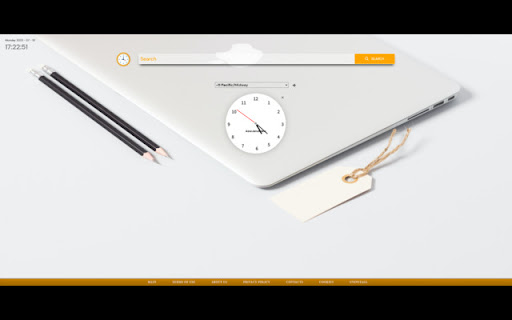
An extension that groups together clocks from all the time zones that are relevant to you and conveniently shows The ultimate extension that helps you stay connected with every part of the world. Perfect for people who's relatives or loved ones live overseas, or to those who conduct business internationally in their line of work. By Clicking "add to Chrome", I accept and agree to installing Worldwide Clock Extension and setting Chrome New Tab search provider to Microsoft Bing as described by the services in terms of use https://onlineleonz.com/terms-of-use/ and privacy policy https://onlineleonz.com/privacy-policy/ How it works: Users can choose which clocks they want to showcase every time they open a new window or tab by clicking on the drop down menu and choosing their desired time zones. After a time zone is chosen, users need to click the "+" sign on the right side of the menu to add the clock. Users can remove certain clocks by clicking the "X" button on the top right corner of each clock. The clocks chosen will carry over to new tabs or windows, so no need to choose them again every time a new one is opened. Alongside the worldwide clocks, users will be show a digital clock on the top left corner of the screen which tells the current time in their location, as well as the current date. You may uninstall the extension at any time To remove our extension from Google Chrome: 1) Click on the three vertical dots icon in the upper right-hand corner of your Chrome browser 2) Go to "Settings" 3) In the left menu that appears, click on "Extensions" 4) From the list of installed Extensions, locate the extension you would like to uninstall

Time Zone Converter - Savvy Time
Time zone and local time converter. Compare and convert time between many locations at a time. Time zone and city time converter between multiple locations worldwide. Converter allows find, add and compare over 100,000 cities and about 300 time zones. Converts times instantly as you type, in both direction. To help us improve, we would love to hear your feedback and any suggestions for future updates.

World Clocks
Add any world clock of your choice to remain updated with the time in different locations. ⏰ A productivity booster World Clock browser extension! 🏆 Featured by Google on Chrome Web Store (since following all technical best practices, latest platform APIs, and meeting a high standard of intuitive user experience & design, among other things). 💪 Features: - All settings are kept in sync - Add, Remove, SORT, and Edit time zones - Convert time zone time to other time zones - Very easy to use - Responsive layout - Nice add/remove effect for better user experience - Select the color theme from the available presets - Set your color for the individual clock - Set font color and size as per your choice - Select 12 or 24-hour format - Turn on/off seconds display - Change the display name after adding the clock - Different sets of layouts added - Keep the settings panel on the left or right - Reset all settings --- New features are added regularly 👨💻 🏡 Home Page: https://weball.io/products/browsers/extensions/world-clocks ⭐⭐⭐⭐⭐⭐⭐ 🥂 Praise ⭐⭐⭐⭐⭐⭐⭐ If you like the extension, I would like to request you to give a 5️⃣⭐ rating, it keeps me motivated to contribute back to the community. 💓 /*****************/ 🐞 Bugs /*****************/ If you find any bugs or if you feel that some feature is missing, please send me a mail 📩 (justdecodeme@hotmail.com) before giving a bad review 🙏, and I'll fix that ASAP. 🙇 Thank you for your understanding, and enjoy the extension!!! :) 🎉 v 23.5.2 - New toggle buttons - UI/UX improvements - Optin for GA4 - Reduces overall extension size - Bug fix: Fixed some crossbrowser CSS issues v 22.11 - Manifest migration from v2 to v3 (very important update) - Size reduced (Increased performance, only ~500KB) - Few CSS updates in the Settings panel - Bug fix: Time conversion just after install v 21.12 (biggest update so far) - Timezone convert feature added (MOST REQUESTED FEATURE) - Multiple layouts added for eye-catching UI - New shades theme added - New mix theme added - Text color options added - Font size options added - Base input font size added to increase or decrease overall time zones font - Reset functionality added - Clock icons positions updated - Beautiful radial background added at loading time - Drag & Drop animation added - Settings panel slide effect added for better UX - Settings panel position can be LEFT or RIGHT - Font sizes change from px > rem and em for better usability - Settings panel now have a scroll bar for screen having small heights - Removed time value from tab - Overall user experience improved - Redundant code removed - Date format updated and the Month has also been added now - Bug Fixed: MAX_WRITE_OPERATIONS_PER_MINUTE - Bug Fixed: Error because of old and new database mismatch v 21.04 - Version naming changed - Few things improved as per the user's feedback - Thank you page will open only on the new install, not on the update - Credit section added - Button text replaced with icons - UI Improvements - Small bug fixed v 2.2 - Note able to drag at the end bug solved - Code refactoring - Thank you page message updated - Credits link added v 2.1 - Don't show the sort and delete icon for the last clock remaining while deleting - Thank you page added after installation - Feedback form added after uninstallation v 1.9 - Items can be rearranged now by drag and drop - Add timezone animation added - Delete buttons not showing up on first load bug fixed - Logic and UI updates v 1.8 - Remove timezone animation added - Can't add duplicated timezones - Default 4 time zones added on the first load V 1.6 - New Features + Bugs solved: - New Add button and Edit Button Layout. - Don't show am/pm in 24hr format. - Stop the user from adding an invalid Time Zone. V 1.4 - New features added: - CSS/Style updates. - Select 12 or 24-hour format. - Change the display name after adding a clock. Oh still here, you are super awesome! 🤘 Keep rocking!!! ❤️ You are breathtaking! ❤️ CWC is yours to keep. Forever.

UTC Time & World Clock
See UTC time at a glance on the extension icon, and switch to any time zone when needed Your time, always in sight. See the current UTC time or any selected world clock directly on your Browser extension icon. No extra tabs. No searching. No friction. Built for people who work, travel, plan, and communicate across time zones, this extension gives you a faster way to stay in sync with the world. 📍 Live time on the extension badge Keep the time you need visible прямо on the extension icon. 🌍 UTC or any world time zone Track the time that matters most to you. 🌗 Day/night indicator See at a glance whether it is day or night in the selected location. 🗓️ Locale-based date and time display Use a format that feels familiar and natural. 🗣️ Multiple language support Choose the language you prefer. 🎨 Light and dark theme friendly Comfortable and readable in different browsing conditions. ⚡ Always one glance away The time is already there when you open Browser. From global teamwork to everyday planning, this extension keeps the time you need exactly where you need it: inside Browser, always in view. Install it and stop wasting clicks on checking the time.

Calendar Plus
Google Calendar extension that provides insights into where your time goes. Includes power user tools, data export and customization Features: - Plot your week/month/year using Bar Chart, Pie Chart or a Time Chart - Allows to automatically place events into correct calendars based on defined rules - Adds autocomplete for event names when creating events - Adds ability to condense the interface to have more space for events - Adds ability to ghost an event (make it semi transparent and non-interactive) - Supports exporting plotted data and exporting/importing plugin settings
