
kgbbebdcmdgkbopcffmpgkgcmcoomhmh

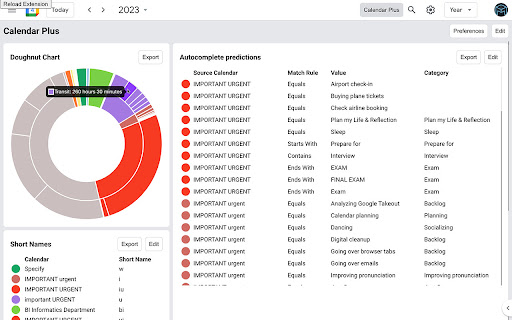

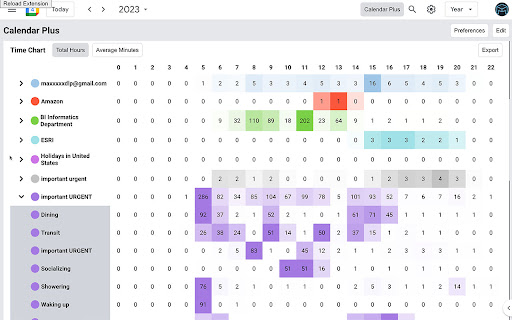
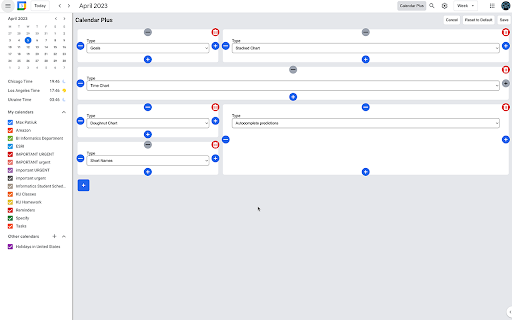
Google Calendar extension that provides insights into where your time goes. Includes power user tools, data export and customization Features: - Plot your week/month/year using Bar Chart, Pie Chart or a Time Chart - Allows to automatically place events into correct calendars based on defined rules - Adds autocomplete for event names when creating events - Adds ability to condense the interface to have more space for events - Adds ability to ghost an event (make it semi transparent and non-interactive) - Supports exporting plotted data and exporting/importing plugin settings

Tackle
Automatic Google Calendar time tracking and productivity insights ⭐ Tackle - The #1 Google Calendar Time Tracker ⭐ Effortlessly track time directly on your Google Calendar. Leverage AI and automation to tag and categorize events, and export your calendar data to Google Sheets seamlessly. Tackle is the ultimate solution for tracking time and getting productivity insights with Google Calendar. Seamlessly integrate to track events and activities, generate customized reports, and gain insights into your time without extra manual work. 📅 Google Calendar Time Tracking: Easily track your time directly from Google Calendar. 🏷️ Custom Tags and Categories: Use AI-powered tagging to organize events into categories like Personal, Work, Projects, and Clients. 📊 Automated Reports: Generate tailored reports with just a few clicks. 📤 Data Export: Export your calendar data to Google Sheets or Excel for further analysis. 📈 Insightful Dashboards: Visualize your time allocation across different activities. 👥 Team Performance Tracking: Organize calendars by teams to gain insights into performance and areas needing improvement. 🔄 Intuitive Workflow Builder: Automate repetitive time-tracking tasks. 🤝 Meeting Health Analytics: Measure and improve meeting effectiveness with AI-driven insights. ➤ Install the Tackle add-on or Tackle Chrome Extension and open Google Calendar. ➤ Sign up via Tackle’s sidebar and complete onboarding. ➤ Create custom tags and properties from the sidebar menu. ➤ Select events and add tags in Google Calendar. ➤ Change the date range to analyze specific periods. ➤ Export calendar data to Google Sheets or Excel from the Tackle app. 🌟 Effortless Time Tracking: Automatic tracking with deep calendar integration. ⚙️ Flexible Solutions: Customize workflows and reports to fit your team’s needs. 🔒 Comprehensive Security: SOC 2 Type 2 certification ensures enterprise-grade security. 💡 Signup and Pricing: * Freemium Plan: Free forever plan with essential features. * Paid Plans: Affordable options for advanced features. 📧 Contact Us: If you have any issues or questions, reach out to us at support@timetackle.com

Time Tasker
Change the duration length of Google tasks on Google Calendar Easily set custom timeframes for your Google Tasks. This extension allows you to extend the duration of your tasks as desired. This will help you schedule your Tasks with accurate timeslots. Simply input the duration of the task and when you are ready to schedule it, drag and drop the task into your calendar. You will then see the task expand into the specified duration. For example, to customize the duration of a task to 3 hours, simply add “(3h)” to the end of the task title and watch as the task automatically expands to fill 3 hours when dragged into your Google Calendar. **3.0.0** - Updated the functionality with updates Google made. Time tasker should now correctly adjust the time of tasks. Updated November 21st 2025

Google Calendar Quick Duplicate
A simple Chrome Extension to quickly duplicate events on Google Calendar. This extension adds a "Duplicate event" icon on the event preview card, letting you quickly duplicate it with one single click. You can also quickly duplicate an event by holding alt (option on Mac OS) while clicking the event.

Meeting Dolphin Google Calendar Tags
The best Google Calendar companion. Enables you to add tags to events, drive insights, search & filter and much more. Meeting Dolphin helps you maximise your Google Calendar experience and optimize it for work purposes. Use it to tag calendar events, organise your week, set Active Hours, and Remove timestamps, ... all in one extension. Learn more @ https://meetingdolphin.com/extension Our blog @ https://meetingdolphin.com/blog FEATURES 🏷️ Tagging for Google Calendar Drag and drop tags to categorize an event. This makes it easy to visualize your week. 📊 Time Analytics See your weekly or monthly time allocation by tag as you shift views. Export your tag data to CSV on the web app. 🔍 Search & Filter Search and filter either by Tags or by Text using the search bar. The matches are highlighted directly in your current calendar view. Set Work/Active Hours You never need to scroll up and down because Meeting Dolphin fixes your view to only your work/active hours. Hide timestamps: Clean up your events by removing the time stamps. At Meeting Dolphin, we believe that great software shouldn't come at a cost to privacy. Our extension securely stores your tags in the cloud so you can keep them backed up and accessible from anywhere you need them. Your data belongs to you, and we store it to provide value to you. Our extension uses read-only permissions for your calendar events. We do not store this data; its purpose is to programmatically link your tags to events. If you ever have questions about Meeting Dolphin's security practices or your data, reach out to us at security@meetingdolphin.com. Feel free to contact support at support@meetingdolphin.com and we'll reply as soon as possible.
