
opimkmliiphijnkokghkjggpgiajedea
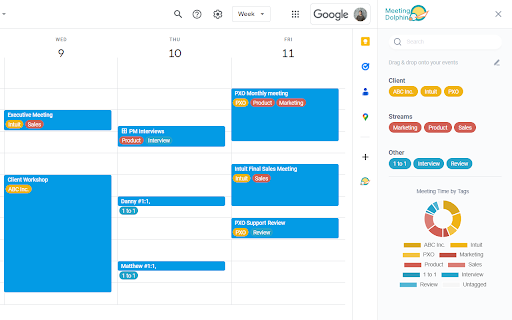

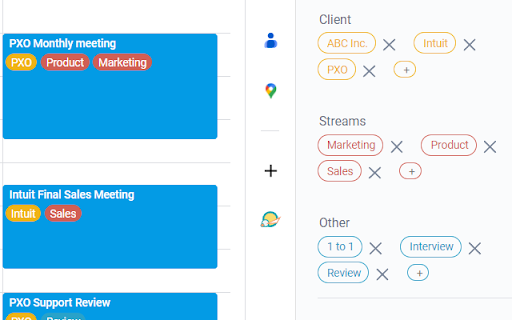
The best Google Calendar companion. Enables you to add tags to events, drive insights, search & filter and much more. Meeting Dolphin helps you maximise your Google Calendar experience and optimize it for work purposes. Use it to tag calendar events, organise your week, set Active Hours, and Remove timestamps, ... all in one extension. Learn more @ https://meetingdolphin.com/extension Our blog @ https://meetingdolphin.com/blog FEATURES 🏷️ Tagging for Google Calendar Drag and drop tags to categorize an event. This makes it easy to visualize your week. 📊 Time Analytics See your weekly or monthly time allocation by tag as you shift views. Export your tag data to CSV on the web app. 🔍 Search & Filter Search and filter either by Tags or by Text using the search bar. The matches are highlighted directly in your current calendar view. Set Work/Active Hours You never need to scroll up and down because Meeting Dolphin fixes your view to only your work/active hours. Hide timestamps: Clean up your events by removing the time stamps. At Meeting Dolphin, we believe that great software shouldn't come at a cost to privacy. Our extension securely stores your tags in the cloud so you can keep them backed up and accessible from anywhere you need them. Your data belongs to you, and we store it to provide value to you. Our extension uses read-only permissions for your calendar events. We do not store this data; its purpose is to programmatically link your tags to events. If you ever have questions about Meeting Dolphin's security practices or your data, reach out to us at security@meetingdolphin.com. Feel free to contact support at support@meetingdolphin.com and we'll reply as soon as possible.

Tackle
Automatic Google Calendar time tracking and productivity insights ⭐ Tackle - The #1 Google Calendar Time Tracker ⭐ Effortlessly track time directly on your Google Calendar. Leverage AI and automation to tag and categorize events, and export your calendar data to Google Sheets seamlessly. Tackle is the ultimate solution for tracking time and getting productivity insights with Google Calendar. Seamlessly integrate to track events and activities, generate customized reports, and gain insights into your time without extra manual work. 📅 Google Calendar Time Tracking: Easily track your time directly from Google Calendar. 🏷️ Custom Tags and Categories: Use AI-powered tagging to organize events into categories like Personal, Work, Projects, and Clients. 📊 Automated Reports: Generate tailored reports with just a few clicks. 📤 Data Export: Export your calendar data to Google Sheets or Excel for further analysis. 📈 Insightful Dashboards: Visualize your time allocation across different activities. 👥 Team Performance Tracking: Organize calendars by teams to gain insights into performance and areas needing improvement. 🔄 Intuitive Workflow Builder: Automate repetitive time-tracking tasks. 🤝 Meeting Health Analytics: Measure and improve meeting effectiveness with AI-driven insights. ➤ Install the Tackle add-on or Tackle Chrome Extension and open Google Calendar. ➤ Sign up via Tackle’s sidebar and complete onboarding. ➤ Create custom tags and properties from the sidebar menu. ➤ Select events and add tags in Google Calendar. ➤ Change the date range to analyze specific periods. ➤ Export calendar data to Google Sheets or Excel from the Tackle app. 🌟 Effortless Time Tracking: Automatic tracking with deep calendar integration. ⚙️ Flexible Solutions: Customize workflows and reports to fit your team’s needs. 🔒 Comprehensive Security: SOC 2 Type 2 certification ensures enterprise-grade security. 💡 Signup and Pricing: * Freemium Plan: Free forever plan with essential features. * Paid Plans: Affordable options for advanced features. 📧 Contact Us: If you have any issues or questions, reach out to us at support@timetackle.com

News Storyline
Know Thy History and Be Notified About Future A Chrome sidebar extension and companion newsletter that gives you an unbiased, context-rich timeline of any news story and quietly watches for what happens next—so you never miss a beat (or waste time scrolling). 📖 On-Demand Timelines in Your Sidebar • One-click access while you’re reading any article: hit the extension icon to slide open a concise, chronological view of past reports on that story. • Facts, not opinions: we aggregate across dozens of reputable outlets, stripping out commentary bias so you see the unvarnished sequence of events. • Top highlights only: instead of drowning you in every mention, we surface a handful of the most relevant milestones—headlines, timestamps, and sources—so you instantly understand “what led here.” 🤖 Background Story Scanning & Positive Alerts • Hands-free monitoring: once you’ve opened a timeline, our service continues scanning in the background for new developments on that very story. • Positive-only notifications: you decide what matters—receive alerts only when something significant (and positive) happens, so your inbox isn’t full of noise. • Peace of mind: no more endless manual refreshes or fear of overlooking a breaking update. 📰 Daily Newsletter & “New Developments” Bulletin • Daily digest delivered each morning: a simple roll-up of every event we tracked across your subscribed stories in the past 24 hours—no grouping, no spin. • On-demand “New Developments” email: when fresh updates arrive mid-day (for critical beats), we’ll ping you separately so you stay in the loop around the clock. 🔔 Story Subscriptions & Future Tracking • Subscribe in one click: any timeline can be turned into a “watched” story. From that moment on, we’ll keep you posted on each follow-up report. • Tailored alerts: choose your stories—finance, politics, tech, climate—and we do the rest, surfacing only the most impactful next chapters. 🔧 Platform & Integration • Chrome-based browsers supported (Chrome, Edge, Brave, Opera). • Privacy-first: minimal permissions, no tracking beyond the stories you opt in to follow. • Lightweight: sits quietly in your toolbar, loading only when you ask. Who It’s For • Journalists & analysts who need quick, neutral context before filing next headlines. • Researchers & students chasing down backstory and evolution of key events. • Curious readers who want more than a single outlet’s perspective—and zero surprises when the story moves on. Why Know Thy History? • Context at your fingertips—instantly see what happened before. • Stop missing updates—positive alerts mean you’ll always catch the next big development. • Save time & mental bandwidth—no more endless feeds or biased roundups. Install now and start each story with the past in view—and the future on your radar.

Pact for Google Calendar
Boost your productivity with Pact for Google Calendar Effortlessly track and manage your work commitments using Pact's Google Calendar extension. Now, visualize your daily pacts and interact with them directly from your calendar. Pact brings accountability to teams through smart reminders, analytics, and automated workflows. It integrates seamlessly into your calendar, email, or Slack for enhanced team collaboration. Pact empowers teams with: 15x more visibility into outcomes, 3x more accurate delivery dates, and a remarkable 91% task completion rate. With our Chrome extension, you can: - Instantly view your commitments (think of them as ‘pacts’) and due dates right in your calendar. - Easily create, view, edit, and update your commitments, all within Google Calendar. - Improve accountability, both with yourself and your team, right from your calendar.

GoldDust
Ask a question about a company or a person. If the answer is on the internet - our AI agent will locate, synthesize, and display it. Welcome to GoldDust, the Chrome extension that automates the tedious and repetitive research you need to effectively qualify leads, prioritize opportunities, and customize outbound messaging. ⭐ Seamless Integration: Whether you're scrolling through LinkedIn, checking out a company’s website, checking latest news or deep in your CRM, GoldDust is there to enrich your experience without the hassle of switching tabs or tools. ⭐ Rich Info, On Demand: You've got a treasure trove of information, when and where you need it. It’s like magic, but for work. ⭐ Custom Insights: You’re getting the good stuff – customized insights that matter to you. Say goodbye to info overload and hello to insights that make a difference
