
plhnjpnbkmdmooideifhkonobdkgbbof


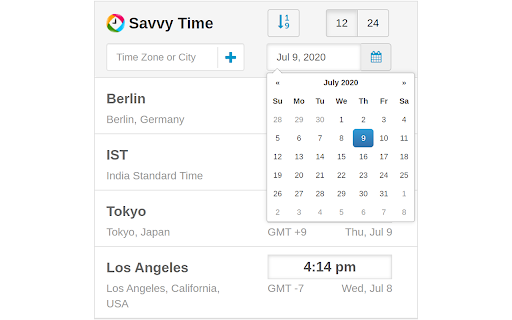
Time zone and local time converter. Compare and convert time between many locations at a time. Time zone and city time converter between multiple locations worldwide. Converter allows find, add and compare over 100,000 cities and about 300 time zones. Converts times instantly as you type, in both direction. To help us improve, we would love to hear your feedback and any suggestions for future updates.

Lightning Extension
Enhance productivity with new add-on features Lightning Extension is a library of features created by the Lightning Product Management team at Salesforce. This extension is designed to complement the user experience with continuous productivity feature releases. These features provide end users with rich enhancements that aren’t available out-of-the-box with Lightning, like Dark Mode. Admins can control which features are made available to their users. To control access to features, from Setup, in the Quick Find box, enter Lightning Extension, and then select Lightning Extension. From there, you can change your users’ access to individual features, or access to the extension itself. Changes can take up to 24 hours to take effect.

Change Timezone (Time Shift)
Easily change your timezone to a desired value and protect your privacy. Change Timezone (Time Shift) is an extension that let you easily and quickly change your timezone to the desired value and protect your privacy. Simply open the addon options page and select a desired timezone from the drop-down list. Once a timezone is selected, adjust the name and value fields if needed. Then reload all tabs for changes to take effect. Please note that this addon takes into account the daylight saving time. If you want to turn off the addon, simply click on the toolbar icon once (the icon color will turn to light grey). By default, the addon is active (the toolbar icon has dark grey color). To report bugs, please fill out the bug report form on the addon's homepage (https://mybrowseraddon.com/change-timezone.html).

FoxClocks
FoxClocks shows times around the world at the bottom of your browser. It deals with daylight saving time so you don't have to. FoxClocks lets you keep an eye on the time around the world - or just your local time - by putting small clocks in your statusbar. Choose from a set of useful time formats or create your own - custom formats are easy to create and very flexible. Alternatively, just click on the FoxClocks icon next to your address bar for quick access to your clocks, without leaving the current web page. And if the statusbar is causing issues with the display of some web pages, you can disable it entirely from the Options page. FoxClocks' Zone Picker tree lets you browse virtually all the world's time zones by country, region or city. Can't find your city? Use the 'Search Cities' feature to find virtually any city in the world. FoxClocks automatically checks for updates to its time zone database, so you'll always have the right time.

Local Time - Automatic Time Zone Converter
Automatically converts and replaces time in the websites you visit by your local time. Automatically detect, convert and replace any time shown on the webpages you visit with your local time. Normally you need to copy the time and paste it somewhere to see the local time. Well, that sucks! With this extensions you don't need to do anything, the converted time, just shows in-place, instead of the original one. No need to set-up anything beforehand, it just works. If you want to see the original time just hover with your mouse above the converted time. Also note, that no icon is added to the browser. Go to Chrome Options - Tools - Extensions menu and look for Local Time.
