
nbofeaabhknfdcpoddmfckpokmncimpj
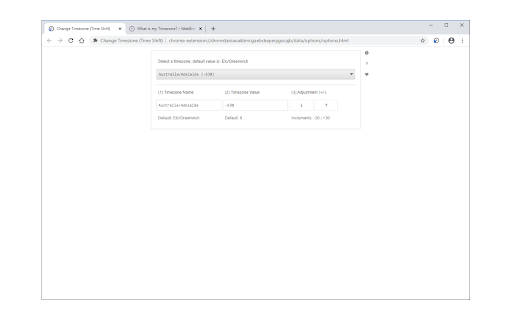
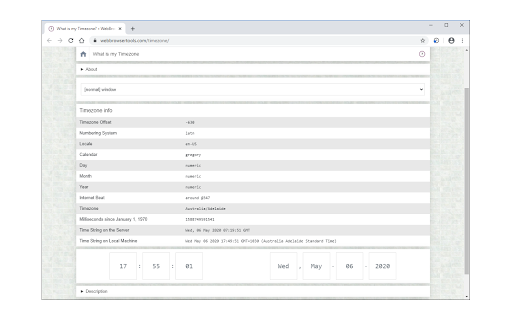
Easily change your timezone to a desired value and protect your privacy. Change Timezone (Time Shift) is an extension that let you easily and quickly change your timezone to the desired value and protect your privacy. Simply open the addon options page and select a desired timezone from the drop-down list. Once a timezone is selected, adjust the name and value fields if needed. Then reload all tabs for changes to take effect. Please note that this addon takes into account the daylight saving time. If you want to turn off the addon, simply click on the toolbar icon once (the icon color will turn to light grey). By default, the addon is active (the toolbar icon has dark grey color). To report bugs, please fill out the bug report form on the addon's homepage (https://mybrowseraddon.com/change-timezone.html).

Random User-Agent (Switcher)
Automatically change the user agent after specified period of time to a randomly selected one User-Agent is like a secret code your browser shares with every website you visit. It reveals details about your browser, your operating system, and even some plugins you have installed. Essentially, it's your browser's fingerprint! But here's the thing - sometimes you don't want to leave such a clear trail behind. That's where this extension comes in! 🚀 We created this extension to shield your online privacy and make it super easy to appear as if you're browsing from different devices. With this extension, your User-Agent string gets automatically swapped out with a randomized one at regular intervals. You can also manually set your User-Agent if you prefer. And guess what? It's super light on your system resources, so you won't even notice it's there. Plus, you're in control! You can customize which browsers and operating systems you want to emulate. We've even got an exceptions list for those special cases. And the best part? It keeps you safe from sneaky JavaScript tricks designed to uncover your identity. Best of all, it's completely free and ad-free. Give your online privacy a boost today! Made with ❤️ Check out the source code: https://github.com/tarampampam/random-user-agent

WebRTC Protect - Protect IP Leak
Hides your private and public IP addresses by configuring how WebRTC's network traffic is routed. Protect against WebRTC leaking your public and private IP addresses. This extension configures how WebRTC's network traffic is routed by altering the browser's privacy settings also controls whether WebRTC Media Device Enumeration API returns anything or not. By default, WebRTC is blocked and your browser will not be able to use it. However, using the toolbar button, you can temporarily enable WebRTC access. Even when disabling the extension from the toolbar button, still your private address is protected by default. Note: As of version 0.1.2, the extension returns an empty array when "WebRTC Media Device Enumeration API" is called. You can disable this action by disabling the extension from the toolbar button or permanently disable it from the options page. Features: 1. Configures WebRTC to not use certain IP addresses or protocols: 2. Hide your private IP address to the public internet 3. Hide your public IP addresses (e.g. an ISP address of the VPN) associated with network interfaces 4. Require WebRTC traffic to go through proxy servers. If UDP is not supported, non-proxied UDP traffic is turned off. Note: Since when this extension is enabled, the potential network paths and protocols used by WebRTC is limited, the extension might affect the performance of websites that use WebRTC for audio/video or real-time data communication. You can turn the extension off from the toolbar button to improve the performance while using the WebRTC.

AudioContext Fingerprint Defender
AudioContext Fingerprint Defender is an extension that let you easily hide your real audiocontext fingerprint by reporting a random fake value and protecting your privacy. This addon does NOT block AudioContext or any other web audio API methods, instead, it simply adds a small noise to the actual fingerprint and "renews" it every time you visit a website or reload a page. It is important to note that, this addon does not have any settings or options to adjust. Simply add it to your browser and start surfacing the internet. If you want to test this addon, please visit a website that shows your fingerprint (i.e. audiofingerprint.openwpm). Every time you reload the page, you will see a new fake fingerprint. Note: depending on your browser and platform, you may need to (Shift+Refresh) a web page to renew the AudioContext fingerprint. To report bugs, please visit the addon's homepage (https://mybrowseraddon.com/audiocontext-defender.html) and fill out the bug report form.

Auto Time Zone Converter
Automatically detect the times from text as you browse the web and convert them to your local timezone. 1. Automatically detects time in the websites you visit and converts it into your local or a custom destination time. 2. Works perfectly fine on the web, Gmail, Online Outlook, etc. 3. Detects different timezones with the same abbreviation 4. Accounts for daylight saving 5. Manage the extension with the on and off buttons 6. Add up to 5 different destination time zones from the setting page 7. Personalize the label of each destination time zone
