
hfglcknhngdnhbkccblidlkljgflofgh
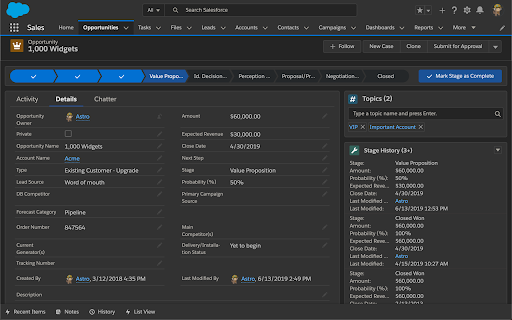


Enhance productivity with new add-on features Lightning Extension is a library of features created by the Lightning Product Management team at Salesforce. This extension is designed to complement the user experience with continuous productivity feature releases. These features provide end users with rich enhancements that aren’t available out-of-the-box with Lightning, like Dark Mode. Admins can control which features are made available to their users. To control access to features, from Setup, in the Quick Find box, enter Lightning Extension, and then select Lightning Extension. From there, you can change your users’ access to individual features, or access to the extension itself. Changes can take up to 24 hours to take effect.

Salesforce Page Optimizer
Analyze, debug, and improve the performance of your Lightning application (Developer Preview) The Salesforce Page Optimizer (Developer Preview) analyzes your lightning based community/apps and identifies performance optimization opportunites. Use the information to refine your design and improve performance for your members. Installation and usage of this extension is covered by the EULA: https://secure2.sfdcstatic.com/assets/pdf/misc/salesforce-community-eula-ofs-page-optimizer.pdf Check out the Settings > Privacy page for more information on what data is gathered/used by this extension.

Salesforce Dark Mode
Blinded by the light? - Say no more! This App adds a dark mode for Salesfoce, your eyes are going to thank you later! Includes Support for Case Merge Premium

Salesforce Inspector Reloaded
Productivity tools for Salesforce administrators and developers to inspect data and metadata directly from the Salesforce UI. This extension is based on the original Salesforce inspector extension made by Søren Krabbe. IMPORTANT: If you have any question or facing bugs, please use the GitHub repository : https://github.com/tprouvot/Salesforce-Inspector-reloaded/issues - Analyze Field Usage in Show All Data - Multi Query tabs in Data Export - Download & Deploy Metadata - Security improvements - Field Creator page to bulk create fields from the extension - Event Monitor page to subscribe to Platform Events from the browser - Import / Export configuration from Option page - Customise extension shortcuts - Support SOSL and GraphQL languages - REST Explore page to run any API from the extension without external tool - Load recent records from popup - Customize extension favicon and Sandbox banner - Check QueryPlan on data export - Enable Logs from User tab - Customize settings in Option page - New Org tab - Search for a particular flow, profile or permission set from Shortcut tab - Restrict Salesforce Inspector usage with a default connected app - New "Shortcut" tab to quickly access setup menu - Link to permission sets assignment from User tab And many more !

Salesforce.com Enhanced Formula Editor
Enhances Salesforce formulas with syntax highlighting, autocomplete, formatting, field analysis, and syntax checking. Use this extension to save time and headaches working with Salesforce formulas. It helps you quickly understand the structure of a Salesforce formula, debug it, and edit it. This extension requires a paid license key subscription and offers a free 14-day trial. Watch the video and visit the extension's website for examples of the below features: https://www.enhancedformulaeditor.com/ When you visit a Salesforce formula edit page it will automatically enhance the formula text field with a code editor or provide an Open button to use the code editor in a popup window. This includes Flow formulas, Process Builder formulas, formula fields, validation rule formulas, workflow rule formulas, and field update formulas. The extension is updated during each Salesforce quarterly release to support the latest API versions and the latest formula functions. Editor Features Include: - Syntax highlighting - Tabbing (tab and shift-tab) - Parentheses matching - Format button - Autocompletion - Review Changes - Automated Syntax Checking A new button named "Analyze Fields" is added to formula pages that loads details about the fields found in the formula. Field details include: - Field type - How many times it is used - Formula field compile sizes - Field record values - Picklist values - Sub formulas Have an issue or a great idea for this extension? Visit the support tab above to leave feedback. Updates 1/4/2026 - fix for obtaining session access token when httponly is enabled 10/12/2024 - support Chrome manifest v3 3/5/2023 - Format button support for Flows and Process Builders 6/12/2022 - Summer 2022 updates (new functions, latest api version) 2/8/2022 - Added automatic syntax checking 1/26/2022 - Added a Review Changes button to highlight what was changed 1/8/2022 - Autocomplete now searches in the middle of field names/functions 12/14/2021 - Added font family dropdown so fixed-width/monospace fonts can be used 12/12/2021 - Added field/function autocomplete for some instances 11/7/2021 - Added OAuth API Access for orgs that don't have the sid cookie available 8/7/2021 - Format formula improvements 6/8/2021 - Added support for cloudforce.com 3/21/2021 - Now supports flow and process builder formulas 2/15/2021 - Resize editor by dragging and dropping the bottom right corner 1/30/2021 - Picklist options now list the API Name and Label 1/9/2020 - Updated licensing system 11/22/2020 - Updated to use the latest metadata API version 6/30/2020 - Updated to use the latest metadata API version 1/6/2019 - Fixed some bugs handling decimal numbers 9/5/2018 - Added a button that formats the formula for you 7/11/2018 - Editor now remembers your font size 6/24/2018 - Now works with Lightning 3/1/2017 - Editor now remembers what size you made it 8/12/2015 - New "Load Field Details" button 7/11/2015 - Insert buttons for fields and functions work now 1/9/2012 - Fixed text wrapping in nowrap mode.
