
hobnkbcfnolegmdfmfakkcllnblnonhb
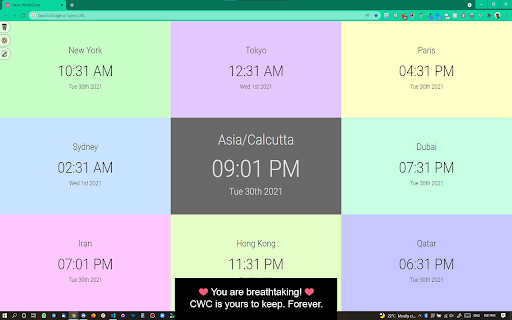
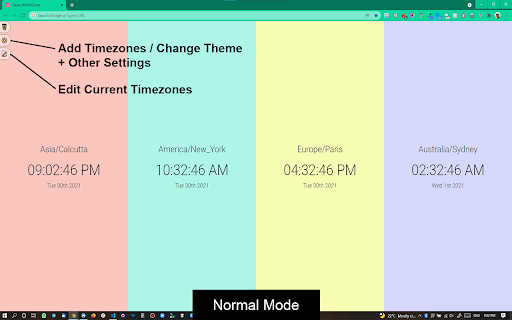


Add any world clock of your choice to remain updated with the time in different locations. ⏰ A productivity booster World Clock browser extension! 🏆 Featured by Google on Chrome Web Store (since following all technical best practices, latest platform APIs, and meeting a high standard of intuitive user experience & design, among other things). 💪 Features: - All settings are kept in sync - Add, Remove, SORT, and Edit time zones - Convert time zone time to other time zones - Very easy to use - Responsive layout - Nice add/remove effect for better user experience - Select the color theme from the available presets - Set your color for the individual clock - Set font color and size as per your choice - Select 12 or 24-hour format - Turn on/off seconds display - Change the display name after adding the clock - Different sets of layouts added - Keep the settings panel on the left or right - Reset all settings --- New features are added regularly 👨💻 🏡 Home Page: https://weball.io/products/browsers/extensions/world-clocks ⭐⭐⭐⭐⭐⭐⭐ 🥂 Praise ⭐⭐⭐⭐⭐⭐⭐ If you like the extension, I would like to request you to give a 5️⃣⭐ rating, it keeps me motivated to contribute back to the community. 💓 /*****************/ 🐞 Bugs /*****************/ If you find any bugs or if you feel that some feature is missing, please send me a mail 📩 (justdecodeme@hotmail.com) before giving a bad review 🙏, and I'll fix that ASAP. 🙇 Thank you for your understanding, and enjoy the extension!!! :) 🎉 v 23.5.2 - New toggle buttons - UI/UX improvements - Optin for GA4 - Reduces overall extension size - Bug fix: Fixed some crossbrowser CSS issues v 22.11 - Manifest migration from v2 to v3 (very important update) - Size reduced (Increased performance, only ~500KB) - Few CSS updates in the Settings panel - Bug fix: Time conversion just after install v 21.12 (biggest update so far) - Timezone convert feature added (MOST REQUESTED FEATURE) - Multiple layouts added for eye-catching UI - New shades theme added - New mix theme added - Text color options added - Font size options added - Base input font size added to increase or decrease overall time zones font - Reset functionality added - Clock icons positions updated - Beautiful radial background added at loading time - Drag & Drop animation added - Settings panel slide effect added for better UX - Settings panel position can be LEFT or RIGHT - Font sizes change from px > rem and em for better usability - Settings panel now have a scroll bar for screen having small heights - Removed time value from tab - Overall user experience improved - Redundant code removed - Date format updated and the Month has also been added now - Bug Fixed: MAX_WRITE_OPERATIONS_PER_MINUTE - Bug Fixed: Error because of old and new database mismatch v 21.04 - Version naming changed - Few things improved as per the user's feedback - Thank you page will open only on the new install, not on the update - Credit section added - Button text replaced with icons - UI Improvements - Small bug fixed v 2.2 - Note able to drag at the end bug solved - Code refactoring - Thank you page message updated - Credits link added v 2.1 - Don't show the sort and delete icon for the last clock remaining while deleting - Thank you page added after installation - Feedback form added after uninstallation v 1.9 - Items can be rearranged now by drag and drop - Add timezone animation added - Delete buttons not showing up on first load bug fixed - Logic and UI updates v 1.8 - Remove timezone animation added - Can't add duplicated timezones - Default 4 time zones added on the first load V 1.6 - New Features + Bugs solved: - New Add button and Edit Button Layout. - Don't show am/pm in 24hr format. - Stop the user from adding an invalid Time Zone. V 1.4 - New features added: - CSS/Style updates. - Select 12 or 24-hour format. - Change the display name after adding a clock. Oh still here, you are super awesome! 🤘 Keep rocking!!! ❤️ You are breathtaking! ❤️ CWC is yours to keep. Forever.

Green Peaceful Ambience Theme
Eye friendly and clean theme for Google Chrome with beautiful HD image for new tab! - Very comfortable on EYES! - Responsive design! - Neat and Clean colors! - Have beautiful HD background image! - Applicable for most Google Chrome versions! /*****************/ Praise /*****************/ If you like the theme, I request you to give best rating if possible, it keeps me motivated to contribute back to the community. /*****************/ Bugs /*****************/ If you find any bug, please send me a mail (justdecodeme@hotmail.com) before giving a bad review, I'll fix that ASAP. Extension: ---------- Classic World Clocks Google Chrome Extension

Timezone Clocks
Allow you to display clocks in different timezones up to 8 at once. Also, the app can change the time graphically, so easy to know the time of in different places. Scheduling Teleconference in several timezones for example, sometimes it is complicated to know what time is it at Place B when Place A is this time. Then trying to see in inversed way, what time is it at Place A when Place B is this time? something like that. With this app, you will be fee to this kind of situation.

World Clock with Sticky Notes & Calculator
World Clock with Sticky Notes & Calculator Replace Your Old New Tab with Wonderful Productive Tab Clock - Displays time and date of multiple cities and time zones - Click on the existing clock and Edit time zones as per your needs - Shows 5 Countries Digital & Analog Clock - 12/24 clocks Sticky notes Sticky notes with title and date Create unlimited sticky notes with color changing option Sticky notes data will be stored even if you exit and reopen in new tab or chrome browser Sticky notes can be resize and can be dragged to any desired place on the page Calculator - A clear display format and easy to read. - An intuitive and attractive design that facilitates calculations every day. - You can use the backspace key to correct a simple mistake. Background Color -No more boring white background! - Customize and change the background color of the page. Dark mode - Dark mode toggle for better experience. Google Search -we are also giving you an easy way to search your desired information, images, video, and more through your favorite google search.

World Clock & Timezone Converter
A beautiful world clock dashboard for your new tab. Instant conversion between timezones! 🌎 World Clock & Timezone Companion Easily manage clocks from around the globe and convert times in a snap! Key Highlights ⏰ Add Multiple Timezones Track cities from over 7000 locations. Stay updated on any global time in one place. ⚙️ International Time Layout Choose between 12 or 24-hour format, enable or disable seconds, and set unique color themes for each clock. ⌨️ Time Converter Made Simple Instantly convert any timezone’s time to another without juggling websites or extra steps. 🔄 Sync & Sort All settings stay synced. Edit, remove, and reorder timezones easily from your dashboard. ✨ Personal Touch Rename clocks, pick fonts, and even customize backgrounds based on day or night. Why You’ll Love It • Quickly schedule meetings across multiple locations. • Get rid of copy-pasting times into search engines. • Experience a neat, responsive design. For more info, visit: https://getreport.ai/timezones Need help? Email us at: timezones@getreport.ai Enjoy a hassle-free World Clock and Timezones experience!
