
blillmbchncajnhkjfdnincfndboieik

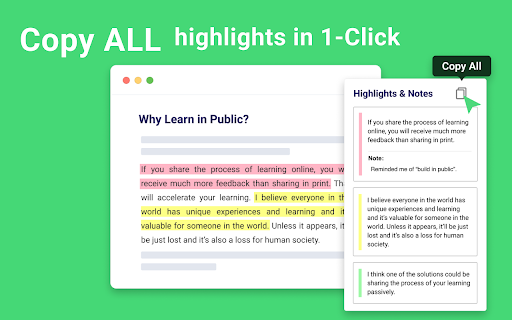


AI-powered Web Highlighter for Websites, PDF, and YouTube videos. YouTube Summary with ChatGPT, Claude, and Gemini. Highlight PDF and Websites, save it for later, and share it with everyone. Glasp is a PDF & Web highlighter that helps you collect and organize your favorite quotes and thoughts from the web. You can also access other like-minded people’s learning and build your AI clone from your highlights and notes. "Glasp Web Highlighter: PDF & Web Highlight" is a free Chrome Extension that lets you quickly highlight websites and PDF files with colored highlighting options, which are then automatically curated to your Glasp homepage. These highlights can then be tagged, searched for, linked to, and shared on a variety of other platforms, including Twitter, Teams, and Slack. YouTube, web article, and PDF summarization functions are powered by AI models such as ChatGPT (OpenAI), Claude (Anthropic), Mistral AI and Gemini. You can see all the highlights and notes in the sidebar on the web and PDF, and clicking each highlight takes you to the highlighted place in the web page or inside the PDF. Also, you can tag the web page and PDF and see what other people highlighted in the website or PDF from the sidebar. With one click, the content you’ve collected appears across all your devices! Check out your highlights on your Glasp page or in the original source, where they remain highlighted. Discover more content on the Glasp website and connect with other like-minded readers who share your interests. By following your friends or like-minded people, you will discover insightful and thought-provoking content that deepen your knowledge and understanding. Key Features: ✅ Web & PDF highlight with multiple colors: 🔴 🟡 🟢 🔵 ✅ Highlight & annotate on YouTube videos: 🎥 ✅ AI-powered summary based on annotations: 💎 ✅ Highlight & annotate on PDF files: ✍️ ✅ Highlight & annotate on Images: 🖼️ ✅ Make notes on the highlights: ✍️ ✅ Tag and link-to your highlights: 🏷️ 🔗 ✅ Copy-and-paste all the highlights and notes with meta data into your note-taking app in one click 📝 ✅ Discover more useful content from other curators: 🤝 ✅ Sync all your highlights and notes from Kindle eBooks: 📚 ✅ YouTube Summary with ChatGPT and Claude: ❤️ ✅ Summarize YouTube videos, web articles, and PDF: ❤️ ✅ Generate stunning quoteshots from webpages 🎨 - Click “Add to Chrome” - Log in to Glasp from the extension menu - Select the text you want to highlight using your mouse or trackpad - Select the highlight color from the Glasp pop-up highlighter tool ### Using Your Highlights - View you highlights on your Glasp Profile Page - Tag your highlights, make notes, summarize your highlights with a page comment, and share your highlights and notes by creating links or directly copy and pasting into other apps. It’s that easy. To see a tutorial of how to use the Glasp Chrome Extension, please click the link to see a demonstration video on YouTube: https://www.youtube.com/watch?v=Tgbszoeokv4 - Adding tags to saved content will help you organize your interests. - If you can’t highlight on a web page, try switching tabs or refreshing the page. - For more details, please check our our FAQs page ;) https://blog.glasp.co/faqs/ Why Choose Glasp? What you collect says so much about who you are. Glasp lets you grasp it! Meet and learn with 500,000+ life-long learners! + Retain information, keep it organized, and easily use it 📚 + Discover useful information from like-minded people 🔍 + Share your highlights & notes with friends and peers with one click 🚀 + Contextualize what you learned and be a better write ✍️ + Leave your digital legacy for future generations (contribute to human history) 🙌 Trusted by 500,000+ Users: Glasp is trusted by content writers, avid readers, active note-takers, researchers, thinkers, students, and people who seek for better reading and knowledge management workflow. Write your feedback to hi@glasp.co If you find bugs, please let us know from here: https://docs.google.com/forms/d/e/1FAIpQLSf-l_PApQyXi7cX4ZO7kZ6ARW8JXLesiTzvwae-nvWISp3P3A/viewform By installing the extension, you agree to Glasp’s Terms of Service, Privacy Policy, and Community Guidelines (which can be found here: https://glasp.co/privacy-policy).

VidSummize - AI YouTube Summary with Chat GPT
Let ChatGPT watch YouTube videos for you, stop wasting time and harness the power of artificial intelligence to make you more… Let ChatGPT watch YouTube videos for you, stop wasting time and harness the power of artificial intelligence to make you more productive and a better learner. ✅ Say goodbye to clickbait videos ✅ Works for super super long videos ✅ Easy-to-read Chapterized parts & bullet points, detailed but succinct ⏳ Works for any length youtube videos, be it 5 minute or 1 hour 🔒 Completely local, no data collected. 🔒 🆓 Fully free with 0 ads 🌐 11+ Languages 🦾 Automatic setup 🤖 Automatic error warning and handling for you 🎨 Embedded GUI, direct interaction with ChatGPT without leaving youtube ⚙️Prompts optimized for summarisation and video comprehension and explanation 🌚 🌝 Light / dark theme Great for: 🎙 Podcasts and interviews 📺 News reports 📱 Product reviews 🙇🏻♀️ Educational videos 🛠 Tutorials 1. Improvements in reliability 2. 5 new languages: Korean, Bahasa Indonesia, Bahasa Melayu, Slovak, Urdu 3. Huge optimizations for speed 4. Better, more elegant UI 5. More robust system 6. More lightweight Introducing the ultimate YouTube video summarization tool: our Chrome extension and mobile apps, powered by ChatGPT, OpenAI's newest natural language processing model. With our extension, you can summarize any-length YouTube videos in just a matter of seconds, with summaries that are of the highest quality and fully representative of the original content. With the power of ChatGPT, YoutubeGPT quickly and easily gets you the most important information from any YouTube video by creating high-quality & fully representative, easy-to-read summaries in chapters and bullet points. It summarizes YouTube videos using artificial intelligence/AI. YouTube summary by ChatGPT.

Perplexity - AI Companion
Ask anything while you browse Ever found yourself buried in browser tabs, trying to find that one answer or summary that makes everything clear? Perplexity is your go-to solution—a harmonious blend of ChatGPT and Google, designed to serve your curiosity instantly. Features You'll Love: 🔍 Instant Page Summaries: Make sense of any article or webpage at a glance. 🎙 Quick Queries: Ask any question directly from your toolbar—no need to jump between tabs. 🔗 Contextual Understanding: Get answers relevant to your current page or even specific to your current domain. 📬 Shareable Insights: Easily share your discoveries with a clickable link. 💬 Dynamic Conversations: Click to ask follow-up questions for deeper understanding.

ChatGPT Summarize
ChatGPT summarize or chat with Websites / Youtube using ChatGPT + DeepSeek. Summary * AI Summarize * OpenAI * PDF Summary * Claude Summary & Chat for ChatGPT™ and DeepSeek™: Your Digital Summarizer & Conversationalist Transform your browsing experience with ChatGPT™ Summary & Chat, the ultimate tool for summarizing web content and engaging in dynamic conversations. Whether you're diving into PDFs or choosing between GPT3.5 and GPT4, this extension enhances learning by focusing on essential insights to give you a perfect and concise summary. • Summarize Web Content: Instantly summarize any website or YouTube video transcript with GPT technology. • Interactive Chat: Engage with web content through questions or discussions, powered by the OpenAI API. • PDF Interaction: Directly chat with PDF content, utilizing ChatGPT's capabilities for an enriched reading experience. • Choose Your GPT Version: Switch between GPT3.5 and GPT4 to suit your needs, ensuring flexibility and power at your fingertips. • Customizable Results: Use templates for tailored summaries, supporting academic, scientific, or journalistic research. • OpenAI API Support: Seamlessly integrates with the official API for reliable performance. • User-Friendly Features: Includes markdown rendering, dark mode for eye comfort, and a sleek design for your summaries Prompt Ideas: ---------------------------------------------- Act as a sharp, insightful, and engaging summary expert. Your job is to condense the CONTENT into high-impact bullet points, using fitting emojis to make it more engaging. Here’s how to do it: Identify the 10 most valuable and unique questions that the CONTENT answers. These should be the most useful, surprising, or thought-provoking takeaways. Answer each question concisely—stick to two sentences max, keeping it clear, engaging, and full of value. Summarize the CONTENT in bullet points, each on a new line. Follow the 80/20 rule: Extract the most valuable 20% of the CONTENT that delivers 80% of its impact. After the summary, add a section break (***), then list 5 key stories, metaphors, symbols, or archetypes that illustrate the main ideas and make them easier to remember. Example Output: 🔥 What’s the main insight? X is the real reason Y happens, not what you think. 🚀 How does it work? Simple: do A, then B, and avoid C. 🎯 What’s the #1 mistake? Most people fail because they ignore Z. 🏔️ Think of this like climbing a mountain… (insert metaphor) 🎭 This is the classic hero’s journey… (insert archetype) Key Rules: ✅ Be human, not robotic—write with personality, wit, and clarity. ✅ Use a natural, engaging tone, inspired by PonchikNews, Hemingway, Sinek, Grant, Naval, and Seth Godin. ✅ Use short, direct sentences—no fluff, no generic AI-speak. ✅ Convert imperial to metric when needed. ✅ Each Question and Answer on a new line. ✅ Output in {{SELECTED_LANGUAGE}} Make it engaging, digestible, and packed with value. Let’s nail this — my job depends on it! The content: {{CONTENT}} ---------------------------------------------- Utilize Our Extension to summarize: For optimal use, visit OpenAI API Keys to integrate your API keys with our extension to use ChatGPT Summaries Upcoming Summary Features: Stay tuned for enhancements like content chunking for character limits, more question templates, continuous chat across tabs, and advanced jump marks in videos and texts. Open Source Initiative: Our extension is open source, promoting transparency and community collaboration. Due to copyright concerns, direct GitHub links are paused. For code access or contributions, please contact us directly. This Chrome Extension is licensed under the GNU Affero General Public License v3.0 (AGPLv3). ⚠️ Additional Usage Restrictions: - Not licensed for commercial use. - Not licensed for military purposes. - Not licensed for companies registered in the United States. - Any modification must clearly credit the original author and link to the source repository. - For commercial or special licensing, contact us. https://github.com/JoSaNYC/ai-summarize-extension Disclaimer: This extension is open source and respects user privacy, adhering to OpenAI's privacy statement. It's designed to augment your content interaction without storing personal data. Note: This extension is independently developed and not officially associated with ChatGPT or OpenAI. Feedback & Summarize Suggestions: Your input is valuable to us. Share your template ideas or feature requests to enhance the extension's functionality and user experience.

Readwise Highlighter
Save a page to Readwise Reader This is the official Reader browser extension made by and maintained by the Readwise team. You use the Reader Highlighter extension to: • Save articles to Reader – the first ever read-it-later app built for power readers. If you’ve ever used Instapaper or Pocket, Reader is like those, except it’s built for the modern era and brings all your reading into one place including: web articles, email newsletters, RSS feeds, Twitter threads, PDFs, EPUBs and more. You can get started with Reader here. • Highlight and annotate the open web. All highlights that you make using this extension will be synced with the Readwise ecosystem and, optionally, to your note-taking app of choice such as Obsidian, Notion, Roam Research, Evernote, Logseq, and more. Note: You must have an existing Readwise account to use this extension. If you are not already a subscriber, you can get a free 30-day trial with no credit card upfront. At the end of the trial, you will not be charged unless you choose to subscribe.
