
cbgecfllfhmmnknmamkejadjmnmpfjmp


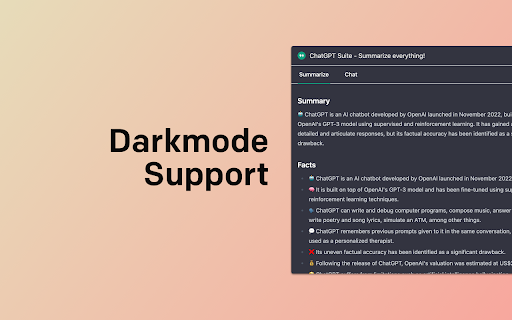
ChatGPT summarize or chat with Websites / Youtube using ChatGPT + DeepSeek. Summary * AI Summarize * OpenAI * PDF Summary * Claude Summary & Chat for ChatGPT™ and DeepSeek™: Your Digital Summarizer & Conversationalist Transform your browsing experience with ChatGPT™ Summary & Chat, the ultimate tool for summarizing web content and engaging in dynamic conversations. Whether you're diving into PDFs or choosing between GPT3.5 and GPT4, this extension enhances learning by focusing on essential insights to give you a perfect and concise summary. • Summarize Web Content: Instantly summarize any website or YouTube video transcript with GPT technology. • Interactive Chat: Engage with web content through questions or discussions, powered by the OpenAI API. • PDF Interaction: Directly chat with PDF content, utilizing ChatGPT's capabilities for an enriched reading experience. • Choose Your GPT Version: Switch between GPT3.5 and GPT4 to suit your needs, ensuring flexibility and power at your fingertips. • Customizable Results: Use templates for tailored summaries, supporting academic, scientific, or journalistic research. • OpenAI API Support: Seamlessly integrates with the official API for reliable performance. • User-Friendly Features: Includes markdown rendering, dark mode for eye comfort, and a sleek design for your summaries Prompt Ideas: ---------------------------------------------- Act as a sharp, insightful, and engaging summary expert. Your job is to condense the CONTENT into high-impact bullet points, using fitting emojis to make it more engaging. Here’s how to do it: Identify the 10 most valuable and unique questions that the CONTENT answers. These should be the most useful, surprising, or thought-provoking takeaways. Answer each question concisely—stick to two sentences max, keeping it clear, engaging, and full of value. Summarize the CONTENT in bullet points, each on a new line. Follow the 80/20 rule: Extract the most valuable 20% of the CONTENT that delivers 80% of its impact. After the summary, add a section break (***), then list 5 key stories, metaphors, symbols, or archetypes that illustrate the main ideas and make them easier to remember. Example Output: 🔥 What’s the main insight? X is the real reason Y happens, not what you think. 🚀 How does it work? Simple: do A, then B, and avoid C. 🎯 What’s the #1 mistake? Most people fail because they ignore Z. 🏔️ Think of this like climbing a mountain… (insert metaphor) 🎭 This is the classic hero’s journey… (insert archetype) Key Rules: ✅ Be human, not robotic—write with personality, wit, and clarity. ✅ Use a natural, engaging tone, inspired by PonchikNews, Hemingway, Sinek, Grant, Naval, and Seth Godin. ✅ Use short, direct sentences—no fluff, no generic AI-speak. ✅ Convert imperial to metric when needed. ✅ Each Question and Answer on a new line. ✅ Output in {{SELECTED_LANGUAGE}} Make it engaging, digestible, and packed with value. Let’s nail this — my job depends on it! The content: {{CONTENT}} ---------------------------------------------- Utilize Our Extension to summarize: For optimal use, visit OpenAI API Keys to integrate your API keys with our extension to use ChatGPT Summaries Upcoming Summary Features: Stay tuned for enhancements like content chunking for character limits, more question templates, continuous chat across tabs, and advanced jump marks in videos and texts. Open Source Initiative: Our extension is open source, promoting transparency and community collaboration. Due to copyright concerns, direct GitHub links are paused. For code access or contributions, please contact us directly. This Chrome Extension is licensed under the GNU Affero General Public License v3.0 (AGPLv3). ⚠️ Additional Usage Restrictions: - Not licensed for commercial use. - Not licensed for military purposes. - Not licensed for companies registered in the United States. - Any modification must clearly credit the original author and link to the source repository. - For commercial or special licensing, contact us. https://github.com/JoSaNYC/ai-summarize-extension Disclaimer: This extension is open source and respects user privacy, adhering to OpenAI's privacy statement. It's designed to augment your content interaction without storing personal data. Note: This extension is independently developed and not officially associated with ChatGPT or OpenAI. Feedback & Summarize Suggestions: Your input is valuable to us. Share your template ideas or feature requests to enhance the extension's functionality and user experience.

YouTube Summary with ChatGPT & Claude
Summarize YouTube videos, web articles, and PDFs to save time, powered by ChatGPT, Claude, Mistral AI, and Gemini. YouTube Summary with ChatGPT & Claude is a free Chrome Extension that lets you quickly summarize YouTube videos, web articles, and PDF you're consuming. Use this extension to save time and learn more quicker. YouTube videos, web articles, and PDF summarization functions are powered by ChatGPT (OpenAI), Claude (Anthropic), Mistral AI and Google Gemini. ## What are the benefits of using YouTube Summary with ChatGPT & Claude? The main benefits are saving time, increasing productivity, and improving learning. YouTube Summary with ChatGPT & Claude reduces the need to watch long videos when you're just looking for the main points. The summaries let you absorb information quickly so you can spend time on other tasks. ## How do I use YouTube Summary with ChatGPT & Claude? Using YouTube Summary is easy. After installing the browser extension, simply open a YouTube video you'd like to summarize. Click the YouTube Summary icon in your browser toolbar, and it will generate a summary and provide an option to access the video transcript if available. You will see a summary of the video with or without timestamps. You can click on the timestamps to jump to the corresponding part of the video. You can also click the "Copy Transcript" button to copy the transcript of the YouTube video to your clipboard. ## Can I customize the length of the YouTube video summaries? Yes, you can customize the length of the video summaries generated by YouTube Summary. Adjust the settings within the extension to tailor the summaries to your preferred level of detail. Also, you can customize the prompt to use to summarize the content. ## Is YouTube Summary with ChatGPT & Claude suitable for educational purposes? Yes, YouTube Summary with ChatGPT & Claude is a valuable tool for educational purposes. It provides concise summaries and transcripts that can aid in research, studying, and learning from YouTube videos. ## Can YouTube Summary with ChatGPT & Claude handle videos in languages other than English? Yes, YouTube Summary is capable of summarizing videos in multiple languages, making it a valuable tool for international users. You can also choose what language you want the transcript to be in. Fore more details, please visit the website: https://glasp.co/youtube-summary

NoteGPT: YouTube Summary, Chat with AI Assistant, ChatGPT DeepSeek Claude
Summarize YouTube videos and turn transcripts into notes with AI. Generate captions, then translate, copy, or download subtitles. NoteGPT Extension is your all-in-one AI tool for YouTube summary, YouTube transcript, and content creation. Instantly extract, summarize, and translate video content—even without subtitles. Whether you want to summarize YouTube videos or generate accurate YouTube transcripts, NoteGPT Extension helps you learn faster and work smarter by turning videos into clear notes, mind maps, slides, and podcasts. Key Features ✅ Instant YouTube Summary & Transcript Get precise AI YouTube summary and transcripts in seconds—even for videos without captions. ✅ Transcribe Long Videos — Even Without Subtitles (Up to 2 Hours) Easily transcribe and summarize YouTube videos with or without captions. For videos without subtitles, we support up to 2 hours in length. Just one click to get your full transcript and download it instantly. ✅ Free Subtitle Download Easily download subtitles in multiple formats (TXT, SRT) for all your YouTube videos—free and fast. ✅ Translate YouTube Transcripts into 40+ Languages Break language barriers with AI-powered translation of transcripts and summaries, perfect for global learners. ✅ AI Chat to Explore Video Content Interact with your videos by asking questions, clarifying concepts, or diving deeper into topics using AI chat. ✅ Turn Notes into Mind Maps, Slides & Podcasts Convert AI-generated notes into visual mind maps, ready-to-use presentations, or narrated podcasts with one click. ✅ Dark Mode & Browser Sync Choose light, dark, or follow your browser’s theme for a seamless user experience. ✅ Prompt Library for Smarter AI Summary GenerationUse our built-in prompt library to get better AI summaries and explanations. Whether you're using NoteGPT as a YouTube video summarizer or exploring other content, these smart prompts help you get high-quality results—without typing prompts yourself. ✅ Custom Settings for YouTube Summary and AI OutputEasily customize your YouTube summary with options to set length, tone, or format. Whether you want a brief AI overview or a full in-depth YouTube video summary, NoteGPT adapts to your workflow and learning style. How to Use ● Install NoteGPT Extension from the Chrome Web Store ● Open any YouTube video ● Click the NoteGPT Extension icon or summary panel on the right ● Choose to: ○ Transcript ○ Summary ○ AI Chat ○ AI Mind Map ○ AI Podcast ○ AI Presentation ● One-click download or translation of video transcripts. ● View or manage all your notes in the NoteGPT workspace (opens in a new tab) FAQs Q1: What is NoteGPT Extension? A: NoteGPT Extension is an AI-powered Chrome extension that helps you summarize, transcribe, and repurpose YouTube videos, webpages, and PDFs. It turns long-form content into structured notes, mind maps, slides, or podcasts — all in one click. Q: Is NoteGPT Extension free to use? A: Yes! You get 15 free quotas per month with permanent storage. Upgrade anytime for unlimited use. Q: Can I summarize videos without subtitles? A: Yes. Even videos without captions are supported (up to 120 minutes). This requires 1 quota per 10 minutes. Q2: How long of a video can NoteGPT Extension summarize or transcribe? A: There’s no length limit for videos with subtitles — NoteGPT Extension can summarize and transcribe them regardless of duration. For videos without subtitles, the maximum supported length is 2 hours. Q5: What else can I use NoteGPT Extension for? A: Beyond YouTube, you can summarize webpages and PDF documents, translate transcripts into any languages, and generate visual mind maps, podcasts, and slide decks from your content. Contact Us Have questions, feedback, or need support? We’d love to hear from you. Join our user group on Discord: https://discord.com/invite/wzNfuks8Qk Or email us at support@notegpt.io 🐦 Twitter/X: @NoteGPT_AINote Learn more: https://notegpt.io/

Youtube Transcript AI Summary
Get AI generated summary for Youtube video transcript with ChatGPT, Claude. Chrome extensions enhance browser functionality and user productivity. This extension provides four core features for processing long-form content using AI-powered tools. ⚡Automatic AI Summary The automatic AI summary feature integrates with the OpenAI API to analyze and condense lengthy text. OpenAI's language models process large volumes of content and generate concise summaries. This youtube video summarizer functionality works across multiple content types, enabling rapid content review without manual processing. Users can quickly extract key information from articles, documents, or transcripts through automated analysis. ✋Manual Summary Processing The manual summary feature allows direct content submission to ChatGPT, OpenAI's large language model. This option provides greater control when automatic summaries require refinement or when users need to summarize a youtube video with specific parameters. Manual processing enables customized analysis based on user-defined criteria and context requirements. ✋Text Splitting Functionality The text splitting feature divides long content into smaller, manageable sections. This improves readability and helps users navigate extensive documents more effectively. The feature addresses concentration challenges and supports varied reading preferences. Text segmentation reduces cognitive load while maintaining content coherence and logical flow. ⚙️Customized Prompt Entry The customized prompt entry system allows users to specify analysis parameters for the AI summary function. Custom prompts direct the algorithm's focus toward specific content aspects, improving summary accuracy and relevance. This feature enables targeted information extraction and personalized content analysis based on individual requirements. 🎯Implementation Benefits These four features combine to create an efficient content processing toolkit. The extension serves students, researchers, and professionals who regularly handle substantial amounts of written material. Users gain time efficiency while maintaining comprehensive content understanding through automated and manual processing options. Version: 1.1.4 1- Support for GPT4 added. 2- Added more GPT models and removed deprecated ones. 3- Added support to select different subtitle language for summaries. Version: 1.0.6 Introducing Pro Features and improved ChatGPT integration. Version: 1.0.2 1- This version now automates ChatGPT via it's Pro version. This breaks long texts into chunks so the limit of ChatGPT isn't breached and you get the accurate summaries. 2- In Pro version, we support getting Captions for Youtube videos and summarize them accordingly. 3- More control on prompts that can be used on both OpenAPI and ChatGPT.

AI Summarizer: Web, YouTube & PDFs with ChatGPT, Claude & More
Summarize web pages, YouTube videos, and PDFs in a snap with top AI like ChatGPT, Claude, and Gemini. Works in tons of languages! Say hello to AI Summarizer 👋, your new favorite Chrome plugin that makes long content short and sweet 🍬! Powered by badass AI models like ChatGPT 🤖, Gemini 🌌, Grok 💡, DeepSeek 🔍, and Qwen 🔧, it sums up web pages 🌐, YouTube videos 🎥 (with subtitles 📝), Bilibili videos 📺 (with subtitles ✨), and PDFs 📄 faster than you can say "TL;DR." ⏱️ Perfect for students 🎓, researchers 🕵️♂️, or anyone who's tired of wading through endless stuff 🏞️. It works in big languages like English 🇺🇸, French 🇫🇷, German 🇩🇪, Italian 🇮🇹, Spanish 🇪🇸, Chinese 🇨🇳, Russian 🇷🇺, Hindi 🇮🇳, Japanese 🇯🇵, and Korean 🇰🇷—basically, wherever you're from, it's got you covered 🌍. ## What's Awesome About It: **One-Click Magic 🪄:** Hit the summary button in the bottom right ➡️ or click the extension icon 🔧—both work like a charm! Use shortcuts too ⌨️—boom, done! **Smart Selection Power 🎯:** Select any text on a webpage and hit summarize—it'll focus on your selected content first! No selection? No problem, it'll summarize the whole page like before! 📄 **Pick Your AI 🎲:** Choose from a lineup of top-notch AI models 🤩. **Drag & Drop Vibes 📍:** Grab that summary button and slide it up and down the right side of your page! Perfect positioning, your way! 🎨 **Hide When You Want ❌:** Hover over the button and spot the little "X" in the top-right corner—click it to temporarily close the button for clean browsing! 🧹✨ **Make It Yours 🎨:** Tweak the AI prompts to get summaries your way ✍️. **Global Vibes 🌏:** Summarize stuff in all kinds of languages 🗣️. **Bilibili Support 📺:** Support Chinese content creators with Bilibili video summaries! 🇨🇳 ## How to Roll: 1. Install the plugin ➕ and log into your fave AI model's site 🔐. 2. Open a webpage 🌐, YouTube vid 🎬, Bilibili video 📺, or PDF 📚. 3. Click the summary button 🖱️, hit the extension icon 🔧, or tap the shortcut ⌨️. 4. Kick back with a slick summary 😎. Save time ⏳, learn fast 🚀, and ditch the fluff 🗑️. Join the crew already loving AI Summarizer ❤️—try it out now! 🎉
