
baecjmoceaobpnffgnlkloccenkoibbb


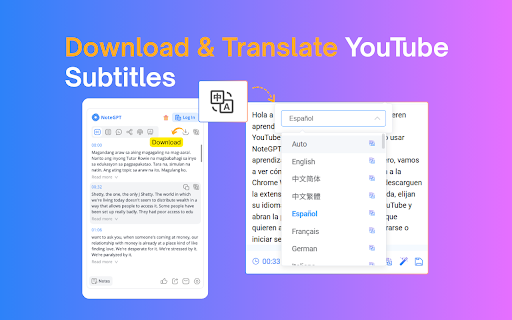


Summarize YouTube videos and turn transcripts into notes with AI. Generate captions, then translate, copy, or download subtitles. NoteGPT Extension is your all-in-one AI tool for YouTube summary, YouTube transcript, and content creation. Instantly extract, summarize, and translate video content—even without subtitles. Whether you want to summarize YouTube videos or generate accurate YouTube transcripts, NoteGPT Extension helps you learn faster and work smarter by turning videos into clear notes, mind maps, slides, and podcasts. Key Features ✅ Instant YouTube Summary & Transcript Get precise AI YouTube summary and transcripts in seconds—even for videos without captions. ✅ Transcribe Long Videos — Even Without Subtitles (Up to 2 Hours) Easily transcribe and summarize YouTube videos with or without captions. For videos without subtitles, we support up to 2 hours in length. Just one click to get your full transcript and download it instantly. ✅ Free Subtitle Download Easily download subtitles in multiple formats (TXT, SRT) for all your YouTube videos—free and fast. ✅ Translate YouTube Transcripts into 40+ Languages Break language barriers with AI-powered translation of transcripts and summaries, perfect for global learners. ✅ AI Chat to Explore Video Content Interact with your videos by asking questions, clarifying concepts, or diving deeper into topics using AI chat. ✅ Turn Notes into Mind Maps, Slides & Podcasts Convert AI-generated notes into visual mind maps, ready-to-use presentations, or narrated podcasts with one click. ✅ Dark Mode & Browser Sync Choose light, dark, or follow your browser’s theme for a seamless user experience. ✅ Prompt Library for Smarter AI Summary GenerationUse our built-in prompt library to get better AI summaries and explanations. Whether you're using NoteGPT as a YouTube video summarizer or exploring other content, these smart prompts help you get high-quality results—without typing prompts yourself. ✅ Custom Settings for YouTube Summary and AI OutputEasily customize your YouTube summary with options to set length, tone, or format. Whether you want a brief AI overview or a full in-depth YouTube video summary, NoteGPT adapts to your workflow and learning style. How to Use ● Install NoteGPT Extension from the Chrome Web Store ● Open any YouTube video ● Click the NoteGPT Extension icon or summary panel on the right ● Choose to: ○ Transcript ○ Summary ○ AI Chat ○ AI Mind Map ○ AI Podcast ○ AI Presentation ● One-click download or translation of video transcripts. ● View or manage all your notes in the NoteGPT workspace (opens in a new tab) FAQs Q1: What is NoteGPT Extension? A: NoteGPT Extension is an AI-powered Chrome extension that helps you summarize, transcribe, and repurpose YouTube videos, webpages, and PDFs. It turns long-form content into structured notes, mind maps, slides, or podcasts — all in one click. Q: Is NoteGPT Extension free to use? A: Yes! You get 15 free quotas per month with permanent storage. Upgrade anytime for unlimited use. Q: Can I summarize videos without subtitles? A: Yes. Even videos without captions are supported (up to 120 minutes). This requires 1 quota per 10 minutes. Q2: How long of a video can NoteGPT Extension summarize or transcribe? A: There’s no length limit for videos with subtitles — NoteGPT Extension can summarize and transcribe them regardless of duration. For videos without subtitles, the maximum supported length is 2 hours. Q5: What else can I use NoteGPT Extension for? A: Beyond YouTube, you can summarize webpages and PDF documents, translate transcripts into any languages, and generate visual mind maps, podcasts, and slide decks from your content. Contact Us Have questions, feedback, or need support? We’d love to hear from you. Join our user group on Discord: https://discord.com/invite/wzNfuks8Qk Or email us at support@notegpt.io 🐦 Twitter/X: @NoteGPT_AINote Learn more: https://notegpt.io/

AI Toolbar - Reclaim Your Time Now
Simplify your life. Generate, Respond, Voice activation, combine prompts, Summarize text anywhere in the Web at no charge! This powerful and efficient Chatgpt powered Virtual Assistant with over 70,000 weekly active users is guaranteed to SAVE YOU TIME! Introducing AI Toolbar: Your Productivity Superstar! You will now have your very own personal assistant, to deal with the tasks you hate! Relax and make yourself a hot tea! Time-Saving Efficiency: Slash your daily tasks and free up your precious time. Effortless Email Handling: AI Toolbar composes brilliant replies, effortlessly tackling your inbox overload. Voice Commands: Simply speak your desires to AI Toolbar, and it will carry them out, no buttons or keyboard wrestling required. - Multilingual Genius: Translate, summarize, and paraphrase any selected text, breaking down language barriers effortlessly. Chatbot Feature: - Engage in witty banter, gather information, and export it in Word or PDF formats with ease. - Seamless Integration with Chatgpt: Partnered with Chatgpt, a rockstar language model, to skyrocket your results and efficiency. Join nearly 100,000 Professionals: Embrace the AI Toolbar revolution and transform the way you work. Become a Workplace Superhero: Conquer your tasks, unleash your productivity, and be the hero of your own success story. Grab AI Toolbar today, let it handle the heavy lifting, and enjoy the sweet taste of victory while sipping your coffee. Don't be left behind in a world of manual labor and outdated routines – join the revolution and become a productivity superhero! Features: 1) select any text on a webpage and speak or type your command 2) reply to emails with minimal input. 3) save your prompts 4) Prompt Builder with over 300 Combinable (Tones, type, Length, Purpose, Excel, ETC..) 5) Voice Prompts - Speak to the Chatbot 4) Export outputs in Word and PDF 5) Automation Tools (Undetectable AI and Video Generation) Step 2 Open your email or any page, article containing text Step 3 Select a piece of text with your Mouse and watch the magic happen! Step 4 - If you are using chatgpt, open it to enjoy our integrated toolbar. Our innovative extension provides over 300 combinable prompts with different functionalities, tones, and purposes, so you can easily customize the conversations and written content provided by OpenAI's API. AI Toolbar, also allows for voice control, making it easy to dictate your ideas and have them transcribed in real-time. This feature is especially useful for those who prefer to speak their ideas rather than write them down. It also allows you to save your common and most used Prompts, and avoid over engineering the creation of prompts and having to keep an external database of Prompts. Finally, Ai Toolbar, also allows for easy word and PDF exports from, so you can share your work with others quickly and easily. Whether you're working on a school project, a business report, or just need to send a quick message, we have you covered. So why wait? Download the AI Toolbar Chrome extension today and take your ChatGpt to the next level!. Our Chrome extension may contain links to third-party websites or services that are not owned or controlled by AI Toolbar such as the OpenAi website in order to access GPT3.5. We are not responsible for the privacy practices or the content of these third-party websites or services. We encourage you to read the privacy policies of any third-party websites or services you visit. Visit the privacy policy section for more information. If you have any questions or concerns about this Privacy Policy or our privacy practices, or want to cancel any upgrades or subscriptions please contact us at ultimatetoolbargpt@gmail.com To cancel an existing subscription please send an email titled Cancel and it will be deleted within 24h, The plans do not provide refunds but you will be able to use the pro version until your renewal date. UPDATES Update for issue with Log in and sign up occurred on 08/10/2023 FIX Released We had a ton of requests to enable users to perform more bespoke actions, however we cannot do it all ourselves. We have included a number of AI services under the "Automation" section. These include, Plagiarism tools, Image and video generators, Website builders, Competitor analytics, Chatbots, AI voice automation and many more, hope you enjoy our work!

Eightify: AI YouTube Summarizer
Summarize YouTube videos with AI. Save time on long videos — get instant, high-quality summaries and key insights. Top Features: ✅ Instant Video Summary: Get a concise YouTube video overview in just 5 seconds. ✅ Key Insights Extraction: Understand main points without watching the entire video. ✅ Timestamped Navigation: Skip unnecessary content and jump to important parts. ✅ Multilingual Support: Summarization and translations in 40+ languages. ✅ Top Comments Overview: See what others think at a glance. ✅ Improved Transcript Generator: Access transcriptions that outperform YouTube subtitles. ✅ One account, unlimited devices: Use on Chrome, iOS, and Android. Eightify is your ultimate YouTube summary tool, powered by Claude and ChatGPT. This Chrome Extension creates concise video summaries and extracts key insights from any YouTube video. Save hours and grasp main ideas instantly while researching, learning, or enjoying your free time. Perfect for: • Podcasts and interviews • AI, Science and Tech videos • Business, Investing, and Trading • News, Politics, and Trends • Health, Wellness, and Personal Growth How to Use: 1. Install Eightify Chrome Extension. 2. Go to any YouTube video. 3. Click the Eightify button. 4. Get your summary and insights instantly. FAQs: Q: Can I try Eightify Summarizer for free? A: Yes! We offer a 7-day free trial of our Chrome Extension. Experience unlimited YouTube video summaries, key insights extraction, and transcript generation powered by ChatGPT and Claude. No charge until trial ends. Q: How do I cancel my subscription? A: Visit our app or website, log in to your account, and navigate to the subscription section. You can cancel anytime, even during the trial period. Q: Can I customize key insights? A: Yes! Customize focus (insightful, actionable, controversial, funny), format (list or Q&A), length, and grouping. Enable/disable emojis, and titles for insight clusters. For more information, visit our website: https://eightify.app/youtube-summary-chatgpt Summarize news, tutorials and podcasts right in the YouTube tab! Install Eightify now and save time on long videos.

NoteGPT: AI Flashcard for Quizlet and Cram
🚀Features: Study smarter with NoteGPT. Create personalized flashcards powered by AI, designed to enhance your memorization process through active recall and spaced repetition. With seamless Quizlet integration, you can import your flashcards with ease and study efficiently. Key features include: ● One-click import: Easily import Quizlet flashcard decks with just one click. ● Knowledge integration: Automatically identify key points, important facts, and concepts from your materials. ● Convenient studying: Start reviewing your flashcards anytime, anywhere with minimal distractions. 🚀How to Use : ● Install the extension. ● Pin the extension and click on the logo. ● Navigate to the flashcard details page on Quizlet (must enter the flashcard page, unable to import card decks from Quizlet homepage). ● After successful import, visit the NoteGPT website to review your flashcards anytime, anywhere. 💡 Q&A Q1: What is Flashcards? A1: Flashcards are a tool for active recall, used to help with memorization and review. Each card typically has a question on one side and an answer on the other, helping to reinforce memory retention through repetition. Q2: What is an Article summary? A2: With NoteGPT, you can generate flashcards from articles, videos, PDFs, and more, saving time and improving study efficiency. NoteGPT:The intelligent learning tool that helps you study smarter. We're continuously expanding our integrations with other flashcard platforms to bring you even more ways to enhance your learning experience!

DeepSum | YouTube AI Summary
Use YouTube AI Summary to transcribe youtube video to text and apply a powerful AI assistant as a video summarizer. 🤖Enhance your productivity with YouTube AI Summary, the premier Google Chrome extension for ai youtube summary and converting video content to text. Leverage ChatGPT to generate insightful summaries, making it perfect for students, professionals, and content creators. Simplify information extraction with the ai assistant, and effortlessly convert YouTube video to text for seamless content management. 🚀Quick Start Tips 1. Install the Youtube Summary AI extension by clicking the "Add to Chrome" button. 2. Open any YouTube video. 3. Click the "Summarize video" button to get comprehensive summary of a video 4. Click the "Transcript" button to get the full transcript of video subtitles 5. Use the "Settings" button to customize the extension setting Optionally, you can click the 'Summarize with ChatGPT' button to view a summary on the external ChatGPT page, or click 'Telegram bot' to get a link to the YouTube AI Summary Telegram bot and try the extension's core features on your mobile device. 🌐Perfect for exploring and analyzing a wide range of content: • AI, Science, and Tech videos • Business, Investing, and Trading • Health, Wellness, and Personal Growth • Podcasts and interviews • News, Politics, and Trends ✨Why to use the YouTube AI Summary extension? ✅ Apply cutting-edge AI models like ChatGPT to summarize YouTube video, delivering precise and comprehensive overviews. ✅ Using video summarizer of YouTube, you can easily explore and search through text to swiftly locate the information you need while. ✅ Experience a user-friendly interface that integrates with your website, ensuring while using youtube summary ai tool. ✅ The AI YouTube summary extension allows you to transcribe videos in different languages, including captions and auto-subtitles. 🏆Key Features ➤ Generate concise summaries of YouTube videos with advanced AI models like ChatGPT. Save time by quickly grasping main points, making YouTube summarization effortless. ➤ Edit summary styles, adjust summary lengths, manage custom prompts to fit different needs, providing a tailored experience across various content types. ➤ Get high-quality transcriptions beyond YouTube subtitles and quickly navigate timestamps to focus on key moments. ➤ Multilingual Support: Summarization and translations in 50+ languages. 📅 Everyday applications: 👌The YouTube video summary generator AI condenses long videos into quick summaries, keeping you informed efficiently. 👍The YouTube video summarizer highlights key points, helping you grasp essential information quickly. 🤟With ChatGPT YouTube integration, you access insightful summaries that reinforce learning and retention. 💼Professional Benefits: • The extension turns lengthy content into concise reviews, helping professionals focus on critical information for faster decision-making and productivity. • YouTube to summary AI highlights key points, ensuring better understanding and retention of essential details from complex materials. • The ChatGPT summarizer allows professionals to efficiently sift through extensive video data, aiding in research, presentations, and strategic planning. 🎓Educational Benefits: ▪ AI summary provides concise synopses of educational videos, allowing students to quickly grasp the main ideas without watching the entire video. ▪ YouTube summary with ChatGPT improves comprehension and retention by summarizing key concepts from lectures. ▪ Language learners can enhance their listening and reading skills using the extension. 💬 Frequently Asked Questions ❓How do I install the extension? 💡Find it on the Chrome Web Store and click "Add to Chrome". ❓How to use the extension? 💡Select Transcript & Summary to view the video transcript. Click the View AI Summary button to send the transcript to ChatGPT or another AI assistant. ❓What does the extension do? 💡The YouTube AI Summary extension transcribes and summarizes YouTube content, providing concise overviews and easy access to key content. ❓Can the extension handle transcript in languages other than English? 💡Absolutely, YouTube AI Summary can summarize videos in multiple languages, making it highly valuable for international users. ❓How to customize the youtube summarization? 💡Click on the extension settings to customize AI models, prompt for summary, and select strategies for longer videos. 👆🏻Click "Add to Chrome" for effortless YouTube video summaries, enhancing your understanding of video content.
