
bjkmnimffmhjbfikbempnbanngnnmknc
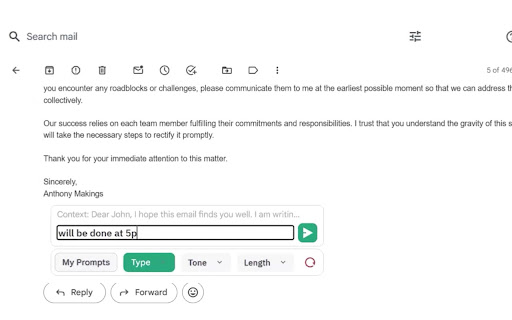


Simplify your life. Generate, Respond, Voice activation, combine prompts, Summarize text anywhere in the Web at no charge! This powerful and efficient Chatgpt powered Virtual Assistant with over 70,000 weekly active users is guaranteed to SAVE YOU TIME! Introducing AI Toolbar: Your Productivity Superstar! You will now have your very own personal assistant, to deal with the tasks you hate! Relax and make yourself a hot tea! Time-Saving Efficiency: Slash your daily tasks and free up your precious time. Effortless Email Handling: AI Toolbar composes brilliant replies, effortlessly tackling your inbox overload. Voice Commands: Simply speak your desires to AI Toolbar, and it will carry them out, no buttons or keyboard wrestling required. - Multilingual Genius: Translate, summarize, and paraphrase any selected text, breaking down language barriers effortlessly. Chatbot Feature: - Engage in witty banter, gather information, and export it in Word or PDF formats with ease. - Seamless Integration with Chatgpt: Partnered with Chatgpt, a rockstar language model, to skyrocket your results and efficiency. Join nearly 100,000 Professionals: Embrace the AI Toolbar revolution and transform the way you work. Become a Workplace Superhero: Conquer your tasks, unleash your productivity, and be the hero of your own success story. Grab AI Toolbar today, let it handle the heavy lifting, and enjoy the sweet taste of victory while sipping your coffee. Don't be left behind in a world of manual labor and outdated routines – join the revolution and become a productivity superhero! Features: 1) select any text on a webpage and speak or type your command 2) reply to emails with minimal input. 3) save your prompts 4) Prompt Builder with over 300 Combinable (Tones, type, Length, Purpose, Excel, ETC..) 5) Voice Prompts - Speak to the Chatbot 4) Export outputs in Word and PDF 5) Automation Tools (Undetectable AI and Video Generation) Step 2 Open your email or any page, article containing text Step 3 Select a piece of text with your Mouse and watch the magic happen! Step 4 - If you are using chatgpt, open it to enjoy our integrated toolbar. Our innovative extension provides over 300 combinable prompts with different functionalities, tones, and purposes, so you can easily customize the conversations and written content provided by OpenAI's API. AI Toolbar, also allows for voice control, making it easy to dictate your ideas and have them transcribed in real-time. This feature is especially useful for those who prefer to speak their ideas rather than write them down. It also allows you to save your common and most used Prompts, and avoid over engineering the creation of prompts and having to keep an external database of Prompts. Finally, Ai Toolbar, also allows for easy word and PDF exports from, so you can share your work with others quickly and easily. Whether you're working on a school project, a business report, or just need to send a quick message, we have you covered. So why wait? Download the AI Toolbar Chrome extension today and take your ChatGpt to the next level!. Our Chrome extension may contain links to third-party websites or services that are not owned or controlled by AI Toolbar such as the OpenAi website in order to access GPT3.5. We are not responsible for the privacy practices or the content of these third-party websites or services. We encourage you to read the privacy policies of any third-party websites or services you visit. Visit the privacy policy section for more information. If you have any questions or concerns about this Privacy Policy or our privacy practices, or want to cancel any upgrades or subscriptions please contact us at ultimatetoolbargpt@gmail.com To cancel an existing subscription please send an email titled Cancel and it will be deleted within 24h, The plans do not provide refunds but you will be able to use the pro version until your renewal date. UPDATES Update for issue with Log in and sign up occurred on 08/10/2023 FIX Released We had a ton of requests to enable users to perform more bespoke actions, however we cannot do it all ourselves. We have included a number of AI services under the "Automation" section. These include, Plagiarism tools, Image and video generators, Website builders, Competitor analytics, Chatbots, AI voice automation and many more, hope you enjoy our work!

Translate and Speak Subtitles for YouTube
Extension convert text subtitles for YouTube into natural-sounding speech using AI technologies. Here is a solution that helps you read subtitles for YouTube videos. It utilizes a Text-to-Speech (TTS) engine to convert text subtitles into natural-sounding speech. This solution is powered by Google and Microsoft AI technologies, providing over 100 voices in multiple languages and variants. 🚀Features: ** Easy to use: Turn on/off with a single click. ** Multiple languages: Supports voices in many languages. ** Multiple subtitles: Supports multiple subtitle formats. 🚀How to use: *Pin the 'YouTube Subtitles Speaker and Translator' extension to the browser toolbar. Click on the extension icon in the Chrome toolbar and navigate to the YouTube video details page. *If the YouTube video has subtitles, a voice icon will appear. *You can then select the UI language and the voice language.

ChatGPT Optimizer - Boost Your AI Workflow
Enhance the Chat GPT interface and bring GPT trough all the web! The ultimate productivity tool for ChatGPT. Enhances the interface and adds new features. Improve your workflow with a simple installation. 💬 Messages - Copy buttons (Plain & HTML) - "Scroll to Latest" Button - "Read Aloud" Button - Stop Reading Button - Play/Pause Read Aloud - 30+ Voices - Persitente Voice Setting - Chars and word counter - Copy the latest message via the shortcut - Windows/Linux/ChromeOS: Ctrl+C - Mac: Command+C - Stop and Regenerate the Answer via the shortcut - Stop: Ctrl+Escape - Regenerate: Ctrl+Backspace - Copy clean text without style of selection - Delete Messages 💪 Prompt Everywhere - Prompt Selection via Context Menu - Prompt Page via Context Menu - Prompt from Search Bar - Type in "gpt" and click tab key to prompt - New chat via command - Windows/Linux/ChromeOS: Ctrl+Shift+O - Mac: Command+Shift+O - Access ChatGPT from extension popup ✍️ Prompting - Prompt input max chars warning - Quick Prompt to rewrite message - Jailbreak with DAN Model button - Prompt URLs 🤝 Usage - Prompt History - Navigate trough prompt history by clicking up and down arrow on prompt text area - Get Insights and Charts - Pass "GPT On Capacity" Page 👀 Interface - Collapsible Navigation Bar - Shortcut: Spacebar - Open chats scrolled to the bottom - Less prominent plan upgrade button - Direct chat deletion with shortcut - All Platforms: Control / Command or Shift + Delete Icon - Direct focus on the text area to directly start typing - Horizontal word break for too long messages in width - Adjustable message width for large screens - Blur chats on sidebar for presentation - Expand/collapse button for prompt field - United Settings Popup ✅ Secure Code - Compatible with ChatGPT Plus - Compatible with ChatGPT Normal - Compatible with AIRMP 🧑💻 Next Features - Improve "Read Aloud" - Read faster - Prompt Generator - Promp on Page Popup 📆 Planned Features - Multi Delete Chats - Search in Chats - GPT in Search Engines - Google - Bing - DuckDuck Go - Brave Search - GPT in GMail - GPT in LinkedIn - Generate Post Content - Improve Post Content - Based on User Pages - GPT in YouTube - Video summarizer based on title and subtitles - Enable / Disable Features - Website about Extension - Version Features - FAQ & Help - Contact - More Information - Quick Feature / Support Requests (For Extension) 💡 Description Introducing the ultimate productivity booster for the official Chat GPT website - the ChatGPT Optimizer! This powerful tool will improve the way you use the website, by adding a host of new features that will boost your productivity and streamline your workflow. The extension also offers a variety of other features that will make it easier for you to use GPT everywhere. This means you can use GPT's capabilities to improve your search results, compose better emails, and even enhance your LinkedIn profile. With its user-friendly interface and powerful features, the GPT Extension is the perfect tool for anyone who wants to get the most out of GPT. So why wait? Download the GPT Extension now and start seeing the benefits for yourself! Important: This extension isn't developed by Open AI or the Chat GPT team.

StealthGPT
Undetectable AI writer and answer assistant, powered by StealthGPT Enhance your AI-writing experience with StealthGPT, a Chrome extension designed to bring humanization and undetectability to your AI-generated text. This tool integrates with any StealthGPT Plan, whether Essential, Pro, or Exclusive, including free trials. Once installed and connected with your StealthGPT account, the extension offers two powerful features. You can either: 1.) "Humanize" the most recent message in any ChatGPT, Gemini, Claude etc. conversation by clicking "Send to Stealth," or 2.) Highlight text on any webpage and select "Send to Stealth" from your right-click menu to humanize selected content. But that’s not all, StealthGPT also includes a built in "Snap Answer" feature, which offers two approaches to tackling any question you may have online: Screenshot: Snap a screenshot of a specific questions and let StealthGPT analyze and provide answers instantly. Experience the full power of StealthGPT in your browser and transform your text into natural, humanized writing while effortlessly acing quizzes.

AI Prompt Genius
Unleash the Power of AI with Prompt Genius To get started, install the extension and click the extension icon. **NEW - Access your prompts with an on demand search using a custom keyboard shortcut** 📢 Enhance your AI interactions with custom prompts 📁 Seamlessly organize your prompts with customizable tags and folders. Enhance with custom themes 🔍 Effortlessly navigate your collection with search 💡 Infuse your AI interactions with a spark of creativity with our prompt variables feature 📱 Keep your AI prompts effortlessly synchronized across multiple devices using our Google Sheets integration 🌐 Experience the versatility of this extension across a wide range of AI agents ↔ Easily import and export your AI prompts, ensuring compatibility and accessibility across different platforms 🌎 Communicate with AI in a language that resonates with you. AI Prompt Genius supports 12 languages, empowering you to interact with AI seamlessly. 🆓 Embrace the power of AI without limitations. AI Prompt Genius is free and open-source, providing you with the ultimate flexibility.
