
gmimaknkjommijabfploclcikgjacpdn


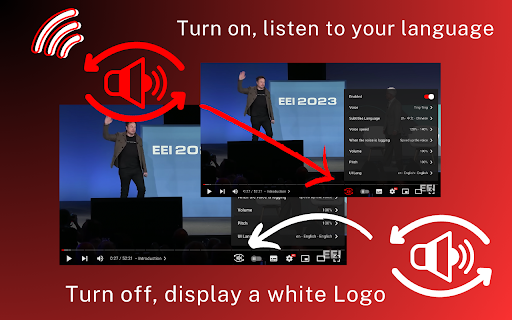
Extension convert text subtitles for YouTube into natural-sounding speech using AI technologies. Here is a solution that helps you read subtitles for YouTube videos. It utilizes a Text-to-Speech (TTS) engine to convert text subtitles into natural-sounding speech. This solution is powered by Google and Microsoft AI technologies, providing over 100 voices in multiple languages and variants. 🚀Features: ** Easy to use: Turn on/off with a single click. ** Multiple languages: Supports voices in many languages. ** Multiple subtitles: Supports multiple subtitle formats. 🚀How to use: *Pin the 'YouTube Subtitles Speaker and Translator' extension to the browser toolbar. Click on the extension icon in the Chrome toolbar and navigate to the YouTube video details page. *If the YouTube video has subtitles, a voice icon will appear. *You can then select the UI language and the voice language.

YouTube To Transcript: AI Summarizer & Chat
Get instant YouTube transcripts with AI summaries, insights, and chat features. Ideal for faster learning and note-taking. YouTube to Transcript instantly turns any YouTube video into text you can use. Get accurate transcripts, AI-generated summaries, key insights, timestamps, and even chat with the video’s content. Perfect for learners, researchers, and creators who want to save time and understand videos faster. ⚡ Instant transcripts for any YouTube video 🧠 AI summaries, key points & takeaways 💬 Chat with the video to ask questions or clarify content ⭐ Works directly on YouTube or via popup 📘 Great for studying, note-taking, and research

TransParrot: YouTube Translate & Dual Subtitles
Translate YouTube videos with AI-powered subtitles. dual/bilingual subtitles and natural text-to-speech. The ultimate AI-powered YouTube translator extension. Experience seamless video translation with intelligent dual subtitles, natural voice synthesis, and immersive language learning across 100+ languages. 🔹 【AI-Optimized for Accurate & Fluent Subtitles】 Experience intelligent YouTube subtitle translation✨! TransParrot's AI restructures text into coherent sentences📖 for a smooth reading flow. Get professional-grade translation in 100+ languages🌍, acting as your personal AI YouTube translator. 🔹 【Human-like Text-to-Speech: A YouTube Audio Translator】 Go beyond reading with our high-quality text-to-speech🔊 that converts subtitles into natural audio🎧. It's like having a real-time YouTube translation ⏱️ of the video's voice! 🔹 【Interactive Learning with Bilingual & Dual Subtitles】 Our innovative bilingual subtitles (or dual subtitles) feature 📚💬 is perfect for language learning with YouTube! Easily compare languages side-by-side ↔️ and enhance your skills📈. TransParrot is more than just a tool; it's the #1 YouTube translator extension🏆 for exploring global content🌏. Try our Chrome extension ⬇️ now and begin your barrier-free journey! ✨

YouTube Text Tools - Video Transcript and Summary
YouTube to text: transcribe YouTube video to text, get YouTube transcript with AI summary. Convert YouTube video to text free. 1. Install the extension by clicking on the "Add to Chrome" button. 2. Open any YouTube video. 3. Click "Transcribe" and get YouTube transcript with time codes, automatic scrolling and translations! 1️⃣ Transcribe YouTube Video to Text ➖ YouTube to Text converts any YouTube video to text format instantly. Get an accurate YouTube transcript of spoken content — perfect for those who prefer reading or need a written record. Our YouTube video transcriber supports all videos with captions in multiple languages. 2️⃣ Convert YouTube Video to Text with One Click ➖ Simply open any video and click to convert YouTube video to text. The transcript appears alongside the video with clickable timestamps. This YouTube to text converter makes it easy to jump to any point in the video. 3️⃣ Search Through Video Transcript ➖ Navigate quickly through the YouTube transcript to find specific information without watching the entire video. Search for keywords in the transcript — each result links to its timestamp, so you can jump directly to the relevant moment. 4️⃣ Copy Transcript to Note-Taking Apps ➖ Easily copy the YouTube video transcript to your favorite note-taking apps, personal knowledge bases, or AI summarizers. Get transcript of YouTube video and use it for research, study, or content creation. 5️⃣ Learn Foreign Languages ➖ Transcribe YouTube video in any language and read along while listening. YouTube to Text is an excellent tool for language learners to practice listening and reading skills simultaneously, improving comprehension and pronunciation. 6️⃣ Auto-Scroll Transcript with Video Playback ➖ The transcript syncs with video playback and scrolls automatically. Read the YouTube transcript in real time without manual adjustments — perfect for multitasking learners and professionals. 7️⃣ Get Video Summary with AI ➖ Generate a concise AI summary of any YouTube video. Absorb key insights from lengthy videos in seconds. This YouTube video to text transcription feature distills hours of content into digestible summaries. 8️⃣ Free YouTube Video to Text Converter ➖ YouTube to Text is completely free to use with no ads. Enjoy an uninterrupted experience — no distractions, just accurate video to text transcription. 📝 Save Time with YouTube Transcript ➖ Stop manually transcribing videos. YouTube to Text provides instant, accurate transcription of any YouTube video to text format. Whether you're a content creator, student, or researcher — get transcript from YouTube video in seconds. 📈 YouTube Video to Text for Content Creators ➖ Transcribe YouTube video to text and repurpose content for blogs, articles, or social media. Use the YouTube transcript as a foundation for editing, saving hours of manual transcription work. 📖 Get Transcript of YouTube Video for Research ➖ Convert YouTube video to text and search for specific keywords, quotes, or insights within the transcript. YouTube to Text is ideal for academics, students, and professionals who need to extract information from video content efficiently. 🖥️ YouTube Video Transcriber for Any Language ➖ Our YouTube to text extension supports multiple languages. Transcribe YouTube video with captions or automatically generated subtitles in English, Spanish, Korean, Vietnamese, and 50+ other languages. ❓ How to transcribe YouTube video to text? 💡 Install YouTube to Text Chrome extension, open any YouTube video, and click "Transcribe". You'll get the full YouTube transcript with timestamps instantly. ❓ Can I convert any YouTube video to text? 💡 Yes! YouTube to Text can transcribe any YouTube video with captions into text format and supports multiple languages. Get transcript of YouTube video — whether it has manual or auto-generated captions. ❓ Is this YouTube to text converter free? 💡 Yes, YouTube to Text is completely free to use. We plan to introduce some premium features in the future. ❓ How to get transcript from YouTube video? 💡 Simply install the extension, open a YouTube video, and the transcript appears automatically. You can copy, search, and navigate through the YouTube video transcript with ease. ❓ Does this YouTube video transcriber keep my data private? 💡 Absolutely! The extension works locally in your browser. We don't collect or store any user data. Your privacy is our priority.

AI Video Dub - Realtime Translation & Voice
AI-powered YouTube video translation & voice dubbing with natural AI voices. Supports 70+ languages. AI Video Dub is a powerful Chrome extension that translates YouTube videos in real-time with natural AI voice dubbing in 70+ languages. AI Video Dub is designed for users who want to watch YouTube content in their native language without language barriers. The extension uses advanced AI technology to: 1. Translate video content to your selected target language using Microsoft Translator 2. Display translated text as an overlay on the video 3. Generate natural-sounding voice dubbing using Microsoft Neural TTS voices 4. Synchronize the dubbed audio with video playback Real-Time Video Translation: The extension works seamlessly with YouTube. When you click "Start Translation" in the popup interface, the extension processes the video in real-time. The translated audio plays simultaneously with the video, allowing you to understand the content in your preferred language. AI Voice Dubbing (NEW): Powered by Microsoft Neural TTS — over 400 natural-sounding voices across 70+ languages. Each language has multiple voice options (male/female). Audio is pre-generated before playback starts for seamless, synchronized dubbing with no delays. Video to Text: Get the full transcript of any YouTube video with timecodes. Click any line to jump to that exact moment — perfect for finding key points, quotes, or re-watching specific scenes. Translate the entire transcript into any of 50+ supported languages. Copy with one click or download as SRT subtitle file for use in video players or editors. Subtitle History: A draggable, resizable panel displays every subtitle that was voiced during your session, so you can scroll back through the entire conversation. Copy the whole history with one click for note-taking, language learning, or documentation. SRT Subtitle Download (NEW): Download translated subtitles as standard .srt files. Compatible with all major video players (VLC, MPV) and video editors (Premiere, DaVinci). Perfect for content creators who want to add subtitles to their own videos. Customizable Playback: - Adjust voice volume and original audio volume independently - Change speech rate from 0.5x to 1.5x - Select from multiple AI voices per language - Show or hide translated and original subtitles - Drag subtitle overlay to your preferred position - Drag and resize the Video to Text and Subtitle History panels - Searchable language selector for quick language switching Multi-Language Support: The extension supports translation and voice dubbing in 50+ languages including: English, Spanish, Portuguese, Russian, French, German, Chinese, Japanese, Korean, Hindi, Arabic, Turkish, Italian, Polish, Dutch, Indonesian, Vietnamese, Thai, Ukrainian, Czech, Armenian, Romanian, Swedish, Greek, Hebrew, Bengali, Urdu, Persian, Malay, Filipino, Hungarian, Finnish, Danish, Norwegian, Bulgarian, Slovak, Croatian, Serbian, Catalan, Tamil, Telugu, Marathi, Gujarati, Kannada, Malayalam, Nepali, Azerbaijani, Georgian, Swahili, Afrikaans, Kazakh, and Uzbek, Punjabi, Pashto, Yoruba, Burmese, Lao, Amharic, Sinhala, Khmer, Zulu, Albanian, Belarusian, Mongolian, Lithuanian, Bosnian, Slovenian, Galician, Macedonian, Irish, Latvian, Estonian, Icelandic, and Welsh. User Feedback & Reviews: Send feedback, report bugs, or suggest new features directly from the extension popup using the "Report a problem" button. Every piece of feedback is reviewed by our team. 1. Visit any YouTube video 2. Click the AI Video Dub extension icon 3. Sign in with your Google account 4. Search and select your target language 5. Click "Start Translation" — wait a few seconds while AI voices are generated 6. Watch the video in your language with natural voice dubbing 7. Optionally open Video to Text for the full transcript or download SRT subtitles AI Video Dub uses Google OAuth 2.0 for secure user authentication. No passwords are stored. Users can revoke access at any time through Google Account Settings. Works with all Chromium-based browsers (Chrome, Edge, Brave, Opera) - even if Chrome sign-in is disabled. This extension: - Does not collect personal information beyond Google authentication - Does not store user viewing history - Does not track user activity - Does not share data with third parties - Uses Google OAuth 2.0 for secure authentication only - Translation requests are processed securely and not stored long-term - User feedback is voluntary and only submitted when the user explicitly clicks "Send feedback" Support and Feedback: For technical support, bug reports, or feature requests, please visit aivideodub.com, use the "Report a problem" button directly in the extension, or contact our support team.
