
appgbhabfeejggifkkbfdbkfckheiojk
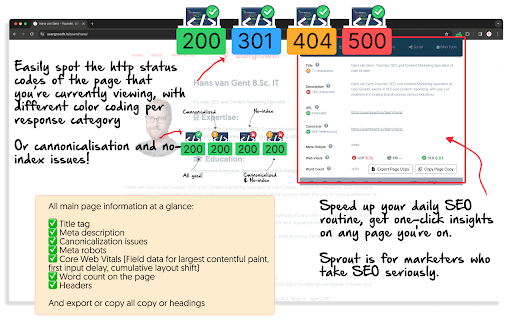

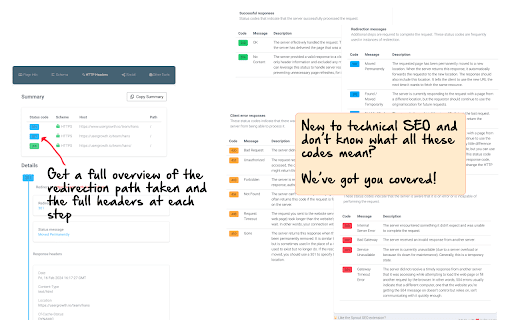


Speed up your daily SEO routine, get one-click insights on any page you're on. Sprout is for marketers who take SEO seriously. Introducing the Ultimate Chrome Extension for Every SEO Expert and Web Developer: Sprout SEO Extension 🌱 Transform your Chrome browser into an SEO powerhouse with the newly enhanced Sprout SEO Extension. Say goodbye to time-draining manual checks and hello to instant insights! 🛠️ One-click validate your page's schema markup directly in your browser with our innovative extension, while direct links to schema-type documentation empower you to enrich your site's metadata. Whether you're aiming for perfect structured data or seeking to ace Google's rich results, this extension is your new go-to solution. Gone are the days of toggling between tabs and tools. 📊 Get a comprehensive view of on-page SEO elements plus Core Web Vitals at a glance – optimization has never been this straightforward. 🚀 Dive into detailed SEO analyses with one-click access to 18 essential SEO tools, from Google Search Console to Ahrefs, without ever leaving your page. 🔗 Fix faulty redirects post-migration with our archive.org CSV download feature, saving you hours of troubleshooting ✅ Instantly determine Indexability and Canonical status, which is crucial for SEO excellence. 🔗 Fix faulty redirects post-migration with our archive.org CSV download feature, saving you hours of troubleshooting. 👽 With Reddit's rising popularity in the SERP (on average, showing up 77% for all product review terms), you can view directly if your content is shared on Reddit and join the discussion, or start sharing your content straight to Reddit. In the digital age, flawless technical SEO is not just a perk – it's a necessity. It's the backbone that helps search engines easily crawl, understand, and display your content effectively, boosting your visibility and SEO performance. New in version 4.4 We've added AI Search Insights to reveal hidden queries from ChatGPT and Gemini, plus extract AI overviews and citations. Also adds Copy as Markdown for clean page content extraction. New in version 4.3 Adding JavaScript debugging tools (disable JS and view rendered source), keyword ideas from Google SERP (10/day limit), SE Ranking in quick tools and right-click menu, copy-to-clipboard for schema markup, plus cross-browser improvements. New in version 4.2 Discover how web performance impacts your SEO rankings with the Sprout SEO Extension 🚀 New in version 4.1 🖼️ Image support! Optimizing images just got a whole lot easier! Our new Images tab gives you a comprehensive overview of all images on the current page, helping you identify optimization opportunities at a glance. Sprout SEO 4.0: The Ultimate Content & Research Upgrade 🚀 We’ve listened, and 4.0 brings you three major new tools that make day-to-day content research a breeze. Say hello to: Google Trends Integration – Get live Google Trends data directly in the search results. No more toggling back and forth; just instant insights to spot seasonal trends and activity spikes in seconds. Location Changer for Google Search – View search results from any location to help you rank-check with ease, no VPN needed. People Also Asked Extractor – Uncover, export, and build on PAA questions to enrich your content and connect with your audience better. With a fresh visual overhaul and boosted speed, 4.0 is designed to make content research easier, faster, and a lot more fun! New in version 3.6 Speed improvements 🏎️, incorporated a whole bunch of caching and async loading of external checks to improve the speed of the extension opening up and showing the data you're looking for. New in version 3.5 Better robots exclusion checker 🤖, checking not only the meta robots tag, but also verifies the current page against the robots.txt and the x-robots-tag header. New in version 3.4 Better sitemaps, remove breadcrumbs from the SERP, add position numbers to the SERP. New in version 3.3: Hreflang checker. Take a readout of a URL's hreflang tags, and then crawls them to assess if they back reference your current URL, together with an http-status check on the URLs itself to see if they are redirected to their final destination or give a straight http 200 status. New in version 3.2: #1 Link sections, showing all internal and external links. Ability to export them and highlight them on the page. #2 Right-click-contextual menu to access most validation techniques straight from a simple right-click (schema validation, page speed test, SEO tools, highlighting of links) 1️⃣ On-page SEO analysis: What's the appearance of the website in Google SERP? Are there any on-page errors? 2️⃣ Instant validation of schema markup using the schema.org validator. 3️⃣ Quick checks with Google's rich results and schema.org validator for optimal SEO. 4️⃣ User-friendly interface integrated directly into your Chrome browser. 5️⃣ Time-saving and efficient, ideal for busy web professionals. 6️⃣ Instantly view all available Schema Types on a page 7️⃣ Export all Schema markup found on a page or each individual type so you can easily backup your schema or study what makes your competitors outrank you 🙃 8️⃣ See full headers of the page you're on, and the potential redirect path that took you there 9️⃣ Check how your content in shared across social platforms, and join the discussion on the most used social community on the planet (Reddit) 🔟 A quick and easy way to test the currently open tab with 18 of the most commonly used SEO tools (Google Search Console, Majestic, Ahrefs, Semrush, to name a few) 1️⃣1️⃣ Had a bad site migration? Download a CSV straight from archive.org with all the pages stored in their memory, saving you time to build that redirection map Empower your SEO efforts with the Sprout SEO Extension 🌱. Ensure your site's SEO and content is impeccable, enhancing your search presence and paving the way for rich, engaging search results. Don't just hope your technical SEO is correct – know it. Add the Sprout SEO Extension 🌱 to your Chrome browser today and take the guesswork out of SEO

Botpresso SEO Extension: Audit On-Page & Technical SEO
Instantly Analyze Webpages & Boost Your SEO Game in ONE CLICK! 🤚🏻Stop wasting time on fragmented SEO tools! Our comprehensive SEO extension empowers you to analyze any webpage in seconds, giving you the complete picture you need to optimize your website for search engines. 🔍 🔥Features Which Will Interest You🔥 ➡️ On-Page SEO Audit ➡️ Advanced Heading Management ➡️ Actionable Keyword & Ngram Insights ➡️ Technical SEO Analysis ➡️ Powerful Link Analysis ➡️ Effortless Image Optimization ➡️ Advanced SEO Powerhouse (Always Evolving) 🔥Let’s take a detailed look at the features🔥 ➡️ Effortless On-Page SEO Audit Identify title tags, meta descriptions, canonical URLs, robots.txt, sitemap.xml, word count, and heading structures (H1-H6) - all crucial for on-page SEO. Our unique feature lets you disable/enable JavaScript and CSS for deeper inspections, ensuring you don't miss a thing. ➡️ Advanced Heading Management Take control of your headings! Effortlessly view, expand/collapse, and copy all heading tags for easy optimization within our user-friendly SEO extension. This ensures proper hierarchy and clarity for both search engines and users. ➡️ Actionable Keyword & Ngram Insights Ditch the guesswork! Uncover the who, what, and why of your content with detailed uni-gram, bi-gram, and tri-gram analysis, including word count and density. This data empowers you to target relevant keywords and optimize content naturally. ➡️ Technical SEO Analysis Gain total transparency with status codes, redirects (if any), and redirect paths. Identify and fix technical SEO issues that could be hindering your website's performance in search results with the help of our comprehensive SEO extension. ➡️ Powerful Link Analysis Made Easy Dive deep into internal and external links with ease. Analyze anchor text, identify broken links (via status codes), and export the entire data set for further analysis. This comprehensive view allows you to build a strong linking strategy for better ranking. ➡️ Effortless Image Optimization Ensure your images are SEO-friendly! View and assess image Alt Text, Title Tags, size, and status for optimal performance. This helps search engines understand your images and improves user experience. ➡️ Advanced SEO Powerhouse (Always Evolving) We're constantly innovating! Our extension includes Schema markup with one-click validation and a Hreflang checker. With even more advanced features to come, you'll always have the latest SEO tools at your fingertips. 🔥Why People Love Our SEO Chrome Extension🔥 ➡️ Simple and Easy-to-Use No complex setup required! Get started analyzing your website's SEO in seconds. ➡️ All-in-One Solution Stop juggling multiple SEO tools. Our extension provides everything you need for a comprehensive SEO audit. ➡️ Actionable Insights Gain valuable data and clear recommendations to optimize your website for search engines. ➡️ Time-Saving Efficiency Analyze web pages quickly and efficiently, freeing up your valuable time to focus on content creation and strategy. 🔥Who Can Benefit from Our SEO Chrome Extension?🔥 ➡️ Website Owners & Managers Gain complete control over your website's SEO with a user-friendly extension. ➡️ SEO Professionals & Consultants Perform fast and efficient SEO audits for your clients, saving time and delivering exceptional value. ➡️ Content Creators & Marketers Ensure your content is optimized for search engines, maximizing its reach and impact. 🚀Ready to take your website's SEO to the next level? Install our powerful SEO Chrome extension today! 🆓

SEO Pro Extension
Are you ready to save at least 5 hours/week on daily SEO checks? If your answer is yes, then SEO Pro is exactly what you need.… Are you ready to save at least 5 hours/week on daily SEO checks? If your answer is yes, then SEO Pro is exactly what you need. SEO Pro helps you get all the necessary information about a website page at a glance. Here are 11 examples of what you can do with this free extension in under 3 seconds: 1️⃣ See all main page information at a glance, including: ✅ Title tag ✅ Meta description ✅ Canonical URL ✅ Meta robots ✅ Core Web Vitals (Field data) ✅ Word count on the page 2️⃣Export all page copy in just 1 click 3️⃣ Instantly check Core Web Vitals metrics for a page The SEO Pro extension shows the Core Web Vitals: The SEO Pro extension will show you hints when the page you’re looking at: • Has meta-robots set to ‘noindex’ • Has the canonical tag pointing to a different page 5️⃣ Easily analyze the headings hierarchy of any page It’s handy when you want to see how many H1s the page is using. Or when you want to spot any heading opportunities your competitors are using. 💡 You can also export all the headings found on a page in a CSV with just 1 click! 6️⃣ See status codes and redirect chains at a glance 💪 Pro tip: You can also check if the most common duplicates – like http/https and www/non-www – are handled properly on the website you’re analyzing. 7️⃣Get the number of links on a page, their type and anchor text - Internal links - External links - Anchor text for each of these links 💪 Pro tip: Export the links and their anchor text for further analysis 8️⃣ Highlight nofollow links on a page You can easily see nofollow links on any page with the SEO Pro extension. On the Images tab of the SEO Pro extension, you can easily see the alt tags of the images on a page. It will help you quickly spot the images that are missing alt tags. 💪 Pro tip: Export all images along with their dimensions in a CSV in 1 click for further analysis. 🔟 See what a page preview will look like when shared on social media No need to look for Open graph tags in the source code anymore! The SEO pro extension will show you the preview image, website, title and description of any page so that you can make sure it looks great when you share it online. SEO Pro extension makes it easy for you to check all types of Schema markup so that you don’t need to open the Rich Snippets tool and wait minutes for it to show the results. Just check out the Schema tab.

SEOcrawl SEO Extension
SEOcrawl is an SEO Extension that allows you to analyze the most important SEO Factors (metadata, headings...) in a single click. SEOcrawl is an SEO extension whose main objective is to help you in your day to day to be more efficient, agile and get better results for your projects. SEO title and meta description previewer and its appearance in search results. Summary of all headings (h1, h2, h3), recommendations for improvements and error identification. Identification of all the internal and external linking of the url with their respective anchor text, link status code... Section dedicated 100% to hreflang codes and to ensure that all your international SEO strategy is well implemented. Preview of Facebook and Twitter social tags (open graph and twitter tags) to ensure that our page is correctly previewed on social networks. Real-time check of the Search Console indexing API for a given url (status code, canonical declared and read by Google, last Google crawl and much more... The star! Discover all the keywords for which a url ranks and its detailed performance with trends directly from the browser by visiting that particular url. Discover from 0 to 100 the health status of that url with a list of recommendations of errors, warnings and all explained in detail so you can act immediately and improve the health of your website in a few steps.

Schema Builder for Structured Data
Easily build validated json-ld structured data markup for any webpage. Based on schema.org specification Generating structured data markup for your webpages doesn't have to be hard! No more having to learn each Schema type, which elements are required vs. recommended or worrying about errors and issues. Schema.dev's Schema Builder makes it as simple as point and click to generate the perfect JSON-LD structured data for dozens of Google supported Schema types! and all for FREE! ============================================= Be sure to view the initial training video for fastest time to value. https://videos.seoclarity.net/video/kazj73n005plxgv61 ============================================= Simply enable the plugin, choose the schema markup you'd like to add and then populate the form using the point and click capabilities or manual input. Already have schema markup on your webpages? The built-in Schema testing tool helps validate your schema markup and shows errors and warnings. Key Features - Updated March 2nd, 2025 ================================== + NEW! Support for Vehicle Listing Markup + Support for 20+ Schema types - including ALL Google supported markups + Automatic detection of existing structured data + Point-and-click ease to populate schema fields + Intuitive UI that guides you through required, recommended and optional elements for each schema + Structured Data Testing capabilities built in for any schema markup generated + Intuitive UI to guide through required, recommended and optional elements NOTE: The plugin is in actively development - Join the forums at https://support.schema.dev for feedback, bugs and tips.
