
ghfgcnplehcolnejmpednmiebhjjdige

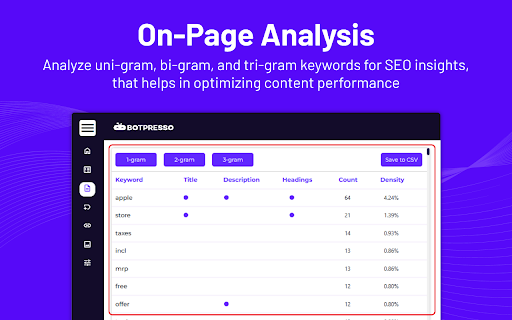
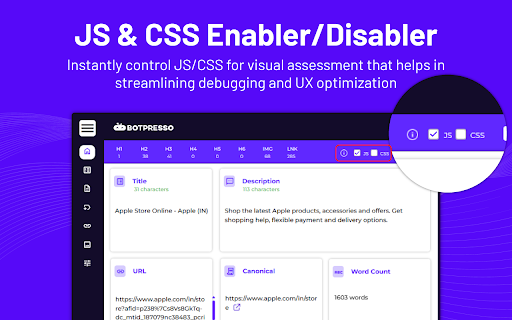
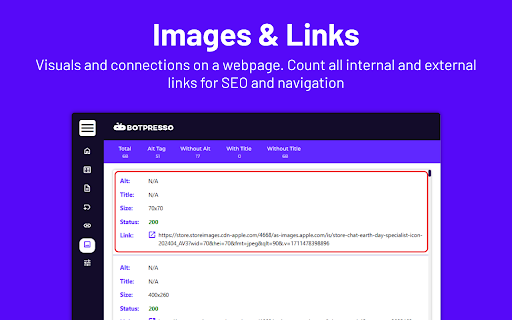
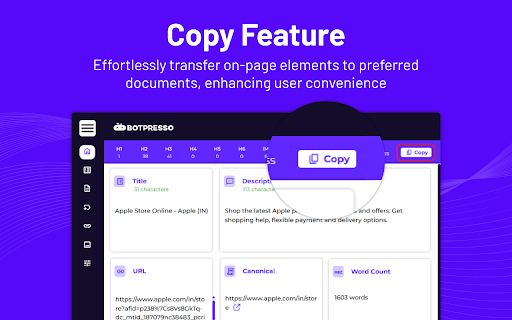
Instantly Analyze Webpages & Boost Your SEO Game in ONE CLICK! 🤚🏻Stop wasting time on fragmented SEO tools! Our comprehensive SEO extension empowers you to analyze any webpage in seconds, giving you the complete picture you need to optimize your website for search engines. 🔍 🔥Features Which Will Interest You🔥 ➡️ On-Page SEO Audit ➡️ Advanced Heading Management ➡️ Actionable Keyword & Ngram Insights ➡️ Technical SEO Analysis ➡️ Powerful Link Analysis ➡️ Effortless Image Optimization ➡️ Advanced SEO Powerhouse (Always Evolving) 🔥Let’s take a detailed look at the features🔥 ➡️ Effortless On-Page SEO Audit Identify title tags, meta descriptions, canonical URLs, robots.txt, sitemap.xml, word count, and heading structures (H1-H6) - all crucial for on-page SEO. Our unique feature lets you disable/enable JavaScript and CSS for deeper inspections, ensuring you don't miss a thing. ➡️ Advanced Heading Management Take control of your headings! Effortlessly view, expand/collapse, and copy all heading tags for easy optimization within our user-friendly SEO extension. This ensures proper hierarchy and clarity for both search engines and users. ➡️ Actionable Keyword & Ngram Insights Ditch the guesswork! Uncover the who, what, and why of your content with detailed uni-gram, bi-gram, and tri-gram analysis, including word count and density. This data empowers you to target relevant keywords and optimize content naturally. ➡️ Technical SEO Analysis Gain total transparency with status codes, redirects (if any), and redirect paths. Identify and fix technical SEO issues that could be hindering your website's performance in search results with the help of our comprehensive SEO extension. ➡️ Powerful Link Analysis Made Easy Dive deep into internal and external links with ease. Analyze anchor text, identify broken links (via status codes), and export the entire data set for further analysis. This comprehensive view allows you to build a strong linking strategy for better ranking. ➡️ Effortless Image Optimization Ensure your images are SEO-friendly! View and assess image Alt Text, Title Tags, size, and status for optimal performance. This helps search engines understand your images and improves user experience. ➡️ Advanced SEO Powerhouse (Always Evolving) We're constantly innovating! Our extension includes Schema markup with one-click validation and a Hreflang checker. With even more advanced features to come, you'll always have the latest SEO tools at your fingertips. 🔥Why People Love Our SEO Chrome Extension🔥 ➡️ Simple and Easy-to-Use No complex setup required! Get started analyzing your website's SEO in seconds. ➡️ All-in-One Solution Stop juggling multiple SEO tools. Our extension provides everything you need for a comprehensive SEO audit. ➡️ Actionable Insights Gain valuable data and clear recommendations to optimize your website for search engines. ➡️ Time-Saving Efficiency Analyze web pages quickly and efficiently, freeing up your valuable time to focus on content creation and strategy. 🔥Who Can Benefit from Our SEO Chrome Extension?🔥 ➡️ Website Owners & Managers Gain complete control over your website's SEO with a user-friendly extension. ➡️ SEO Professionals & Consultants Perform fast and efficient SEO audits for your clients, saving time and delivering exceptional value. ➡️ Content Creators & Marketers Ensure your content is optimized for search engines, maximizing its reach and impact. 🚀Ready to take your website's SEO to the next level? Install our powerful SEO Chrome extension today! 🆓

Google Search Console Enhanced Analytics
Google Search Console Enhanced Analytics is a simple, time-saving extension that enhances your analysis. Google Search Console Enhanced Analytics let’s you easily select and compare dates, generate percentage changes or generate search volumes. It enhances your analysis! Features - Select a custom standard period (either in the UI or in the extension) - Do a quick comparison - Do a custom comparison - Generate percentage changes - Generate search volumes - See exact metrics above the chart - Export all generated data to Excel Privacy Your privacy is extremely important to me. This extension does not store any data. Does this extension need Google Search Console property access? No. The only thing this extension does to calculate data is use the info inside your browser. You do not need to give access to your Google Search Console property and I don’t store / send any data to a server. How do you save my DataForSEO credentials? To make sure you don’t need to login every time you open my extension, I give you an option to save your data. Save data, don’t remember me > Your credentials are saved in the session storage of your browser and are kept there during your browsers session. Save data, remember me > Your credentials are saved in the local storage of your browser and are kept there until you delete your data inside the extension or remove the extension.

Ahrefs SEO Toolbar
Save hours with a complete toolkit in one SEO extension. Insights for on-page, keyword research, and link analysis on any webpage. Ahrefs toolbar is free and gives you detailed SEO insights without leaving your browser. 🌍 Global SEO research (No VPN needed) Switch regions, Google domains, languages, and get new keyword ideas directly in search results. 📃 On-page SEO data in 1 click Check titles, meta descriptions, headers, and technical SEO factors like canonical tags and indexation directives in one click. 🔗 Link analysis made easy Highlight links on the page, trace redirects, filter outgoing links, spot broken links, and export all the data to CSV. 🛠 Detailed SEO research tools Save URLs from open tabs or a SERP, switch user agents to see pages like Googlebot, read HTTP headers, and get performance data for page speed insights. ✨ Paid Ahrefs users unlock Ahrefs metrics: See domain and page-level metrics like keyword counts, traffic estimates, referring domains, and more - directly on every site or result. 📌 Note: Ahrefs subscription is required for access to Ahrefs metrics. The core tools of this SEO extension remain completely free.

Gandalf
Gandalf is a powerful Chrome extension designed to transform your Google Search Console experience. Gandalf is the ultimate Chrome extension for digital marketers and SEO professionals who want to find the needle in the haystack of their Search Console data. Just as the wizard Gandalf guided the Fellowship through Middle-earth, our extension guides you through the complex landscape of your website's performance in search results. Precise Keyword Categorization: Uncover your most impactful keywords with Gandalf's advanced algorithms. Our extension helps you identify and categorize your top-performing search terms, providing invaluable insights into your site's visibility. Custom Metric Filtering: Dive deep into your data with customizable filters. Sort and analyze your search performance based on crucial metrics such as Impressions, Click-Through Rate (CTR), and Position. This granular control allows you to focus on the metrics that matter most to your SEO strategy. Intuitive Data Visualization: Transform raw data into actionable insights with Gandalf's user-friendly interface. Our extension presents your Search Console data in clear, easy-to-understand visualizations, helping you spot trends and opportunities at a glance. Time-Saving Automation: Let Gandalf do the heavy lifting. Our extension automates the tedious task of data sorting and analysis, freeing up your time to focus on strategy and implementation. Regular Updates: Stay ahead of the curve with frequent updates that ensure Gandalf remains compatible with the latest Search Console features and provides cutting-edge analysis tools. Whether you're a seasoned SEO wizard or just beginning your journey into the realm of search optimization, Gandalf is your trusted companion in navigating the complexities of Search Console data. Don't just guess at your site's performance – let Gandalf illuminate the path to SEO success. Download Gandalf today and discover what's really going on in the depths of your search data!

SEO Pro Extension
Are you ready to save at least 5 hours/week on daily SEO checks? If your answer is yes, then SEO Pro is exactly what you need.… Are you ready to save at least 5 hours/week on daily SEO checks? If your answer is yes, then SEO Pro is exactly what you need. SEO Pro helps you get all the necessary information about a website page at a glance. Here are 11 examples of what you can do with this free extension in under 3 seconds: 1️⃣ See all main page information at a glance, including: ✅ Title tag ✅ Meta description ✅ Canonical URL ✅ Meta robots ✅ Core Web Vitals (Field data) ✅ Word count on the page 2️⃣Export all page copy in just 1 click 3️⃣ Instantly check Core Web Vitals metrics for a page The SEO Pro extension shows the Core Web Vitals: The SEO Pro extension will show you hints when the page you’re looking at: • Has meta-robots set to ‘noindex’ • Has the canonical tag pointing to a different page 5️⃣ Easily analyze the headings hierarchy of any page It’s handy when you want to see how many H1s the page is using. Or when you want to spot any heading opportunities your competitors are using. 💡 You can also export all the headings found on a page in a CSV with just 1 click! 6️⃣ See status codes and redirect chains at a glance 💪 Pro tip: You can also check if the most common duplicates – like http/https and www/non-www – are handled properly on the website you’re analyzing. 7️⃣Get the number of links on a page, their type and anchor text - Internal links - External links - Anchor text for each of these links 💪 Pro tip: Export the links and their anchor text for further analysis 8️⃣ Highlight nofollow links on a page You can easily see nofollow links on any page with the SEO Pro extension. On the Images tab of the SEO Pro extension, you can easily see the alt tags of the images on a page. It will help you quickly spot the images that are missing alt tags. 💪 Pro tip: Export all images along with their dimensions in a CSV in 1 click for further analysis. 🔟 See what a page preview will look like when shared on social media No need to look for Open graph tags in the source code anymore! The SEO pro extension will show you the preview image, website, title and description of any page so that you can make sure it looks great when you share it online. SEO Pro extension makes it easy for you to check all types of Schema markup so that you don’t need to open the Rich Snippets tool and wait minutes for it to show the results. Just check out the Schema tab.
