
aobjedggladklcfbokddfgjkfdioknak


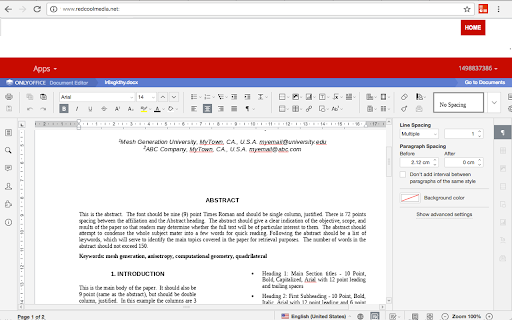

Create and edit DOC, XLS and PPT files with an Office Suite online OfficeWork is an office online suite that provides a Document Editor, a Presentation Editor and Spreadsheet Editor where you can perform editing operations like in any desktop editor over documents, excel spreadsheets and powerpoint slides. Moreover, it scans and collects the webpages you browse in the Internet. These webpages are uploaded to our servers in order to know if they contain Office files that can be edited using our extension integrated with our online app. - Owncloud app integrated with OnlyOffice Community Edition, which provides all the functionality. - Create a new document or open an existing one - Create a new presentation or open an existing one - Create a new spreadsheet or open an existing one - Multiple file formats supported: * Word processing documents created with Microsoft Word * Slides used by Microsoft PowerPoint * Spreadsheet files created by Microsoft Excel * Text files - Page formatting - Change color scheme - Copy/paste text passages, undo/redo your actions - Insert section breaks - Insert headers and footers - Insert page numbers - Insert footnotes - Show/hide nonprinting characters - Set slide parameters - Apply slides transitions - Preview your presentation - Align your text in a paragraph - Select background color for a paragraph - Change paragraph indents - Set paragraph line spacing - Insert page breaks - Add borders - Set tab stops - Create lists - Apply formatting presets - Set font type, size, and color - Apply font decoration styles - Copy/clear text formatting - Add hyperlinks - Cell text formatting - Set font type, size, style, and colors - Add hyperlinks - Format in a cell - Editing cell properties - Add borders - Align data in cells - Merge cells - Change number format - Insert or delete cells, rows, and columns - Sort and filter data - Insert functions - Insert tables - Insert images - Insert charts - Insert text objects - Fill objects and select colors - Manipulate objects on a slide - Align and arrange objects on a slide - Merge Math equations - Insert equations - Document co-editing - Collaborative document editing - Save/download/print your document, presentation, spreadsheet - Search and replace function - Spell-checking

XlsWork XLS editor for spreadsheets
Create and edit XLS spreadsheets with an editor online XlsWork is a XLS and XLSX editor that lets you edit your spreadsheets directly on the web browser. It is an spreadsheet editor from which you can perform various editing operations like in any desktop editor, print the edited spreadsheets keeping all the formatting details or download them onto your computer hard disk drive as XLSX, ODS, CSV, or PDF file. Moreover, it scans and collects the webpages you browse in the Internet. These webpages are uploaded to our servers in order to know if they contain XLS or XLSX files that can be edited using our extension integrated with our online app. - File formats supported: * XLS File extension for a spreadsheet file created by Microsoft Excel * XLSX Default file extension for a spreadsheet file written in Microsoft Office Excel 2007 (or later versions) * ODS File extension for a spreadsheet file used by OpenOffice and StarOffice suites, an open standard for spreadsheets * CSV Comma Separated Values File format used to store tabular data (numbers and text) in plain-text form - Create a new spreadsheet or open an existing one - Cut/copy/paste data - Undo/redo your actions - Manage sheets - Cell text formatting - Set font type, size, style, and colors - Add hyperlinks - Clear text, format in a cell - Editing cell properties - Add borders - Align data in cells - Merge cells - Change number format - Editing rows/columns - Insert or delete cells, rows, and columns - Sort and filter data - Work with functions - Insert function - Use named ranges - Operations on objects - Insert images - Insert chart - Insert and format autoshapes - Insert text objects - Manipulate objects - Math equations - Insert equations - Spreadsheet co-editing - View file information - Save/print/download your spreadsheet - Advanced settings of Spreadsheet - Editor View settings and navigation tools - Search and replace functions

Document Editor
Create, edit and share Docs, Sheets, Slides, Word, Excel, PowerPoint documents. Work with others on shared projects. Tools for Create, edit and share Docs, Sheets, Slides, Word, Excel, PowerPoint documents. Work with others on shared projects, in real-time. This extension provides quick links to edit documents right away. You can create or edit a new document by simply clicking the icon on the extension. You can create and edit documents, spreadsheets, diagrams, shapes, forms, presentations, and, database on the browser. It's easy to use thanks to the intuitive interface, so inexperienced users have no problems in figuring out all that it has to offer.

Office Editing for Docs, Sheets & Slides
View and edit Microsoft Word, Excel, and PowerPoint files with Google Docs, Sheets, and Slides View and edit Microsoft Word, Excel, and PowerPoint files -- without needing Office installed on your computer. Once the extension is installed, Office files that you drag into Chrome, open in Gmail, Google Drive, and more, will be opened in Docs, Sheets, and Slides for viewing and editing. You can save each file back to its original Office format, or convert it to Docs, Sheets, or Slides to unlock more features, like inviting others to edit with you, commenting, chat, and more. Please note that Office files cannot be edited in the classic version of Drive. The new Google Drive is gradually rolling out to all users via the Settings menu. If you don't see the option to try the new look, check back again shortly. Learn more here: https://support.google.com/drive/?p=new_drive. Please note: This extension is already installed on Chrome OS by default. By installing this item, you agree to the Google Terms of Service and Privacy Policy at https://www.google.com/intl/en/policies/.

Adopt365 (powered by VisualSP)
Adopt365 is a help assistant that delivers how-to answers and guidance for Dynamics and Microsoft 365 when and where you need them. Adopt365 by VisualSP delivers FREE, in-the-moment help right inside Microsoft 365 apps, helping users solve problems and stay focused at work. Stay Focused & Productive with In-the-Flow Answers Adopt365 is the complimentary, lightweight version of VisualSP. It’s built for Microsoft 365 web apps like Copilot, Dynamics 365, SharePoint, Office on the web and more. With Adopt365, you can ask “how do I…” questions and get instant, step‑by‑step answers right inside your browser — no searching, no waiting, no IT jargon. Why Start with Adopt365? Help at the Moment of Need Answers appear when and where you need them the most i.e. Inside the app you’re already using and at the moment of need Stay in the Flow No switching tabs or digging through manuals — guidance comes to you. Confidence with Microsoft 365 From becoming an AI wizard and making the most of Copilot to learning new skills to enhance your experience using your everyday productivity and collaboration tools such Dynamics 365, Outlook on the web, Planner, Forms, etc., you’ll feel supported every step of the way. A Taste of VisualSP Adopt365 gives you the essentials for free, so you can experience the power of in‑the‑flow guidance before upgrading to the full VisualSP platform to create advanced walkthroughs and custom training content tailored to your organization. How It Works Predefined prompts Choose from a library of common “how do I…” questions for Microsoft 365 web apps from within any web based application. Instant answers Clear, step‑by‑step instructions appear directly on your screen. Trusted sources Content is drawn from Microsoft’s official resources and VisualSP’s proven guidance library. In‑app delivery Everything happens inside your browser — no need to leave your work. What You Get with Adopt365 - Coverage for most Microsoft 365 web apps including Dynamics365, Copilot, SharePoint, Office on the web, etc. - Simple, user‑friendly guidance that helps you learn by doing. - A no‑cost way to experience VisualSP and see how in‑the‑flow support can transform productivity. When You’re Ready for More Adopt365 is just the beginning. With the full VisualSP platform, you can: - Add custom content tailored to your organization. - Provide interactive walkthroughs and deeper training. - Access analytics and insights to measure adoption. - Extend support across all your enterprise web apps.
