
nckcnmaeicmholjaolkfcodfpblenkfp
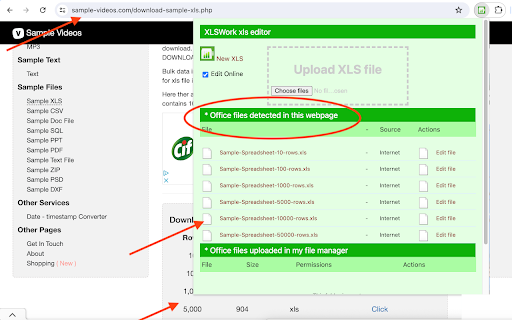


Create and edit XLS spreadsheets with an editor online XlsWork is a XLS and XLSX editor that lets you edit your spreadsheets directly on the web browser. It is an spreadsheet editor from which you can perform various editing operations like in any desktop editor, print the edited spreadsheets keeping all the formatting details or download them onto your computer hard disk drive as XLSX, ODS, CSV, or PDF file. Moreover, it scans and collects the webpages you browse in the Internet. These webpages are uploaded to our servers in order to know if they contain XLS or XLSX files that can be edited using our extension integrated with our online app. - File formats supported: * XLS File extension for a spreadsheet file created by Microsoft Excel * XLSX Default file extension for a spreadsheet file written in Microsoft Office Excel 2007 (or later versions) * ODS File extension for a spreadsheet file used by OpenOffice and StarOffice suites, an open standard for spreadsheets * CSV Comma Separated Values File format used to store tabular data (numbers and text) in plain-text form - Create a new spreadsheet or open an existing one - Cut/copy/paste data - Undo/redo your actions - Manage sheets - Cell text formatting - Set font type, size, style, and colors - Add hyperlinks - Clear text, format in a cell - Editing cell properties - Add borders - Align data in cells - Merge cells - Change number format - Editing rows/columns - Insert or delete cells, rows, and columns - Sort and filter data - Work with functions - Insert function - Use named ranges - Operations on objects - Insert images - Insert chart - Insert and format autoshapes - Insert text objects - Manipulate objects - Math equations - Insert equations - Spreadsheet co-editing - View file information - Save/print/download your spreadsheet - Advanced settings of Spreadsheet - Editor View settings and navigation tools - Search and replace functions

OpenOffice Calc online for xls spreadsheets
Create and edit xls and xlsx spreadsheets with OpenOffice Calc online OpenOffice Excel online for XLS spreadsheets is an extension that allows to create, edit and view any Microsoft Excel spreadsheet in both xls and xlsx formats. It is a spreadsheet processor integrated with our file manager to manage only XLS file types with this desktop app. The OpenOffice Excel main features are: - Wizards that guides you through choosing and using a comprehensive range of advanced spreadsheet functions. - Flexible cell formatting options: rotating contents, templates, backgrounds, borders, and many more. - Possibility to cross-tabulate and summarise. - Creating formulas using words. - The Intelligent Sum Button inserts a sum function or a subtotal automatically, depending on context. - Range of templates from Extensions repository for ready-made spreadsheet solutions. - Advanced Styles and Formatting. - Save your spreadsheets in OpenDocument format, the new international standard for office documents. But you are free to use your old Microsoft Excel spreadsheets, or save your work in Excel format or use Portable Document Format (.pdf). - Integrated with a file manager to save, upload and download xls files. This extension uses the platform http://www.offidocs.com. It is an integration with an Open Office Linux desktop application. In concrete, it is a desktop app running through our OffiDocs API. It is available for free online users but it also allows the integration with premium users and on-premises OffiDocs deployments where the OffiDocs OpenOffice Excel is installed. IMPORTANT: This extension scans the URLs browsed in order to detect XLS files. The XLS files detected appear in a list located in the extension popup that are retrieved from our servers. The scanning is performed from our servers so your URL are reported to our system. No personal data is collected. This scan can be disabled with a checkbox that appears in the extension popup. If you disable this scanning, this functionality is not available so then the extension functionality is very limited.

XlsCloud - editor for xls & xlsx
Create or edit spreadsheets that use OpenDocument format (ODF) and Microsoft Excel xls/xlsx formats. This XlsCloud extension allows users to create and edit any XLS or XLSX spreadsheet like Microsoft Excel because it is an editor that can handle such spreadsheets in multiple formats, including the standardized OpenDocument format (ODF), and the mentioned Microsoft Excel .xls and .xlsx formats. • Is it like a Microsoft Excel online but all the XlsCloud features are available using a web browser. • XlsCloud provides you with functions, including statistical and banking functions, that you can use to create formulas to perform complex calculations on your data. • You can also use the Function Wizard to help you create your formulas. • It provides What-If Calculations, an interesting feature is to be able to immediately view the results of changes made to one factor of calculations that are composed of several factors. For instance, you can see how changing the time period in a loan calculation affects the interest rates or repayment amounts. Furthermore, you can manage larger tables by using different predefined scenarios. • It provides database functions. Use spreadsheets to arrange, store, and filter your data. • It allows arranging data. With a few mouse-clicks, you can reorganize your spreadsheet to show or hide certain data ranges, or to format ranges according to special conditions, or to quickly calculate subtotals and totals. • It includes dynamic charts. XlsCloud lets you present spreadsheet data in dynamic charts that update automatically when the data changes. • It allows to opening and save Microsoft Excel Files. Use the XlsCloud filters to convert Excel files, or to open and save in a variety of other formats. This extension XlsCloud also includes access to a file manager to upload and download the spreadsheets created or to be edited.

Office online OfficeWork for XLS DOC and PPT
Create and edit DOC, XLS and PPT files with an Office Suite online OfficeWork is an office online suite that provides a Document Editor, a Presentation Editor and Spreadsheet Editor where you can perform editing operations like in any desktop editor over documents, excel spreadsheets and powerpoint slides. Moreover, it scans and collects the webpages you browse in the Internet. These webpages are uploaded to our servers in order to know if they contain Office files that can be edited using our extension integrated with our online app. - Owncloud app integrated with OnlyOffice Community Edition, which provides all the functionality. - Create a new document or open an existing one - Create a new presentation or open an existing one - Create a new spreadsheet or open an existing one - Multiple file formats supported: * Word processing documents created with Microsoft Word * Slides used by Microsoft PowerPoint * Spreadsheet files created by Microsoft Excel * Text files - Page formatting - Change color scheme - Copy/paste text passages, undo/redo your actions - Insert section breaks - Insert headers and footers - Insert page numbers - Insert footnotes - Show/hide nonprinting characters - Set slide parameters - Apply slides transitions - Preview your presentation - Align your text in a paragraph - Select background color for a paragraph - Change paragraph indents - Set paragraph line spacing - Insert page breaks - Add borders - Set tab stops - Create lists - Apply formatting presets - Set font type, size, and color - Apply font decoration styles - Copy/clear text formatting - Add hyperlinks - Cell text formatting - Set font type, size, style, and colors - Add hyperlinks - Format in a cell - Editing cell properties - Add borders - Align data in cells - Merge cells - Change number format - Insert or delete cells, rows, and columns - Sort and filter data - Insert functions - Insert tables - Insert images - Insert charts - Insert text objects - Fill objects and select colors - Manipulate objects on a slide - Align and arrange objects on a slide - Merge Math equations - Insert equations - Document co-editing - Collaborative document editing - Save/download/print your document, presentation, spreadsheet - Search and replace function - Spell-checking

Spreadsheetor - Spreadsheet in side panel
🔔 Top Features ✪ Create Spreadsheet or excel file in side panel ✪ View and edit local spreadsheet file (xlsx, csv) ✪ Work with local files (no server involved) ✪ Auto copy-paste ✪ Extract table from any websites ✪ Input files: excel, csv,xlsx,json,html, markdown spreadsheet, ✪ Output files:excel, csv,xlsx,json,html, markdown,spreadsheet,sql ✪ Lightweight only 63kb ✪ No permission required ✪ No signup required ✪ no tracking, no Ads ✪ Dark mode ## How to use Spreadsheetor Pin Spreadsheetor after install extension Click on Spreadsheetor or (Alt + S) to open Spreadsheetor side panel Click on plus button at bottom-right corner to open file or folder Table editor dialog opened Select text from any webpages. When you mouse up, selected text auto-pasted in focused cell. When you close dialog, edited file with auto-saved to local disk You can mail us: docrailhelp@gmail.com
