
opdljgpndkbanhjibhjiemnkplbdbpnb

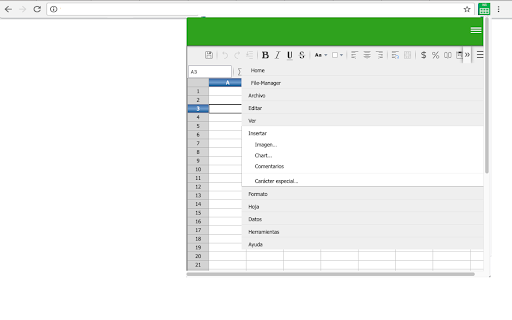
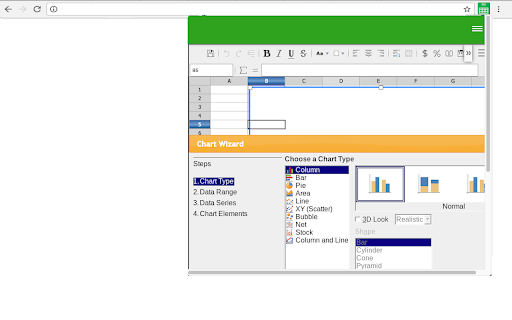
Create or edit spreadsheets that use OpenDocument format (ODF) and Microsoft Excel xls/xlsx formats. This XlsCloud extension allows users to create and edit any XLS or XLSX spreadsheet like Microsoft Excel because it is an editor that can handle such spreadsheets in multiple formats, including the standardized OpenDocument format (ODF), and the mentioned Microsoft Excel .xls and .xlsx formats. • Is it like a Microsoft Excel online but all the XlsCloud features are available using a web browser. • XlsCloud provides you with functions, including statistical and banking functions, that you can use to create formulas to perform complex calculations on your data. • You can also use the Function Wizard to help you create your formulas. • It provides What-If Calculations, an interesting feature is to be able to immediately view the results of changes made to one factor of calculations that are composed of several factors. For instance, you can see how changing the time period in a loan calculation affects the interest rates or repayment amounts. Furthermore, you can manage larger tables by using different predefined scenarios. • It provides database functions. Use spreadsheets to arrange, store, and filter your data. • It allows arranging data. With a few mouse-clicks, you can reorganize your spreadsheet to show or hide certain data ranges, or to format ranges according to special conditions, or to quickly calculate subtotals and totals. • It includes dynamic charts. XlsCloud lets you present spreadsheet data in dynamic charts that update automatically when the data changes. • It allows to opening and save Microsoft Excel Files. Use the XlsCloud filters to convert Excel files, or to open and save in a variety of other formats. This extension XlsCloud also includes access to a file manager to upload and download the spreadsheets created or to be edited.

LibreOffice Calc online
Create and edit XLS with a tool for creating and editing spreadsheets. This extension allows users to use the LibreOffice Calc online. LibreOffice Calc online is a powerful tool for creating and editing spreadsheets that support XLS Microsoft Excel and LibreOffice formats. This extension analyzes webpages that you actively open in your browser to detect and show available Office/spreadsheet files to you. It uses the current page URL and page content only to identify Office/spreadsheet resources and display them in the extension UI. This access is used solely for this user-facing Office/spreadsheet detection feature. Please refer to our Privacy Policy for more information. • Calculation Tools: LibreOffice Calc online includes a wide range of mathematical functions, including basic arithmetic, statistical, and financial functions. Users can also create complex formulas using cell references and operators. • Data Analysis: The app provides tools for analyzing large sets of data, such as data sorting, filtering, and pivot tables. Users can easily identify trends and patterns in their data. All of them very similar to what Microsoft Excel provides. • Charts and Graphics: LibreOffice Calc online allows users to create professional-looking charts and graphs to visualize their data. Users can customize the appearance of charts by changing colors, fonts, and labels. • Templates: The app offers a variety of templates for different types of spreadsheets, including budgets, invoices, and loan calculators. Users can also create their own templates for future use. • Compatibility: The app is compatible with Microsoft Excel and other spreadsheet software, making it easy to import and export files in different formats. This extension also includes access to a file manager to upload and download the spreadsheets or XLS created using Microsoft Excel or LibreOffice Calc. This extension is the LibreOffice Calc online distribution so it is compliance with the LibreOffice Calc GPL.

XlsWork XLS editor for spreadsheets
Create and edit XLS spreadsheets with an editor online XlsWork is a XLS and XLSX editor that lets you edit your spreadsheets directly on the web browser. It is an spreadsheet editor from which you can perform various editing operations like in any desktop editor, print the edited spreadsheets keeping all the formatting details or download them onto your computer hard disk drive as XLSX, ODS, CSV, or PDF file. Moreover, it scans and collects the webpages you browse in the Internet. These webpages are uploaded to our servers in order to know if they contain XLS or XLSX files that can be edited using our extension integrated with our online app. - File formats supported: * XLS File extension for a spreadsheet file created by Microsoft Excel * XLSX Default file extension for a spreadsheet file written in Microsoft Office Excel 2007 (or later versions) * ODS File extension for a spreadsheet file used by OpenOffice and StarOffice suites, an open standard for spreadsheets * CSV Comma Separated Values File format used to store tabular data (numbers and text) in plain-text form - Create a new spreadsheet or open an existing one - Cut/copy/paste data - Undo/redo your actions - Manage sheets - Cell text formatting - Set font type, size, style, and colors - Add hyperlinks - Clear text, format in a cell - Editing cell properties - Add borders - Align data in cells - Merge cells - Change number format - Editing rows/columns - Insert or delete cells, rows, and columns - Sort and filter data - Work with functions - Insert function - Use named ranges - Operations on objects - Insert images - Insert chart - Insert and format autoshapes - Insert text objects - Manipulate objects - Math equations - Insert equations - Spreadsheet co-editing - View file information - Save/print/download your spreadsheet - Advanced settings of Spreadsheet - Editor View settings and navigation tools - Search and replace functions

Spreadsheetor - Spreadsheet in side panel
🔔 Top Features ✪ Create Spreadsheet or excel file in side panel ✪ View and edit local spreadsheet file (xlsx, csv) ✪ Work with local files (no server involved) ✪ Auto copy-paste ✪ Extract table from any websites ✪ Input files: excel, csv,xlsx,json,html, markdown spreadsheet, ✪ Output files:excel, csv,xlsx,json,html, markdown,spreadsheet,sql ✪ Lightweight only 63kb ✪ No permission required ✪ No signup required ✪ no tracking, no Ads ✪ Dark mode ## How to use Spreadsheetor Pin Spreadsheetor after install extension Click on Spreadsheetor or (Alt + S) to open Spreadsheetor side panel Click on plus button at bottom-right corner to open file or folder Table editor dialog opened Select text from any webpages. When you mouse up, selected text auto-pasted in focused cell. When you close dialog, edited file with auto-saved to local disk You can mail us: docrailhelp@gmail.com

SheetWhiz: Excel & PPT Shortcuts, Tracing, & What-If for Sheets & Slides
SheetWhiz brings Trace Precedents, Trace Dependents, Goal Seek, What-If, Macabacus format cycling, Excel and PPT shortcuts to Google SheetWhiz brings Excel-style shortcuts, auditing tools, and modeling functionality to Google Sheets and Google Slides. Built for finance, FP&A, investing, operations, and other spreadsheet-heavy workflows, it helps you move faster, audit formulas more easily, and bring more of the speed and productivity you expect from Excel into Google Workspace. • Excel and PowerPoint shortcuts in Google Sheets and Google Slides Use familiar shortcuts across Mac and Windows, with fully customizable key mappings to match your workflow. • Trace Precedents and Trace Dependents Instantly see formula relationships, jump between linked cells, and navigate spreadsheet logic with arrow keys. Great for auditing models and understanding how formulas flow across a sheet. • Goal Seek and What-If analysis Run Goal Seek and build one- and two-variable data sensitivities directly in Google Sheets for financial models, budgets, forecasts, and scenario analysis. • Format Cycling Apply consistent number formats, company colors, and indentation cycles with a single shortcut, similar to workflows used in tools like Macabacus and Arixcel. • Export Selection as Image Copy cells into Google Slides or Docs while preserving formatting and linking back to the source spreadsheet. • Auto-Color for faster audits Quickly highlight hardcoded inputs and linked cells so it is easier to review spreadsheet structure and spot issues. • Familiar to users of Excel add-ins like Macabacus, Arixcel, FactSet, and CapIQ, but built specifically for Google Sheets and Google Slides • Designed for finance and operations teams that want Excel-like speed while working in Google Workspace • Works across both Mac and Windows with native key mappings • Lets you customize shortcuts and formatting cycles to fit your team’s workflow • Secure and private: SheetWhiz never sees or stores your spreadsheet data and is SOC 2 Type 2 compliant SheetWhiz includes shortcuts and tools for: • Trace Precedents and Trace Dependents • Goal Seek and What-If data sensitivities • Paste Special actions like formulas and values • Insert and delete rows and columns • Borders, alignment, autofit, row height, and column width • Decimal controls, fonts, and text wrapping • Filters, freeze panes, merge and unmerge • Number, font color, and fill color cycles • Export Selection as Image • Auto-Color for spreadsheet audits • Google Slides alignment, layering, grouping, distribution, and text formatting shortcuts ► FREE TRIAL AND PLANS All new installs include a 21-day free trial of the Pro plan. After the trial, you will continue on the Free plan with core formatting shortcuts, with the option to upgrade anytime.
