
fbdaigphodbigaofobmhdcfncjofaffp
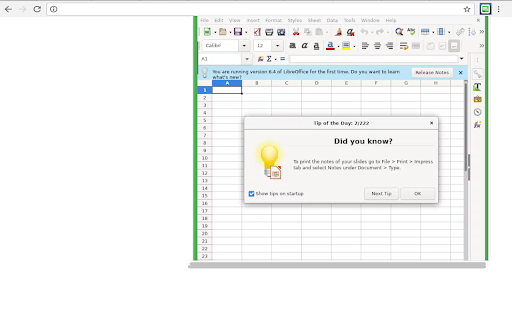

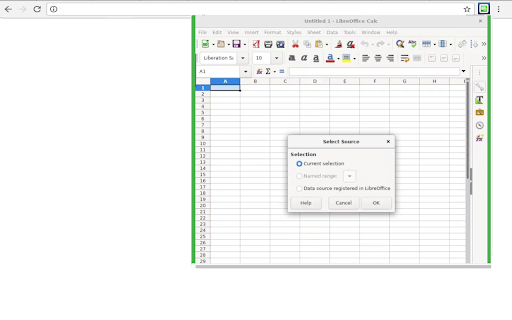
Create and edit XLS with a tool for creating and editing spreadsheets. This extension allows users to use the LibreOffice Calc online. LibreOffice Calc online is a powerful tool for creating and editing spreadsheets that support XLS Microsoft Excel and LibreOffice formats. This extension analyzes webpages that you actively open in your browser to detect and show available Office/spreadsheet files to you. It uses the current page URL and page content only to identify Office/spreadsheet resources and display them in the extension UI. This access is used solely for this user-facing Office/spreadsheet detection feature. Please refer to our Privacy Policy for more information. • Calculation Tools: LibreOffice Calc online includes a wide range of mathematical functions, including basic arithmetic, statistical, and financial functions. Users can also create complex formulas using cell references and operators. • Data Analysis: The app provides tools for analyzing large sets of data, such as data sorting, filtering, and pivot tables. Users can easily identify trends and patterns in their data. All of them very similar to what Microsoft Excel provides. • Charts and Graphics: LibreOffice Calc online allows users to create professional-looking charts and graphs to visualize their data. Users can customize the appearance of charts by changing colors, fonts, and labels. • Templates: The app offers a variety of templates for different types of spreadsheets, including budgets, invoices, and loan calculators. Users can also create their own templates for future use. • Compatibility: The app is compatible with Microsoft Excel and other spreadsheet software, making it easy to import and export files in different formats. This extension also includes access to a file manager to upload and download the spreadsheets or XLS created using Microsoft Excel or LibreOffice Calc. This extension is the LibreOffice Calc online distribution so it is compliance with the LibreOffice Calc GPL.

Online Notes
Online Notes is your go-to companion to instantly take quick notes- anytime & anywhere! ⚡ Introducing Online Notes, an innovative Chrome extension designed to streamline your note-taking experience while browsing the internet. With Online Notes, users can instantly capture their thoughts, ideas, and important information, anytime and anywhere. Say goodbye to the hassle of switching between tabs or applications to take notes. With a quick-access notepad sidebar that can be effortlessly accessed using the Alt + N keyboard shortcut combination, Online Notes ensures that you never miss a beat. What is Online Notes? Online Notes is a simple, easy-to-use, accessible, and minimalistic notepad Chrome extension, ideal for taking quick notes or rough notes on the go. It's the perfect solution for individuals who want to focus on the important stuff and the context, rather than worrying about finding a note-taking solution. How Does It Work? Online Notes operates seamlessly within the Chrome browser, providing users with a convenient notepad sidebar that can be accessed instantly using the Alt + N keyboard shortcut combination. Users can jot down their thoughts, ideas, or important information without interrupting their browsing experience. The notes are automatically saved, ensuring that nothing gets lost, even if the browser is closed. Key Features: Quick Access: Easily accessible notepad sidebar with the Alt + N keyboard shortcut combination. Simplicity: Minimalistic and user-friendly interface for effortless note-taking. Automatic Saving: Notes are automatically saved, preventing any loss of information. Efficiency: Allows users to focus on the important content and context. Accessibility: Accessible anytime and anywhere while browsing the internet. Key Benefits: Instant Note-Taking: Capture thoughts, ideas, and important information instantly. Seamless Integration: Operates seamlessly within the Chrome browser. Time-Saving: Eliminates the need to switch between tabs or applications to take notes. Increased Productivity: Enables users to focus on the task at hand without too many context switches. Never Miss a Thought: Ensures that users never miss a deadline, idea, or task. Key Capabilities: Quick Access Notepad: Instantly accessible notepad sidebar for quick note-taking. Effortless Integration: Seamlessly integrates with the Chrome browser for a smooth user experience. Automatic Saving: Automatically saves notes, preventing any loss of information. User-Friendly Interface: Simple and easy-to-use interface for enhanced usability. Top Use Cases: Research and Study: Take quick notes while researching or studying online. Content Creation: Capture ideas and inspiration while browsing the internet. Meetings and Workshops: Quickly jot down important points during meetings or workshops. Shopping: Make shopping lists or note down product details while browsing online stores. Who is This For? Online Notes is perfect for: Students Working Professionals Researchers Content Writers Or, anyone who wants to streamline their note-taking process. Online Notes is a must-have Chrome extension for anyone who values efficiency, productivity, and convenience. It is the ultimate solution for quick and effortless note-taking while browsing the internet. With its simple and user-friendly interface, seamless integration with the Chrome browser, and automatic saving feature, Online Notes ensures that users never miss a thought, idea, or deadline. Say goodbye to the hassle of switching between tabs or applications to take notes. Experience the convenience of Online Notes and take your note-taking experience to the next level. Get Online Notes Chrome extension today and revolutionize the way you save information and take notes online.

XLS Editor
Create and edit XLS spreadsheets XLS Editor is an extension that allows to create, edit and view any Microsoft Excel document in both XLS and XLSX format. It also handles the standard Open Office format ODS. It is an integration with LibreOffice Online and a file manager. It is a spreadsheet editor integrated with our file manager to manage only XLS, XLSX and ODS file types with this online app. - A direct link to create xls, xlsx or off spreadsheets with this XLS Editor. - It intercepts when you access to xls, xlsx, csv or odf spreadsheets, and it automatically opens it directly using this XLS Editor. - Edit and view XLS spreadsheets written using OpenOffice Calc, LibreOffice Calc or Microsoft Excel. - Styles management. - Font sizes. - Font colours. - Background colours. - Search for texts. - Insert columns / rows / tables / images.. - Delete rows / columns. - Advanced find & replace / regular expressions / special characters. - Spreadsheet functions. - Export to PDF. - Auto save files. - Open source code. - Supports multiple formats for spreadsheets that are detailed here https://wiki.openoffice.org/wiki/Documentation/OOo3_User_Guides/Getting_Started/File_formats. * Microsoft Excel 97/2000/XP (.xls) * Microsoft Excel 4.x–5.0/95 (.xls) * Microsoft Excel 2007 XML (.xlsx) * LibreOffice ODF spreadsheet (.ods) * OpenOffice ODF spreadsheet (.ods) * Text and CSV (.csv and .txt) - Handle files and directories in the Cloud. - Operations with files and folders: copy, move, upload, create folder/file, etc - Search for files This XLS Editor extension uses the platform http://www.offidocs.com. It is available for free online users but it also allows the integration with premium users and on-premises OffiDocs deployments where the OffiDocs LibreOffice Calc online is installed. IMPORTANT: This extension scans the URLs browsed in order to detect XLS files. The XLS files detected appear in a file list located in the extension popup that are retrieved from our servers. The scanning is performed from our servers so your URL are reported to our system. No personal data is collected. This scan can be disabled with a checkbox that appears in the extension popup. If you disable this scanning, this functionality is not available so then the extension functionality is very limited.

Extension Excel Spreadsheets for Chrome
Extension Excel Spreadsheets. Extension Excel Spreadsheets for Chrome. Excel Spreadsheets for Chrome This Chrome extension allows users to adjust the brightness and background color of the Microsoft Cloud page. With a simple slider and color picker, users can customize their viewing experience to reduce eye strain and enhance readability. Ideal for anyone working on cloud-based spreadsheets or data management tasks.

DocCloud editor for doc & docx
Create or edit documents that use OpenDocument format (ODF) and Microsoft Word doc/docx formats. This DocCloud extension allows users to create and edit any Microsoft Word document doc and docx as it is a word processor to design and produce documents that can also include graphics, tables, or charts. You can then handle the documents in multiple formats, including the standardized OpenDocument format (ODF), Microsoft Word .doc format, or HTML. • Create or edit online both basic documents, such as memos, faxes, letters, resumes and merge documents, as well as long and complex or multi-part documents, complete with bibliographies, reference tables and indexes. • Includes features as a spellchecker, a thesaurus, AutoCorrect, and hyphenation as well as a variety of templates for almost every purpose. • Styles window to create, assign and modify styles for paragraphs, individual characters, frames and pages. • Create various indexes and tables in text documents. You can define the structure and appearance of the indexes and tables according to your individual needs. • Insert pictures with different formats into a text document, including graphics with a JPG or GIF format. • Support a wide range of file formats, including Microsoft Word (.doc and .docx), making it easy to work with documents created in other word processors. • Formatting tools for text, images, and other objects, allowing you to create professional-looking documents. • PDF Export: You can export documents directly to PDF format without needing additional software. This extension DocCloud also includes access to a file manager to upload and download the documents created or to be edited.
