
iobjaooppmgjlgomfpaohhncpfjpigaf


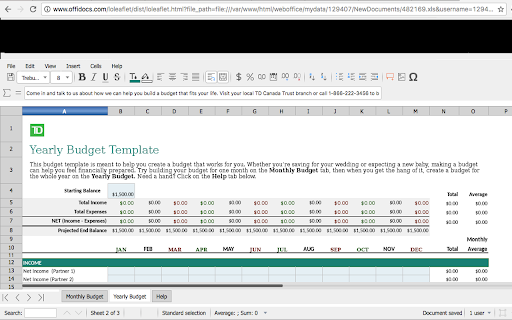
Create and edit XLS spreadsheets XLS Editor is an extension that allows to create, edit and view any Microsoft Excel document in both XLS and XLSX format. It also handles the standard Open Office format ODS. It is an integration with LibreOffice Online and a file manager. It is a spreadsheet editor integrated with our file manager to manage only XLS, XLSX and ODS file types with this online app. - A direct link to create xls, xlsx or off spreadsheets with this XLS Editor. - It intercepts when you access to xls, xlsx, csv or odf spreadsheets, and it automatically opens it directly using this XLS Editor. - Edit and view XLS spreadsheets written using OpenOffice Calc, LibreOffice Calc or Microsoft Excel. - Styles management. - Font sizes. - Font colours. - Background colours. - Search for texts. - Insert columns / rows / tables / images.. - Delete rows / columns. - Advanced find & replace / regular expressions / special characters. - Spreadsheet functions. - Export to PDF. - Auto save files. - Open source code. - Supports multiple formats for spreadsheets that are detailed here https://wiki.openoffice.org/wiki/Documentation/OOo3_User_Guides/Getting_Started/File_formats. * Microsoft Excel 97/2000/XP (.xls) * Microsoft Excel 4.x–5.0/95 (.xls) * Microsoft Excel 2007 XML (.xlsx) * LibreOffice ODF spreadsheet (.ods) * OpenOffice ODF spreadsheet (.ods) * Text and CSV (.csv and .txt) - Handle files and directories in the Cloud. - Operations with files and folders: copy, move, upload, create folder/file, etc - Search for files This XLS Editor extension uses the platform http://www.offidocs.com. It is available for free online users but it also allows the integration with premium users and on-premises OffiDocs deployments where the OffiDocs LibreOffice Calc online is installed. IMPORTANT: This extension scans the URLs browsed in order to detect XLS files. The XLS files detected appear in a file list located in the extension popup that are retrieved from our servers. The scanning is performed from our servers so your URL are reported to our system. No personal data is collected. This scan can be disabled with a checkbox that appears in the extension popup. If you disable this scanning, this functionality is not available so then the extension functionality is very limited.

Excel Editor Online
Select your Excel XLSX document into the Excel online editor, edit your Excel documents and add Images, text to a Excel file. Collaborate for free with an online version of Excel. Create or edit Excel documents online you can use any device connected to the internet. You can save your documents as Excel documents, PDF, and other popular files. Open and edit your Excel documents without install any software.

XlsCloud - editor for xls & xlsx
Create or edit spreadsheets that use OpenDocument format (ODF) and Microsoft Excel xls/xlsx formats. This XlsCloud extension allows users to create and edit any XLS or XLSX spreadsheet like Microsoft Excel because it is an editor that can handle such spreadsheets in multiple formats, including the standardized OpenDocument format (ODF), and the mentioned Microsoft Excel .xls and .xlsx formats. • Is it like a Microsoft Excel online but all the XlsCloud features are available using a web browser. • XlsCloud provides you with functions, including statistical and banking functions, that you can use to create formulas to perform complex calculations on your data. • You can also use the Function Wizard to help you create your formulas. • It provides What-If Calculations, an interesting feature is to be able to immediately view the results of changes made to one factor of calculations that are composed of several factors. For instance, you can see how changing the time period in a loan calculation affects the interest rates or repayment amounts. Furthermore, you can manage larger tables by using different predefined scenarios. • It provides database functions. Use spreadsheets to arrange, store, and filter your data. • It allows arranging data. With a few mouse-clicks, you can reorganize your spreadsheet to show or hide certain data ranges, or to format ranges according to special conditions, or to quickly calculate subtotals and totals. • It includes dynamic charts. XlsCloud lets you present spreadsheet data in dynamic charts that update automatically when the data changes. • It allows to opening and save Microsoft Excel Files. Use the XlsCloud filters to convert Excel files, or to open and save in a variety of other formats. This extension XlsCloud also includes access to a file manager to upload and download the spreadsheets created or to be edited.

Document Editor for doc & docx
Create and edit documents doc, docx or odt Document Editor is an extension to create, edit and view any document in formats doc, docx, and odt. It is an integration with LibreOffice Writer Online and a file manager in order to handle all your documents when your are online. It provides direct access to create a doc from the beginning, but it also intercepts files that are open when using your web browser. It is a document editor integrated with our file manager to manage only DOC, DOCX and ODT file types with this desktop app. - Create, edit and view documents. - Styles management. - Font sizes. - Font colours. - Background colours. - Search for texts. - Insert tables / images.. - Advanced find & replace / regular expressions / special characters. - Export to PDF. - Auto save files. - Open source code. - Formats: * LibreOffice and OpenOffice ODF text document (.odt) * Microsoft Word 6.0/95/97/2000/XP (.doc) * Microsoft Word 2007 XML (.docx) * Rich Text Format (.rtf) - File manager module with operations over files and folders: copy, move, upload, create folder/file, etc This extension uses the platform http://www.offidocs.com from which the service is provided. It is available for free online users but it also allows the integration with premium users and on-premises OffiDocs deployments where the OffiDocs LibreOffice Online Writer is installed. IMPORTANT: This extension scans the URLs browsed in order to detect DOC files. The DOC files detected appear in a file list located in the extension popup that are retrieved from our servers. The scanning is performed from our servers so your URL are reported to our system. No personal data is collected. This scan can be disabled with a checkbox that appears in the extension popup. If you disable this scanning, this functionality is not available so then the extension functionality is very limited.

XLS Editor Online
Online and free editor for XLS files Open and edit Spreadsheets files online Convert your XLS files to PDF format as well. Disclaimer: Please note this extension is NOT made by Google and is made by an independent development team. All copyrights belong to their respective owners. Google doesn’t endorse or sponsor this Chrome extension. Excel Viewer And Editor for Google Chrome™ is not owned by,it is not licensed by and is not a subsidiary of Google Inc.
