
amcohnjkplnibjnndkpmanegodllopdj

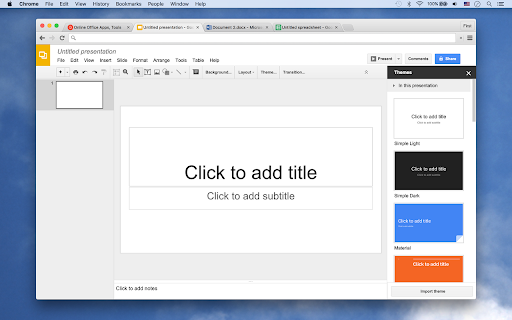
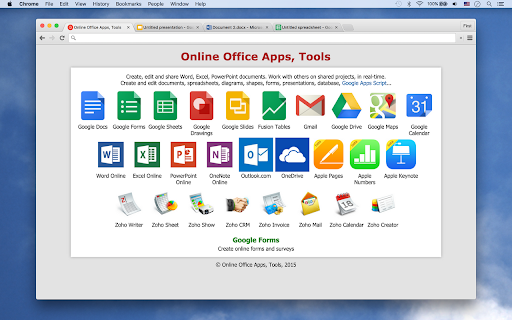

Create, edit and share Docs, Sheets, Slides, Word, Excel, PowerPoint documents. Work with others on shared projects. Tools for Create, edit and share Docs, Sheets, Slides, Word, Excel, PowerPoint documents. Work with others on shared projects, in real-time. This extension provides quick links to edit documents right away. You can create or edit a new document by simply clicking the icon on the extension. You can create and edit documents, spreadsheets, diagrams, shapes, forms, presentations, and, database on the browser. It's easy to use thanks to the intuitive interface, so inexperienced users have no problems in figuring out all that it has to offer.

Word Editor
A free & easy-to-use word editor extension for your browser. Word Editor, is a free and open-source text/document editor extension for your browser. Word Editor is very similar to popular word processor apps available in the market, except, it works inside your browser without the need for any external plug-ins or software. You can open any text or HTML document with this add-on, and save the result in HTML format. Please note that this add-on works with HTML document extension, in other words, all the input/output files need to be in the HTML format. Currently, it does not support other famous document formats such as .doc, .docx or etc. However, you can copy text from other software (such as MS word, webpage, etc.) and paste it in the add-on (preserving all the styles). Since extensions, in general, do not have access to the hard drive in order to save files, this add-on uses the download API to gain file I/O access. Therefore, all the operations related to file storage are happening in the default download folder in your browser. If you want to change this folder, please head to the extensions tab in your browser, search for download settings and update the default folder to where you prefer. Word Editor is built on top of the famous TinyMCE JavaScript library (https://github.com/tinymce/tinymce). Once you open the app for the first time, you will see a blank screen with a toolbar on top. Simply type or paste your document, and at the end, click on the save button (File > Save) to download the document as an HTML file in your system (default download location). If you have a feature request or found a bug to report, please fill the bug report form on the addon's homepage (https://mybrowseraddon.com/word-editor.html).

LibreOffice Editor
Create and edit documents with LibreOffice Online. LibreOffice Editor is a Chrome extension that allows to create, edit and view any Microsoft Word document, Excel spreadsheet and Powerpoint slide. It is an integration with LibreOffice Online and a file manager in order to handle all your documents when online. It is a document, spreadsheet and presentation editor integrated with our file manager to manage only "Office" file types with this online app. 1) It provides direct access to create a doc, xls or ppt document from scratch with this LibreOffice Editor. 2) It detects when you access to an "Office" document, and it opens it directly using this LibreOffice Editor. A) LibreOffice Editor Online, which contains the following features: - Create, edit and view XLS spreadsheets written using OpenOffice Calc, LibreOffice Calc or Microsoft Excel. - Create, edit and view DOC documents written using OpenOffice Doc, LibreOffice Doc or Microsoft Word. - Create, edit and view PPT slides written using OpenOffice Impress, LibreOffice Impress or Microsoft Powerpoint. - Styles management. - Font sizes. - Font colours. - Background colours. - Search for texts. - Insert columns / rows / tables / images.. - Delete rows / columns. - Advanced find & replace / regular expressions / special characters. - Spreadsheet functions. - Slides preview. - Export to PDF. - Auto save files. - Open source code. B) LibreOffice Desktop API, which supports the formats detailed here https://wiki.openoffice.org/wiki/Documentation/OOo3_User_Guides/Getting_Started/File_formats. 3) File manager module, which includes the following functionality over the files used by this extension: - Personal files and directories in the Cloud. - Operations with files and folders: copy, move, upload, create folder/file, etc - Search for files This LibreOffice Editor extension use the platform http://www.offidocs.com. It is available for free online users but it also allows the integration with premium users and on-premises OffiDocs deployments where the OffiDocs LibreOffice online global bundle is installed. IMPORTANT: This extension scans the URLs browsed in order to detect DOC, XLS, PPT files. The DOC, XLS, PPT files detected appear in a list located in the extension popup that are retrieved from our servers. The scanning is performed from our servers so your URL are reported to our system. No personal data is collected. This scan can be disabled with a checkbox that appears in the extension popup. If you disable this scanning, this functionality is not available so then the extension functionality is very limited.

Ultimate Office Tools
Easily Access Office Tools Right from Your Browser. Ultimate Office tools are an ideal collection of tools that enables end-users to access and open documents right from the browser. This kit features access to Google Translate, Sheets, Docs, Slides, Forms and Keep, in addition to a search bar for easy web browsing online. With this package, users can run everyday tasks conveniently at the comfort of their homes. Ultimate Office tools is a browser extension which is integrated into Chrome for reliable results. Users are required to securely sign into their Google accounts to access the extension. The search engine on the new tab will change to Bing.com once downloaded. The program comes with features that include; • Easier and fast access to programs such as Google Translate, Sheets, Docs, Slides, Forms and Keep • Fast and reliable web search powered by Bing.com • Exclusive view time Permissions The extension requires your permission to access the office tools. It also requires this permission to allow new tabs display the Ultimate Office tools extension with the features including the background image, time and customised search. The extension will override the new tab page in order to display all the Google office tools. Ultimate Office Tools does not save or share any user data or credentials. We do NOT ask or save your login and password details. Uninstallation To uninstall the extension in Chrome, go to chrome://extensions/ and locate "Ultimate Office tools", click on Remove and you will be prompted with a pop up "Remove Ultimate Office tools?", click the Remove button. Ultimate Office tools offer users the ultimate opportunity to complete tasks from their favorite browsers. The package has a storage size of 2MB where the customer support offers help in the English language. By clicking "Add to Chrome", I accept and agree to install "Ultimate Office tools" extension and hereby agree to set Chrome New Tab to that provided by the service and the Privacy Policy and Terms of Use. Please refer to our Privacy Policy (https://mediastinct.com/privacy-policy/) and Terms of Use (https://mediastinct.com/terms-conditions/) Disclaimer: Ultimate Office Tools is not a part of any of the applications or tools added in this extension including Google Translate, Sheets, Docs, Slides, Forms and Keep. It is an unofficial app (browser add-on) not linked to Google.com and an independent project and functions only as a toolbar extension that has been created to ensure that office tool services can be accessed and used at ease. Please, refer to our Privacy Policy for more details on the purpose and methods of our handling user data. Note: Once the extension is downloaded, the new tab search box will be replaced by a search bar powered by Bing.com (Microsoft), please refer to Microsoft's Privacy and Cookie policy here - https://privacy.microsoft.com/en-us/privacystatement

Office online OfficeWork for XLS DOC and PPT
Create and edit DOC, XLS and PPT files with an Office Suite online OfficeWork is an office online suite that provides a Document Editor, a Presentation Editor and Spreadsheet Editor where you can perform editing operations like in any desktop editor over documents, excel spreadsheets and powerpoint slides. Moreover, it scans and collects the webpages you browse in the Internet. These webpages are uploaded to our servers in order to know if they contain Office files that can be edited using our extension integrated with our online app. - Owncloud app integrated with OnlyOffice Community Edition, which provides all the functionality. - Create a new document or open an existing one - Create a new presentation or open an existing one - Create a new spreadsheet or open an existing one - Multiple file formats supported: * Word processing documents created with Microsoft Word * Slides used by Microsoft PowerPoint * Spreadsheet files created by Microsoft Excel * Text files - Page formatting - Change color scheme - Copy/paste text passages, undo/redo your actions - Insert section breaks - Insert headers and footers - Insert page numbers - Insert footnotes - Show/hide nonprinting characters - Set slide parameters - Apply slides transitions - Preview your presentation - Align your text in a paragraph - Select background color for a paragraph - Change paragraph indents - Set paragraph line spacing - Insert page breaks - Add borders - Set tab stops - Create lists - Apply formatting presets - Set font type, size, and color - Apply font decoration styles - Copy/clear text formatting - Add hyperlinks - Cell text formatting - Set font type, size, style, and colors - Add hyperlinks - Format in a cell - Editing cell properties - Add borders - Align data in cells - Merge cells - Change number format - Insert or delete cells, rows, and columns - Sort and filter data - Insert functions - Insert tables - Insert images - Insert charts - Insert text objects - Fill objects and select colors - Manipulate objects on a slide - Align and arrange objects on a slide - Merge Math equations - Insert equations - Document co-editing - Collaborative document editing - Save/download/print your document, presentation, spreadsheet - Search and replace function - Spell-checking
