
adbkiegjafadlmleigmjongmcadeghmo

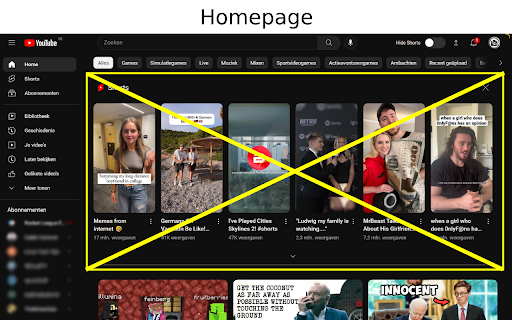
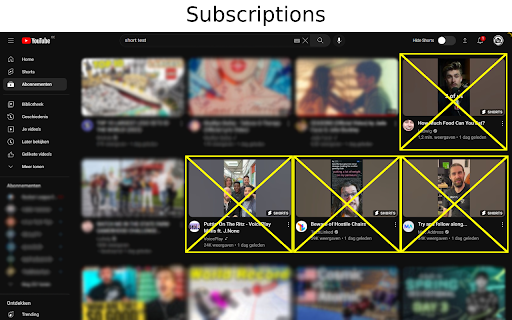
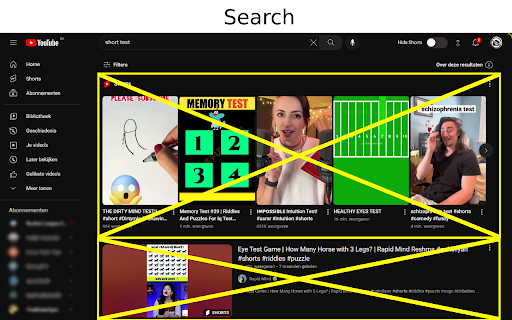
Remove Shorts from your YouTube desktop experience. This extension gives you the possibility to hide all unwanted YouTube Shorts by simply flipping a switch on the top of the page.

Unhook - Remove YouTube Recommended & Shorts
Hide YouTube related videos, shorts, comments, suggestions wall, homepage recommendations, trending, and other distractions. A browser extension to remove YouTube distractions, including the recommended sidebar, shorts, endscreen video suggestions, user comments, homepage related videos feed, trending tab, turn off autoplay or annotations, and more. Toggle the options through the popup to customize your own YouTube experience! Compatible with mobile YouTube, m.youtube.com, through Firefox on Android. Also works on video embeds. Unhook YouTube is available as an add-on for: - Firefox: https://addons.mozilla.org/firefox/addon/youtube-recommended-videos/ - Microsoft Edge: https://microsoftedge.microsoft.com/addons/detail/unhook-remove-youtube-r/hebpjnnclppdnfghdnmhgdljmjpfhggk If you find Unhook useful, please consider making a donation: PayPal.me/unhook OPTIONS: - Hide Homepage Feed - Hide Video Sidebar - Hide Recommended (Related Videos) - Hide Live Chat - Hide Playlist - Hide YouTube Shorts - Hide End Screen Videowall - Hide End Screen Cards - Hide Comments - Hide Mix Radio Playlists - Hide Merch, Tickets, Offers - Hide Video Info - Hide Video Buttons Bar (share, likes, dislikes) - Hide Channel (profile + subscribe button) - Hide Video Description - Hide Top Header - Hide Notification Bell - Hide Irrelevant Search Results ("Related to your search", "Latest from", "Searches related to", "People also search for", etc.) - Hide Explore and Trending - Hide More from YouTube - Hide and Redirect Subscriptions - Disable Autoplay - Disable Annotations

ShortsBlocker - Remove Shorts from YouTube
SHORTSBLOCKER CHROME EXTENSION ===================================== This extension removes all Shorts videos from the YouTube homepage, tabs, search, explore, and subscriptions. Good news! The free version of ShortsBlocker continues to work exactly as before. All core Shorts blocking functionality remains completely free for personal use. Free Features: * Blocks Shorts across YouTube * Lightweight, fast, and easy to use * No account required Premium Features: * Advanced customization settings * Daily Shorts limit (control how many Shorts you can watch per day) * Scheduled blocking (block Shorts on selected days and times) * Channel whitelist (allow Shorts only from selected channels) * Blocked Shorts statistics (today, weekly, total) with time-saved tracking * More premium features coming soon Please Note: The free version works great for most users and will continue to be maintained and updated. Only purchase premium if you need advanced customization. * Unauthorized commercial or institutional use violates our Terms of Service. * Personal, non-commercial users are welcome to continue using ShortsBlocker for free. ===================================== UPDATE 3.6.1 ===================================== * YouTube is changing the way Shorts are displayed, which broke the extension. * Fixed various bugs and stability issues. 👉 Please report any bugs you encounter so I can address them quickly. Love the extension? Give us a rating! ===================================== FAQ ===================================== 1. What information do you collect? * We do not collect any personal data from free users. Premium users require basic account information for authentication purposes only. 2. Do I need the premium version? * Most users are completely satisfied with the free version. Only upgrade if you need the advanced customization options. * Businesses, schools, or universities: License required. ===================================== CHROME PERMISSION JUSTIFICATION ===================================== 1. Single purpose: The extension runs on YouTube.com and adds additional features. 2. Host Permission: Used to access information and run content scripts on the YouTube website. 3. Storage Justification: Used to access and store extension settings that users can toggle manually using the popup interface.

UnTrap for YouTube — Block YouTube Shorts & Remove Recommendations
Make YouTube more focused and distraction-free. UnTrap turns YouTube into a clean, focused, and intentional space. It removes distractions like Shorts, visual noise, and attention-grabbing UI elements, so you can watch content without endless scrolling or interruptions. UnTrap offers 250+ powerful features that let you fully customize how YouTube looks and behaves — from layout and content filters to automation, focus tools, and AI-powered summaries. Short videos are one of the biggest attention traps. UnTrap lets you remove Shorts entirely or treat them as regular videos, so you stay in control without breaking your workflow. You can disable Shorts, open them in the standard player, or keep them hidden for a cleaner interface. Decide what stays and what goes. Remove related videos, comments, suggestions, live chat, notifications, buttons, sidebars, and trending sections when they pull attention away. Reduce visual noise by hiding thumbnails, overlays, promotions, and ad banners, or even the Home feed entirely. Get instant AI video summaries with key insights, timestamps, and enhanced transcripts. Jump directly to important moments, expand transcripts or descriptions, and save summaries for later — with multilingual support across content types. A calm interface and mindful controls help reduce overstimulation and support healthier viewing habits. Whether you’re building productivity habits or simply trying to stay focused, UnTrap adapts to your workflow. Enjoy a distraction-free player with full-window viewing, resizable layout, and precise playback controls. Personalize YouTube with themes, cinema mode, or full-size theater mode. Restore the old YouTube layout, use legacy list views, or switch to a minimal interface. Small tweaks like disabling ambient lighting or improving in-page search refine everyday use. Filter content, block unwanted videos or channels, mute topics, and apply keyword-based rules to shape your feed. UnTrap supports advanced content filtering and parental control tools to help build a safer, distraction-free environment. Save time with smart automation. Disable autoplay, auto-skip video promotions, add intentional opening delays, set default playback speed, enable fullscreen automatically, redirect the Home page, and control YouTube with custom keyboard shortcuts. YouTube adapts to you — not the other way around. UnTrap works across desktop, mobile, and embedded YouTube players, making it a reliable YouTube enhancement wherever you watch.

No YouTube Shorts
Tired of the YouTube Shorts? No problem, this extension has your back and removes them from the YouTube page! New in version 0.6.6: - Adjustments for the new YouTube design
