
enboaomnljigfhfjfoalacienlhjlfil
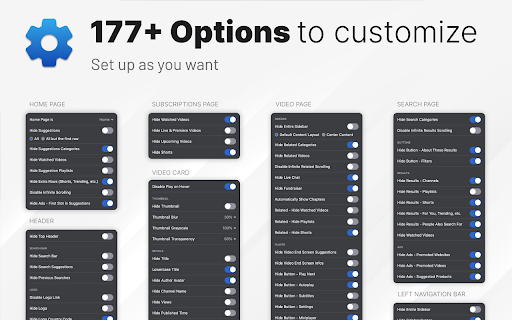

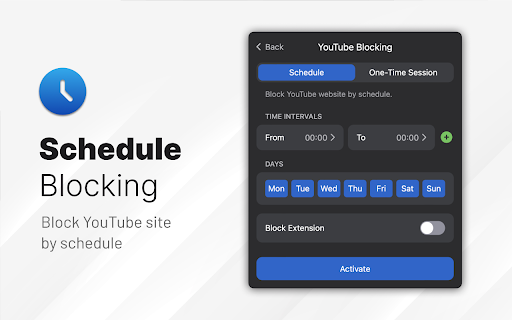

Make YouTube more focused and distraction-free. UnTrap turns YouTube into a clean, focused, and intentional space. It removes distractions like Shorts, visual noise, and attention-grabbing UI elements, so you can watch content without endless scrolling or interruptions. UnTrap offers 250+ powerful features that let you fully customize how YouTube looks and behaves — from layout and content filters to automation, focus tools, and AI-powered summaries. Short videos are one of the biggest attention traps. UnTrap lets you remove Shorts entirely or treat them as regular videos, so you stay in control without breaking your workflow. You can disable Shorts, open them in the standard player, or keep them hidden for a cleaner interface. Decide what stays and what goes. Remove related videos, comments, suggestions, live chat, notifications, buttons, sidebars, and trending sections when they pull attention away. Reduce visual noise by hiding thumbnails, overlays, promotions, and ad banners, or even the Home feed entirely. Get instant AI video summaries with key insights, timestamps, and enhanced transcripts. Jump directly to important moments, expand transcripts or descriptions, and save summaries for later — with multilingual support across content types. A calm interface and mindful controls help reduce overstimulation and support healthier viewing habits. Whether you’re building productivity habits or simply trying to stay focused, UnTrap adapts to your workflow. Enjoy a distraction-free player with full-window viewing, resizable layout, and precise playback controls. Personalize YouTube with themes, cinema mode, or full-size theater mode. Restore the old YouTube layout, use legacy list views, or switch to a minimal interface. Small tweaks like disabling ambient lighting or improving in-page search refine everyday use. Filter content, block unwanted videos or channels, mute topics, and apply keyword-based rules to shape your feed. UnTrap supports advanced content filtering and parental control tools to help build a safer, distraction-free environment. Save time with smart automation. Disable autoplay, auto-skip video promotions, add intentional opening delays, set default playback speed, enable fullscreen automatically, redirect the Home page, and control YouTube with custom keyboard shortcuts. YouTube adapts to you — not the other way around. UnTrap works across desktop, mobile, and embedded YouTube players, making it a reliable YouTube enhancement wherever you watch.

Search Fixer for YouTube
Remove all distracting YouTube search suggestions, redirect shorts and much more! This extension is designed to fix YouTube search and de-clutter your results feed to make it less distracting. FEATURES 1. Remove suggestions like "For you", "People also search for", "Searches related to", "Learn while you're at home", "Related to your search", "People also watched", "Other people are watching", "Recommended to you" and "Latest YouTube posts" from your feed. 2. Remove Shorts from search results 3. Remove watched content from results. 4. Remove live videos from search results 5. Remove time-stamped content from results. 6. Remove artist and verified channel content from results. 7. Individual toggles for turning off sections. Eg. Horizontal Cardlist, Shorts Panel, Auto-Generated YouTube Mixes and many more. 8. Use an option to permanently redirect "shorts" back to the normal video page. 9. Turn off playlists from appearing in search results. 10. Hide YouTube mixes and reels suggestions. 11. Remove musician sidebar(optional). 12. Filter out channel listings from results. 13. Remove courses from search feed. 14. Video Spotlight to highlight videos in the search page (optional). 15. Centered video title (optional). 16. Centered video description (optional). 17. (New) Display search results in grid view. 18. (New) Power search lowers visibility of results that don't contain your search query. 19. An options page to turn off visual changes. IS IT SAFE? Absolutely. This is some barebones JavaScript to detect elements and some CSS to apply visual changes. There are no trackers phoning home or telemetry scripts working in the background in this extension. Not to mention no data is being sent or shared with any third party or the developer. It's completely open source so you can audit the code. PRIVACY POLICY This extension does not send or receive data of any kind nor does it use any cookies. This means no analytics of any kind. --- Search Fixer for YouTube™ YouTube™ is a trademark of Google Inc. Use of this trademark is subject to Google Permissions.

UnHook YouTube
Use UnHook YouTube tool to hide shorts, comments, remove recommendations, related videos. Get distraction free and focusing youtube. Introducing UnHook YouTube – Your Gateway to Distraction Free Viewing! 🚀 Did you know that recommendations are responsible for over 70% of time spent on the platform? Take back your time and install Unhook Youtube. This tool is fully customizable! Just tap on it in the toolbar and choose the options you want to remove. 🧑💻 How to Make the Most of It: 1. Install extension by pressing the button Add to Chrome. 3. Click on the UnHook YouTube icon in the toolbar. 4. Choose which distractions to remove from these options: hide homepage recommendations, hide explore, hide subscriptions, hide shorts, hide related videos on the video page, hide comments, hide video endscreen, hide thumbnails. Are you tired of feeling like you're in a never-ending loop, constantly bombarded with shorts, trending videos, and endless distractions? It's time to take back control of your online experience with unhooked YouTube – the ultimate Chrome tool designed to help you focus on what truly matters. With UnHook YouTube, you can customize your environment to suit your needs, enabling you to get distractions free youtube and create a space where you can concentrate on the content that aligns with your goals and interests. Let's dive into the features that make unhooked Youtube the must-have tool for anyone seeking a more focused browsing experience: 1️⃣ Disable YouTube Shorts: Say goodbye to those addictive short videos that keep pulling you away from your tasks. With unhooked youtube, you can easily disable shorts and regain control of your viewing habits. 2️⃣ Hide youtube comments: Say farewell to the endless scroll of comments that can distract you from the video content. unhook youtube lets you disable comments, giving you a cleaner and more streamlined viewing experience. 3️⃣Hide youtube Explore: Keep your homepage clutter-free by hiding the explore tab. Say goodbye to irrelevant recommendations and hello to a personalized feed that caters to your interests. 4️⃣ Hide YouTube Related Videos: Put an end to the cycle of clicking from one video to the next. With UnHook YouTube, you can hide related videos on the video page, allowing you to focus on the content at hand without getting sidetracked. 5️⃣ Hide youtube Subscriptions: Keep your subscription feed clean and clutter-free by hiding subscriptions. UnHook YouTube ensures that you only see the channels and content you truly care about. 6️⃣ Hide Youtube Homepage Recommendations: Take control of your homepage by hiding recommendations that don't align with your interests. UnHook YouTube lets you customize your feed, ensuring that you only see content that matters to you. 7️⃣ Hide Youtube Thumbnails: Say goodbye to distracting thumbnails that lure you into clicking on videos you don't need to watch. unhook youtube allows you to hide thumbnails, so you can focus solely on the titles and descriptions of videos. 8️⃣ YotTube Unhooked: Take control of your watching experience in a whole new way with unhook YouTube. Say goodbye to distractions and hello to a focused browsing experience that allows you to make the most of your online time. Stay tuned for future updates, where we plan to introduce enhanced hiding options and new features for staying focused. 💡 Unhook youtube is a chrome extension that allows you to remove distractions: youtube comments, youtube explore, youtube related, block youtube shorts, subscriptions, video endscreen, thumbnails. 📌 Can I use it for free? 💡 To install unhook youtube, press the button "Add to Chrome". 📌 Can extension hide anything on the platform? 💡It can remove most of the distractions available there. Soon we'll add more options. 📌 Is it safe for my privacy to use this extension? 💡 Yes, this tool operates locally within your browser, ensuring the privacy and security of your personal information. It does not collect or store any user data. 📌 Is it available on iOS, Android, Windows, and Mac? 💡Development for these platforms is in progress, and soon you'll be able to enjoy our tool on multiple platforms. UnHook YouTube fast isn't just a tool – it's a game-changer for anyone who wants to make the most of their time online. Whether you're a student trying to study, a professional trying to work, or just someone who wants to enjoy distraction free youtube, Unhook youtube is the solution you've been searching for. So why wait? Install unhook youtube today and experience the freedom of distraction free Youtube. Take control of your online experience and unlock a world of productivity with our focus youtube tool! 🌟

Hide YouTube Thumbnails
Hide YouTube Thumbnails for less clickbaity browsing Simply hides thumbnails on YouTube to have a more peaceful and less distracting browsing experience. Also useful for avoiding spoilers or inappropriate imagery. This extsion could also be descibed as blocking YouTube thumbnails on videos, disabling YouTube thumbnails on videos, blurring YouTube thumbnails on videos. People have found it useful for: - Hiding distracting or inappropriate YouTube thumbnails in class when teaching students - Hiding YouTube thumbnails to reduce distraction and procrastination when studying or working - Hiding YouTube thumbnails to avoid spoilers in the video

Minimal YouTube
An extension for that replaces the YouTube UI with a minimal design containing no recommendations, shorts, or distractions. Dopamine Free Youtube at your service
