
phmcfcbljjdlomoipaffekhgfnpndbef
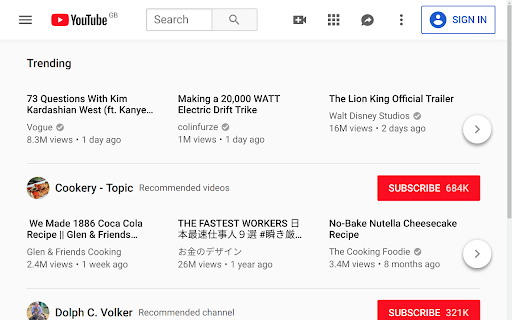
Hide YouTube Thumbnails for less clickbaity browsing Simply hides thumbnails on YouTube to have a more peaceful and less distracting browsing experience. Also useful for avoiding spoilers or inappropriate imagery. This extsion could also be descibed as blocking YouTube thumbnails on videos, disabling YouTube thumbnails on videos, blurring YouTube thumbnails on videos. People have found it useful for: - Hiding distracting or inappropriate YouTube thumbnails in class when teaching students - Hiding YouTube thumbnails to reduce distraction and procrastination when studying or working - Hiding YouTube thumbnails to avoid spoilers in the video

hide youtube thumbnails
The extension for hide youtube thumbnails hide youtube thumbnails for spoilers, leak contents. All thumbnails is hided on default. You can show a thumbnail by mouseover. For everyone waiting for entertainment like movies, tv shows, You could be free from the stressful and suffering days avoiding spoilers.

FocusTube: Remove All Distractions from YouTube
Stay focused on YouTube by hiding distractions: thumbnails, Shorts and more. 🎯 FocusTube: Remove Distractions and Reclaim Your Attention from YouTube's Algorithm 🛠️ Built by Benjamin Floyd Rubin (ex-Amazon) YouTube's algorithm decides what you see. FocusTube lets you take that control back. Hide or show exactly what you want on every page: Shorts, recommendations, comments, thumbnails, feeds. Use YouTube without distraction. ✦ CUSTOMIZE EVERY PAGE ✦ 🏠 Home / 🔔 Subscriptions / 🔍 Search / 🎬 Video / 👤 Channel / 📋 Playlists Toggle what appears on each page independently. Hide or show: navigation, sidebar, Shorts, thumbnails, video feeds, comments, recommendations, live chat, video end cards, view counts, like/dislike buttons, breaking news, YouTube Playables, and more. Lock any control so "hide/show all" skips it. Fine-grained control without the chaos. ✦ BLOCK YOUTUBE WHEN YOU NEED IT ✦ 🚫 Enable hard block mode to stop browsing entirely. Choose to block all open tabs or new tabs only. YouTube redirects to a focus screen. One toggle to unblock. Your block settings remember your preference, no need to reconfigure every time. ✦ MINIMAL, FOCUSED HOMEPAGE ✦ 🔍 Enable Google-style homepage layout for a distraction-free, search-first YouTube. Cleaner interface, fewer engagement traps, more control over what you see. ✦ YOUR SETTINGS, YOUR ACCOUNT ✦ ☁ All preferences sync to your Google account via Chrome Sync. Dark mode extension popup. Per-page visual preview so you know exactly what each toggle does before you enable it. Toggle groups let you hide or show all unlocked elements at once. ✦ LIGHTWEIGHT & PRIVATE ✦ 🔒 No tracking. No ads. No analytics. Your preferences stay on your device and sync to your Google account. Runs silently in the background with minimal overhead. ✦ FINE-TUNED CONTROLS ✦ ✶ HOME PAGE: Hide navigation, sidebar, video feeds, Shorts, thumbnails, breaking news, YouTube Playables ✶ SUBSCRIPTIONS: Hide navigation, sidebar, subscription videos, Shorts, thumbnails ✶ SEARCH: Hide navigation, sidebar, search results, Shorts, thumbnails ✶ VIDEO (WATCH PAGE): Hide navigation, player controls, title, description, comments, recommendations, thumbnails, Shorts, like/dislike buttons, view counts, post time, end cards, live chat ✶ CHANNEL: Hide navigation, sidebar, channel content, thumbnails ✶ PLAYLISTS: Hide navigation, sidebar, playlist content, thumbnails ✦ COMING SOON ✦ ⭐ FocusMode (watch ad-free, cookie-free YouTube) ⭐ Lock Settings (schedule or lock your FocusTube settings while on YouTube) ✦ SUPPORT & FEEDBACK ✦ 💬 Submit support tickets, feature requests, and bug reports at getfocustube.com/support

Youtube-shorts block
Play the Youtube shorts video as if it were a normal video. A extension allows youtube shorts videos to play on a regular page. Features - Redirect shorts - Hide "shorts" tab - Hide shorts - Extended GUI for shorts player *** "Hide shorts video" is now enabled by default!!!! If you don't want to do that, please disable in option page! *** The UI of Youtube-shorts is not very well optimized for PCs and has poor functionality. This extension aims to improve the user experience by displaying short videos in the regular video player. ...utube.com/shorts/"video-id" ↓↓ ...utube.com/watch?v="video-id" Change the URL to something like. v1.5.5 features - Fix: Extension Breaks YouTube's New Replies UI #64 v1.5.2 features # Changed - Fix block the entire News(and other) page v1.5.1 features # Changed - Fix where opening in a new tab redirected to the wrong video v1.5.0 features # Changed - refactoring codebase - Fixed an issue where the hide shorts feature might not work depending on the environment (specifications). - Fixed the "open in new tab" feature on the shorts screen. - Updated to comply with YouTube's latest specifications (blocking ytd-rich-shelf-renderer). v1.4.2 features # Added - Russian translation from @jooblex # Changed - Support for Youtube specification changes v1.4.1 features # Added - German translation from @golgorath # Changed - Support new subscription page(Hide shorts video) v1.3.1 features # Changed - Fixed a bug that redirected links that were not short videos containing the string "shorts" v1.3.0 features # Added - Added "Open in regular player" button in the Shorts player - Block Shorts-related feeds (if Hide shorts video is enabled) - Add a Release notes # Changed - Fixed the problem that the load spinner does not disappear when "Hide Shorts video" is selected - Optimize "hide shorts video" v1.5.4 features - Additional selector for Shorts shelf elements by @HardyHeron2008 in #62 - Fix timing issue for richShelfFilter by @seporterfield in #63

Hide Youtube Viewers and Ratings
This app hide the number of watching now, rating, viewers, and subscribers on youtube. INFO: 2025/07/26 The number of viewers for videos in the sidebar cannot be removed at this time. There may be a strange script on the YouTube side. The YouTube UI changes at different times for different people. Therefore, there are cases where it may not be possible for us to respond without UI information. The following settings are possible for youtube. ・Hide the views and WatchingNow ・Hide the rating ・Hide the subscribers ・Hide the comment ・Hide the comment rating YouTube specifications (roughly) ・ Hide the number of views on the Top page ・ Hide the number of Watching Now on the Top page ・ Hide the number of subscribers on the channel page ・ Hide the number of views on the channel page ・ Hide the number of views on the video page ・ Hide the number of Watching Now on the video page ・ Hide the rating of the video page ・ Hide the number of subscribers on the video page ・ Hide the number of views of the video on the side of the video page ・ Hide the comment on the video page ・ Hide the comment rating on the video page -------------------------------------------------------- Please use this,If you want to hide the number of viewers and Watching Now on Twitch. Hide Youtube Viewers and Ratings - Chrome Store Page https://chrome.google.com/webstore/detail/hide-twitch-viewer-count/mflpplkkbeohfhkdbjfciehbkgmmdapg I made this for myself, so I do not customize pages that I do not usually see. If you have any requests, please use the following Twitter or Link Click here for details and requests. ( Note or Twitter ) https://note.com/siroiudon/n/nfcdb37f1bb52 Twitter:@shiroi_udon Donate to the author💸:https://www.paypal.com/paypalme/shiroiudon Ko-fi: https://ko-fi.com/shiroiudon ---------------- Update 1.1.11:update (fix hide comment Rating 1.1.9:Partial update to new UI 1.1.8:Partial update to new UI(rating 1.1.7:Partial update to new UI(rating 1.1.6:Partial update to new UI 1.1.4 : Dealing with youtube UI changes (provisional version) 1.1.3 : This add-on changed for manifest V3. Changed to only hide the number of ratings for comments.(e.g. Reply button for comments, etc. is shown)
