
acmfnomgphggonodopogfbmkneepfgnh
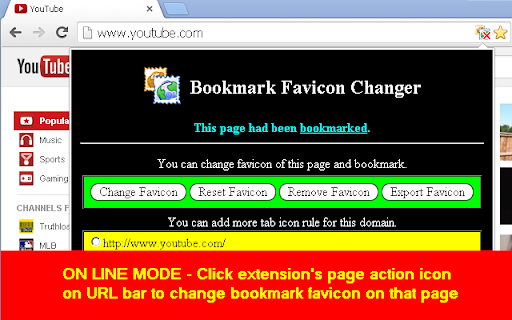
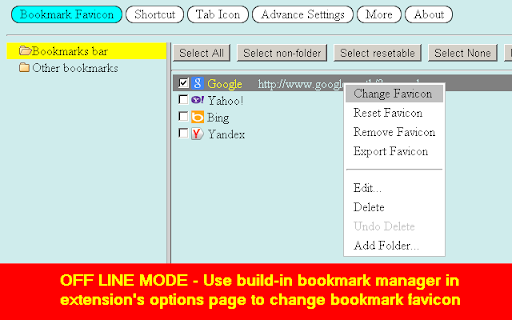
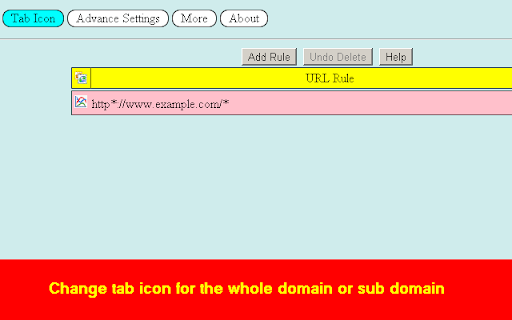
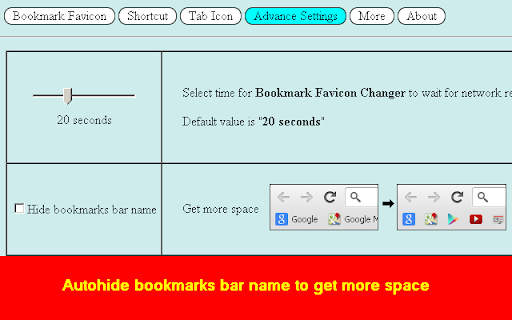

Change your bookmark favicon with ease using the Bookmark Favicon Changer extension. Simply click the extension icon or open the options page. Right-click on any bookmark, and a popup menu will appear, offering options to “Change Favicon,” “Reset Favicon,” and “Export Favicon.” - Use any image file or image URL supported by your browser as a favicon. - Automatically resize images to a maximum of 512x512 pixels and save them as PNG files. - No need to keep the original favicon file after changing it. - Easily reset the favicon back to its original state. - Export your custom favicon for bookmarks. - Assign icons to tab icons for entire domains or subdomains. - Auto-hide bookmark bar names to maximize space. Limitations: - Bookmarks with the same URL will share the same favicon. - You can only change the favicon for bookmarks with HTTP, HTTPS, or file protocols due to Chrome’s security permissions. - To protect your custom favicon, keep the “Bookmark Favicon Changer” extension active; uninstalling the extension will revert your favicon to the default. - Remember to enable “allow access to file URLs” in your browser extensions settings to change favicons for file URLs.

Bookmark Manager and Viewer
An elegant bookmark manager with fuzzy search and more The "Bookmarks Manager and Viewer" extension provides a panel view to modify your bookmarks. The panel is equipped with fuzzy search (like Google search) to help you find the matching bookmarks. You have a set of tools to edit your bookmarks on the fly. It is even possible to drag a bookmark to a new position in the tree or create a new directory and place the bookmark inside it. Features: 1. Fuzzy Search: Use to find matching items even if you are not sure what the exact title or URL of the stored bookmark is. 2. Validation Button: Delete broken bookmarks or find duplicated bookmarks recursively. 3. Edit Properties: Modify the title or address of a bookmark 4. Toolbar Color: Detect if the current page is bookmarked or not 5. Sort Bookmarks 6. Supports Live Bookmarks 7. Opening Mode: Open in a browser tab or popup view 8. Keyboard Navigation and Operation

Recursive Bookmark Sorter
Sort your bookmarks recursive ## Sort your chrome bookmarks recursive ### Description This extension can sort ALL your bookmarks RECURSIVELY. Withouto this extenion you can sort ONLY ONE bookmark folder by Chrome Bookmark Manager. Now, ALL bookmarks will be sorted by just one click !

Sprucemarks
• Organize your Bookmarks Bar, Other Bookmarks, and Mobile Bookmarks. • Group folders together or have them sorted alongside bookmarks. • Each area can have its own sort order. • Save your options once and have your bookmarks sorted now and automatically into the future. • Review and improve your bookmarks collection with a suite of tools. Check for and optionally remove empty folders, duplicate bookmarks, and similar bookmarks. View and optionally clear your bookmark history. Sprucemarks can be used alongside other bookmark extensions but you must be careful that both extensions do not try to sort the same areas. Each extension may have its own sorting logic which may lead to endless sorting as each extension reacts to changes by the other. LIMITATIONS FOR CHROME Chrome may display bookmarks out of order if you have a mix of local and synced bookmarks. To avoid this issue, use only local or synced bookmarks, not both. Sprucemarks respects your privacy. https://nightmode.fm/software/sprucemarks/privacy This software is provided under a no-contact and no-support model. Do not contact the author, for any reason, even if you think it would benefit the author.

Bookmarks Organizer
Bookmarks Organizer helps in keeping the bookmarks sorted. It monitors for newly added or moved bookmarks and auto arranges them in ascending order by title. There is a reorder button to manually order the whole bookmark, which can be used initially after installation or import. Only bookmarks in the Bookmarks Bar are sorted. If you want to have a custom order, those bookmarks can be placed inside the Other Bookmarks. Limitations: There are max write limits set by the browser so that the sync servers are not abused. So only a certain number of move operations can be performed per session in a given interval of time.
