
mnhojcjhcilkgkmijhphlbmghmmdhlfg
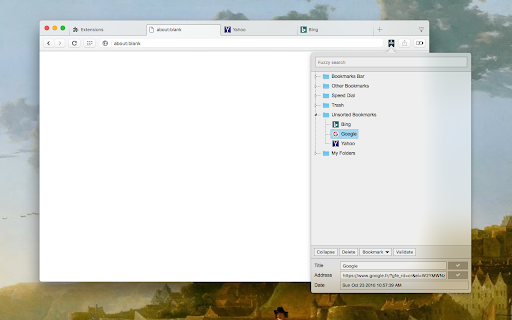
An elegant bookmark manager with fuzzy search and more The "Bookmarks Manager and Viewer" extension provides a panel view to modify your bookmarks. The panel is equipped with fuzzy search (like Google search) to help you find the matching bookmarks. You have a set of tools to edit your bookmarks on the fly. It is even possible to drag a bookmark to a new position in the tree or create a new directory and place the bookmark inside it. Features: 1. Fuzzy Search: Use to find matching items even if you are not sure what the exact title or URL of the stored bookmark is. 2. Validation Button: Delete broken bookmarks or find duplicated bookmarks recursively. 3. Edit Properties: Modify the title or address of a bookmark 4. Toolbar Color: Detect if the current page is bookmarked or not 5. Sort Bookmarks 6. Supports Live Bookmarks 7. Opening Mode: Open in a browser tab or popup view 8. Keyboard Navigation and Operation

Bookmark Manager
Experience a new bookmark manager with restore session page, search & better history and bookmarks. Now save and manage your Tabs as sessions. Organise them using drag & drop from UI. Sessions (Tabs) page is now with search functionality. You can delete duplicate URLs with one click. You can search your bookmarks and history, right from the extension popup. Organise your existing bookmarks using Bookmark Manager. You can move your existing bookmarks to separate folders, by just specifying any word present in your bookmark URL. Manage bookmarks and folders: – Identify Duplicate bookmarks. – Clean your bookmarks by deleting empty folders. Set shortcut for triggering extension: Go to Url 'chrome://extensions/'. In the menu there is a Keyboard shortcuts link. Permissions: – "Tabs" in order to save your browsing sessions. – "Bookmarks" in order to save bookmarks. Note: None of your information (history or bookmarks) are stored or kept anywhere else than on your computer.

Popup my Bookmarks
A more efficient way to view and manage your bookmarks menu. - Search bookmarks when you type - Do what Bookmark manager can do and more (e.g., Sort bookmarks by name, Add separator) - Save 24px of your vertical workspace (Rock on Chromebook!) - Take as few permissions as possible, we never put your privacy at risk - No background running application, save computer memory and your privacy!

Bookmarks
Bookmarks popup window gives you quick access to your favorite websites. A simple and minimalistic pop-up bookmark manager.

Bookmanize - Advanced bookmark manager
Advanced bookmark manager provides tagging, instant sorting, and filtering among all bookmarks on a full list view. Bookmark manager with a clean user interface where all bookmarks can be easily accessed in one full list view with tagging, instant sorting, and filtering. Organize your bookmarks with custom tags and faster navigates between them. We are an independent team of developers who love what they do:) If you want to improve or expand anything - email us bookmanize@gmail.com Support us with a cup of coffee - https://www.buymeacoffee.com/bookmanize ★ All bookmarks on one screen ★ Fast access to all main functions ★ Instant searching, filtering, sorting, adding, deleting bookmarks ★ Drag n drop bookmarks and folders All the features that the default bookmarks have (add, delete, sort, drag and drop bookmarks) in a more user-friendly interface with high performance for a large number of bookmarks Note: Your data (history and bookmarks) is not saved or stored anywhere else but on your computer. Hotkeys: - ctrl+shift+f or command+shift+f — focus the search field
