
ackephkehloidacldkffjpohlhmmnfof
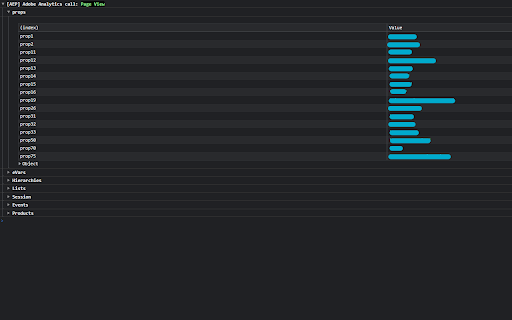
Extension to parse Adobe Experience Platform analytics requests Are you using Adobe Experience Platform Launch with the Adobe Analytics Connector in your website or web application? Are you tired of manually looking for which parameters were sent to Analytics? This extension is perfect for you! Simply open the console and enjoy a clear visualization of the variables sent to Analytics! In this first version I tried to display all the necessary parameters; in case you need a specific one, feel free to contact me or open an issue on GitHub :)

Tealium Tools
Evaluate website data, tags, and events with powerful tools for seamless Tealium iQ integration and server-side enrichments. Access quick links to documentation, training, and support, along with a catalog of custom tools built by the community. Improve your Tealium implementations with features like Web Companion for data layer validation, Server-side Trace for real-time action debugging, and Environment Switcher for seamless testing. Additional tools for troubleshooting, real-time interaction, and comprehensive testing ensure efficient, error-free setups. NEW FEATURES in V3: - New Side Panel Support - SSO Login - Click-and-Hold to Custom Sort - Built-in Feedback form 🔍 | Web Companion Easily inspect and validate your website's data layer, including cookies, JavaScript variables, and other critical elements. Fully integrated with Tealium iQ, Web Companion allows you to evaluate tags, extensions, and load rules directly on your web pages. 🎯 | Server-side Trace Monitor and debug your audience segmentation and real-time actions with Trace. Ensure the accuracy of visitor attributes, segment updates, and action firing to refine your digital marketing strategies. 🔄 | Environment Switcher Seamlessly switch between development, QA, and production environments within Tealium iQ to test and validate tags before deployment, ensuring error-free implementations across your digital properties. 🛠️ | uTag Debugger Diagnose and troubleshoot your Tealium iQ Tag Management setup with real-time logs that display tag execution and data layer interactions, ensuring accurate and efficient tag deployment. 💡 | Custom Tools Build complex and rich apps for the Tealium ecosystem. Custom tools allow you to run JavaScript on the current page, similar to an advanced bookmarklet, enabling you to gather data and create powerful, tailored tools for your specific needs. ➔ Real-Time Interaction: Make adjustments instantly with immediate feedback within your browser. ➔ User-friendly interface: Simplifies complex processes, making it accessible for both technical and non-technical users. ➔ Comprehensive Testing and Debugging: Provides tools for thorough testing and validation to ensure reliable performance and accurate data collection.

Adobe Experience Platform Debugger
Debug Adobe Experience Platform and Adobe Experience Cloud products using the Adobe Experience Platform Debugger The new Adobe Experience Platform Debugger helps to debug Adobe Experience Platform and Adobe Experience Cloud products. The new Debugger includes everything you love in the previous debugger plus these new features: Fresh-yet-familiar design Enjoy a debugging experience that feels more intuitive and natural. More space to debug The new navigation bar auto-collapses when Debugger get too small to ensure you have enough space to debug. See your data layer in action See data layer changes on a timeline alongside every Adobe network call to more easily debug your data. Understand your data layer Toggle the diff viewer to see how your data layer evolves across the event timeline. Freely Flip through tabs Click the Lock icon to stay connected to the current tab in focus without losing the context of the page you’re debugging. Implementation health at your fingertips See in-context implementation health checks powered by Adobe Experience Platform Auditor so ensure your Adobe implementations are healthy. More flexible Launch and DTM testing Inject Launch embed codes, or replace or block both DTM and Launch embed codes. Easy on the eyes Go to settings to toggle between dark- and light-mode.

AEP Enhancement Suite
A collection of AEP features designed to provide a frictionless experience for practitioners. Practitioners working in Adobe Experience Platform can greatly improve their efficiency using our Enhancement Suite. It's been built for practitioners, by practitioners. > Speedy Root Cause Analysis Simply click an icon to download any batch from a dataset, enabling lightning fast diagnosis and error correction. Quickly scale your problem with failed batches, enabling you to prioritize the problem before spending hours addressing it. > Streamlined Data Collection Quickly and easily filter rules through applying meta tags to the rule names so you spend less time searching and fumbling with Data Collection's default search UI. For those with a lot of rules, quickly and intuitively identify what's disabled vs. what's enabled. Speed up your publishing workflow with a handy reminder to use a Working Library. > Intuitive Data Analysis Toggle word wrap for your dimensions so you don't have to waste time figuring out what's overflowed from the column.

Adobe Experience Cloud Visual Editing Helper
The Visual Editing Helper extension allows users to load their website into Adobe Target or Adobe Journey Optimizer. The Visual Editing Helper Chrome extension allows Adobe Experience Cloud users to load their website into Adobe Target or Adobe Journey Optimizer and to use a visual WYSIWYG editor to personalize it. The extension solves site-loading issues for which customers now rely on the Target Enhanced Experience Composer or third-party extensions to be able to author their websites. Benefits of using the Visual Editing Helper extension: - All iframe busting headers, such as X-Frame-Options and Content-Security-Policy, are implicitly removed from the website to enable authoring. - Extension sets SameSite attribute to the value "None" for the website's session cookies in order to be able to login using the visual editor. - Customers new to Target or to Journey Optimizer can use the extension to experiment even if their IT developers have not yet implemented Target or Journey Optimizer on their websites.
