
acdnmaeifljongleeegkkfnfcopblokj
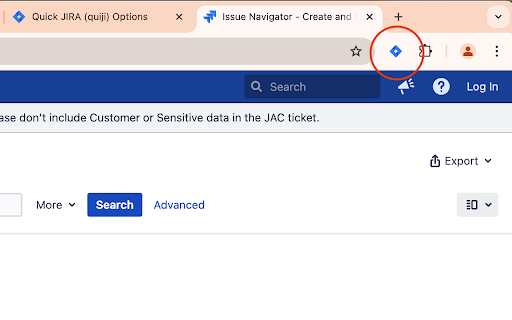


Quickly opens the JIRA with the corresponding ticket Quick JIRA (short just quiji) is designed to speed up your workflow. With the simple button you can access any JIRA tickets within seconds, instead of typing the whole time in the address bar. You just type the ticket ID and hit enter and are directly on the JIRA ticket page. Alternatively you can use the omnibox by typing the keyword 'jira' first and then your ticket ID You can switch between the current and the new tab as your default action. Quick JIRA is equipped with the following features ● button for current tab ● button for new tab ● button to re-open last ticket ● hotkey to open the dialog (CTRL + SHIFT + K) ● hotkeys to open the selected text as a ticket in the current (ALT + K) or a new tab (ALT + SHIFT +K) ● omnibox command: jira ● options page to select JIRA URL and default action of the enter key ● right click (context menu) integration ● fully localized into English Support (and source code) can be found at GitHub: https://github.com/timbru31/quickjira Follow me on X: https://x.com/timbru31 I am not affiliated with Atlassian in any way. The JIRA logo belongs to Atlassian and was obtained from the press kit.

Jira Extension in Chrome
The Jira Extension in Chrome is the ultimate solution to connect your Google Apps with Jira. Jira Extension in Chrome simplifies Jira ticket creation from Gmail, Google Calendar, Drive, Microsoft Edge, and anywhere online. ** Don't forget to download the Google To Jira - GTJ app on your Jira instance from the Atlassian marketplace through this link https://l.linklyhq.com/l/isHY ** This is the ultimate extension to connect Google to Jira, with its fresh and intuitive user experience. Jira ticket creation has now evolved with the ability to create tickets from anywhere! ✔ Need to turn an email into a Jira issue? ✔ A Calendar event into a new task? ✔ Create and attach files from Google Drive? ✔ Find content on Google or ChatGPT that you need to include in a Jira issue? Everything is on the table! It's time for a new way to handle Jira project management and this tool will help you lead the way. You can now: ► Switch between multiple Jira accounts in Gmail ► Link emails to existing Jira issues for better tracking ► Switch to dark mode to reduce eyestrain. ► Create Jira tickets from Google Apps and any content online ► Edit, comment, and log work on tickets ► Create a task/sub-task and view related issues ► Allow customer access to Jira Service Management portal ► Support 3rd party add-ons including Insight, Elements Connect, and Tempo fields with preset configurations ► Support all Jira platforms ► Advanced JQL search ► Arabic and all languages support ► Support custom fields, new labels, and rich media ► Preview, rename and delete attachments ► Upload email attachments and inline images ► Cloud, Server, and Data Center login ► Add email subject as summary and body as description/comment ► Detect Jira issue keys from email subjects ► Detect meetings/event duration with Calendar's time tracking

Ticket Templates for JIRA
This addon inserts templates easily into textfields. It supports autofill, quickfill, sharing and many more. With Ticket Templates for JIRA you can create templates for user stories, bugs or comments you often need. This extension provides a autofill function, shortcut buttons and many more. ✔ autofill templates based on issuetype and project ✔ create custom templates for tickets or comments in JIRA, Trello, Asana ... ✔ inserting templates with quickaccess buttons, dropdown menu or right-click menu ✔ easy sharing your templates with your team via export and import via file or URL ✔ keep existing descriptions while inserting your template ✔ add templates for specific projects ✔ add custom ticket types

Time Tracker by Tempo
Track and visualize your progress on Jira issues Track the duration of your work on Jira issues with real-time browser trackers. Start a tracker and assign it to a Jira issue, or use it for work outside of Jira * Add new trackers and pause or stop them as required * Use as many trackers as you like when working on multiple issues at once * Visualize all active trackers across your browser tabs * Log time from extension or from the Log Time form on Timesheets * Locate trackers easily from the bottom-right of your browser Time Tracker by Tempo is free and available for all Tempo customers on Jira Cloud. UPDATE (v.2.0.10): * Log time directly from the extension, or go to the Log Time form on Timesheets to specify details like Start Time, Account, etc. UPDATE (v.2.0.1): * Trackers are visible across all webpages (not just Jira) * Log time directly from the extension (if your Tempo instance does not require additional worklog attributes) * Edit duration before logging time * Extension icon shows tracker is running * Hide presence of trackers if required

Night Mode for Jira
Take care of your eyes day and night using dark theme for Jira tools and services. Looking for a way to change the color of Jira Service Management UI to black? Atlassian doesn’t offer this out of the box, so we created an extension that can change the white light of the Jira Service Management to black. NEVER STRAIN YOUR EYES AGAIN The dark skin will do what the name implies. But for greater comfort, we added the possibility to tweak the contrast and brightness of the colors. Don’t forget about the Night Shift to save your eyes from straining. Shift the color scheme from blue to warm and minimize the harmful effects on your eyesight. MAINTAIN A HEALTHY SLEEP CYCLE WITH NIGHT SHIFT Excessive exposure to blue light that comes from the computer screen can mess up your sleep. Therefore, we added Night Shift, which you can turn on and off when needed. It will change the blue light to soft, warm tones to reduce the risk of insomnia and other health issues.
