
abgjhpgebjabcdihdnlmnjkkpaifgalg


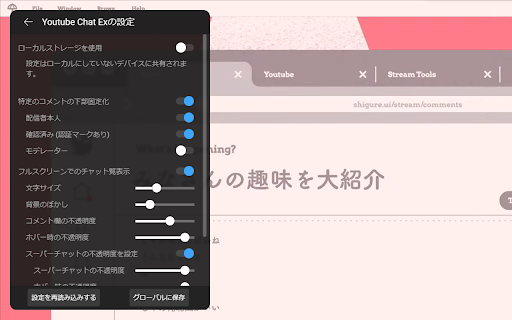
Provides additional features to Youtube. It can be used by checking the item you want to add. Main features Bottom pinning of specific comments like streamer and verified user. Show the Youtube chat in full screen viewing. Mouse scrolling in Super Chat list. How to open the settings screen Click on the button in the upper right corner of the chat field to access the settings. Update history 2.0.13 (2024-12-01) fix Corrupted layout 2.0.12 (2024-11-30) fix Corrupted layout 2.0.11 (2025-11-30) fix Chat view does not work properly 2.0.10 (2025-09-28) fix Chat view does not work properly 2.0.9 (2025-08-06) fix Chat movement does not work properly 2.0.8 (2025-06-29) fix Minor style corrections 2.0.7 (2024-12-16) fix Minor style corrections 2.0.6 (2024-12-14) fix Minor style corrections 2.0.5 (2024-11-23) fix Minor style corrections 2.0.4 (2024-10-26) fix Comments were not pinned on Bottom pinning of comments 2.0.3 (2024-10-22) fix Minor style corrections 2.0.2 (2024-08-25) fix Corrupted layout 2.0.1 (2024-08-23) fix Corrupted layout 2.0.0 (2024-07-27) fix Core system improvements Corrupted layout 1.3.12 (2024-05-31) fix Corrupted layout 1.3.11 (2024-02-11) fix Compatible with tablet devices Chat movement does not work properly when changing page magnification Minor style corrections Other minor things 1.3.10 (2024-01-14) fix Minor style corrections 1.3.9 (2024-01-14) fix Minor style corrections 1.3.8 (2024-01-13) fix Adjust design on View chat list in full screen Corrupted layout 1.3.7 (2023-08-23) fix Corrupted layout 1.3.6 (2023-07-08) fix Corrupted layout 1.3.5 (2023-04-01) fix Corrupted layout 1.3.4 (2023-01-01) implementation Pin the chat list to the right side on View chat list in full screen fix Some fixed comments were not displayed on Bottom pinning of comments Adjust text outline on View chat list in full screen 1.3.3 (2022-12-28) implementation Text outline on View chat list in full screen Notify with badge on update fix Corrupted layout on Bottom pinning of comments when the number of pinned comments increases 1.3.2 (2022-12-11) fix Corrupted layout Support Super Chat for Bottom pinning of comments Other minor things 1.3.1 (2022-11-09) fix Addition of some parts that were not translated to English 1.3.0 (2022-11-07) implementation Bottom pinning of specific comments View chat list in full screen Mouse scrolling in Super Chat list

Youtube Comment Viewer
Watch the video with comments on full screen! Enjoy viewing comments on all types of screens without scrolling down! ---- Features ➡️ View comments with all video types (fullscreen, theater, general mode) ➡️ Drag to resize the comment window ➡️ Automatically resize the video based on the size of the comment window ➡️ Support Dark mode 🆕 NEW UPDATES: ✨ Your preferred comment window size is now remembered between sessions ✨ Type comments freely without triggering YouTube shortcuts (fixed bug with space bar and other keys) ✨ NEW keyboard shortcut 'v' to quickly toggle comment viewer ✨ Added helpful tooltips to the comment viewer toggle button ---- Why YouTube Comment Viewer is needed: Traditional YouTube requires scrolling down to read comments, which is very cumbersome. With 'YouTube Comment Viewer', you can easily display comments on the right side of the video, and the size of the window can be customized to your preference. ---- 💬Bug reports and inquiries - tonymkcv93@gmail.com ----

OverPlay - YouTube chat overlay in fullscreen
Read and write chat messages while your YouTube player is in fullscreen mode. - Messages appear as semi-transparent bubbles of text. - The message input area is invisible by default but shows up when you hover over the bottom area of the chat, or when you type something into it. - The overlay is on the left side of the screen by default, but can be moved by dragging the drag handle on the top-left of the overlay, and can be resized by dragging the resize handle on the bottom right of the overlay. This extension is currently rudimentary and there will likely be changes in the future. This extension may sometimes break / cease functioning until fixed with an update, as YouTube's website code changes (and it may break for some people while still working fine for others due to YouTube's A/B testing). Credits: the drag and resize handle icons were edited from icons obtained from UIcons by Flaticon (https://www.flaticon.com/uicons).

Flow Chat for YouTube Live
Chrome Extension for Flow Chat Messages on YouTube Live. - Flow messages over the video. - Change color, size and speed for messages. - Show author and avatar on messages. - Show super chats and super stickers. - Filter banned words. - Add helper menu buttons on the chat list.

YouTube Live Chat Fullscreen
Watch YouTube Live in fullscreen without losing chat. Post comments, send Super Chats, and style the overlay your way. YouTube's fullscreen mode hides the chat. This extension brings it back — as a transparent, draggable overlay right on your video. Features: 💬 Chat in fullscreen — Post comments and Super Chats directly from the overlay. 🖱️ Drag, resize, reposition — Put the chat window exactly where you want it. 🎨 Style it your way — Background, text color, font size, blur, spacing. 📋 Save presets — One-click switch between styles for different streams. 🌗 Light and dark themes — Follows your system, or set it manually. 📼 Archive support — Works with chat replay on archived streams too. 🌐 50+ languages supported. How to use: 1. Install the extension. 2. Open a YouTube live stream or archive with chat replay. 3. Go fullscreen — flip the switch at the bottom-right. 4. Drag, resize, and make it yours. Questions, ideas, or bug reports? We'd love to hear from you on GitHub. Source code: https://github.com/daichan132/Youtube-Live-Chat-Fullscreen Support the developer: https://ko-fi.com/daichan132
