
dbkfbnelkejobnjchbcebhhjeaengldp


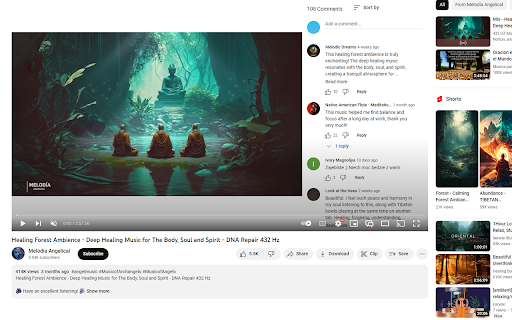
Watch the video with comments on full screen! Enjoy viewing comments on all types of screens without scrolling down! ---- Features ➡️ View comments with all video types (fullscreen, theater, general mode) ➡️ Drag to resize the comment window ➡️ Automatically resize the video based on the size of the comment window ➡️ Support Dark mode 🆕 NEW UPDATES: ✨ Your preferred comment window size is now remembered between sessions ✨ Type comments freely without triggering YouTube shortcuts (fixed bug with space bar and other keys) ✨ NEW keyboard shortcut 'v' to quickly toggle comment viewer ✨ Added helpful tooltips to the comment viewer toggle button ---- Why YouTube Comment Viewer is needed: Traditional YouTube requires scrolling down to read comments, which is very cumbersome. With 'YouTube Comment Viewer', you can easily display comments on the right side of the video, and the size of the window can be customized to your preference. ---- 💬Bug reports and inquiries - tonymkcv93@gmail.com ----

YouTube Windowed FullScreen
Watch videos on YouTube fullscreen within your browsers screen. A simple and lightweight extension that adds an icon which allows the YouTube video player to fill the entire page, as a full browser player. Note: I'd requested notification permissions to be able to show a little popup when I add new features in an update but have decided to remove this in 4.9. UPDATE: Now works with new Youtube UI! Other New/Updated Features (Premium required for some features, $12 AUD for Lifetime access): - Adds button to player for windowed fullscreen + configurable hotkey (FREE) - Auto-toggle windowed fullscreen (Premium) - Allow scrolling while windowed fullscreen mode (Premium) - Miniplayer while scrolling (Premium) - Picture-in-Picture Shortcut (Premium) - Hide Youtube Miniplayer Button (Premium) - Always Show Search Bar during windowed fullscreen mode (FREE) - Show video title during windowed fullscreen mode (FREE) Configure options by either clicking the icon in your browser, or head to chrome://extensions and click on Details for Youtube Windowed FullScreen and click the "Extension Options". Please note some Shortcut Keys may not work correctly as YouTube, or your system may block them. Most keys should work if they are not reserved. While in fullscreen mode, mouse over where the search bar usually is for it to appear; it will also appear while scrolling. Change Log: V5.0 - Fix for updated new YouTube UI V4.12 - Fix for certain new YouTube layout V 4.11 - Add 'Hide Miniplayer Button' setting to hide miniplayer button on youtube player V 4.9 - Remove notification permission V 4.8 - Add new setting for hiding scrollbar while in scrollable fullscreen to squeeze that extra bit of real estate out of the page - Add new setting for hiding 'Includes paid promotion' overlay button for thumbnails on the subscription page for people like me that middle click videos often but then end up in a google support page! (This removes the little indicator that youtube adds to thumbnails to indicate a video has sponsorships. This is not something the extension adds just to get you to pay to remove or anything!) V 4.7 - Shifted from yearly subscription to one time payment. Please rest assured anyone that had previously subscribed has been automatically migrated to lifetime access and any renewal/subscription has been cancelled. - Updated algorithim for consistent auto-toggling and button rendering We're Moving to a Freemium Model: Sign up won't take any credit card or anything like that; A one time payment of $12 AUD grants you premium access for life for the feature mentioned above that require premium Link to the terms of use and privacy policy: https://docs.google.com/document/d/1czbBOblR46ucyfxpCUhdNnxh_TUH69R2Up-KbA6-ffw/pub

Show YouTube comments while watching
Show YouTube comments on the right of the video. Read comments while you watch! ---------- Want to read comments while you watch a YouTube video? Tired of scrolling or pausing just to read comments? We got you. Comments now appear to the right of the video player, and suggested videos are moved underneath the video player. Thank you so much for your comments! I do read all of them and appreciate your feedback. 1.0.5 - 2026-05-13 * Fixed the extension breaking due to YouTube layout changes. Thank you all for your quick bug reports. 1.0.4 * Fixed the extension breaking due to YouTube layout changes. Thank you all for your quick bug reports. 1.0.3 * Fixed a bug where comments would only swap after refreshing the page. * Migrated to Manifest V3 (new thingies from Google) before it becomes mandatory. Will be monitoring closely for bugs.

YouTube Comments Sentiment
Visualize a YouTube video's sentiment given the comments. Visualize the aggregate sentiment of a YouTube video's comments on an adapted Likert scale. This extension uses the specialized social media VADER Sentiment Analysis algorithms to evaluate the sentiment of the top 300 comments by relevance. The compound sentiment value for a comment is scaled by the amount of likes the comment has received. Scaling by likes allows for an accurate depiction of the sentiment with a low sample size of comments. The sentiment analysis results act as a loose proxy for the Like-to-Dislike ratio, but are not always indicative of the true Like-to-Dislike ratio.

Youtube Comments Insights
Analyzes the comment section of a youtube video according to the themes that are discussed the most This Chrome extension is a unique tool designed specifically to analyze the comment section from videos of your favourite Youtube channels. Whether you want to grab a quick glance of the most popular discussed topics or explore emerging trends based off the comments from your favourite creators, this extension can help provide you with a quick overview, which is especially useful for videos that contain thousands of comment threads. Youtube Comments Insights also possesses a filter for the number of total comments you want to retrieve for a useful analysis which are given the percentage values of 50%, 75%, or 100%. Additionally to the most repeated words, the result from each analysis also identifies the most repeated bigrams, and trigrams which will provide a clear insight into the general themes being discussed within the comments section of the video you wanted to analyze.
