
ppkojackhibeogijphhfnamhemklmial

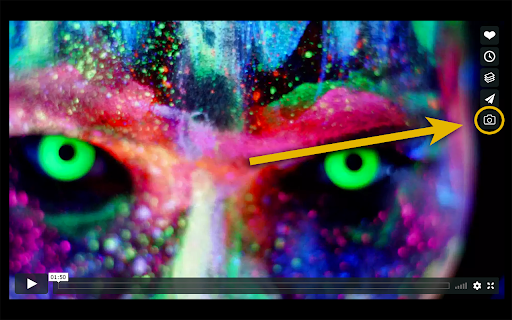
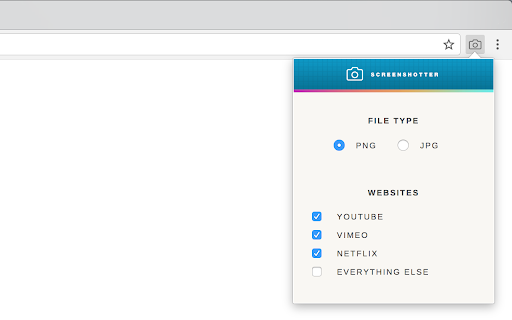
***This extension only works in Chrome*** This extension allows you to download full resolution stills from YouTube, all major streaming services (Netflix, Disney+, Prime, etc.), and videos on most other websites without seeing the player controls or the surrounding webpage. When a video begins to play, you'll see a camera icon appear alongside the normal player controls. Clicking the camera button (or using a keyboard shortcut) downloads a screenshot of the current frame. The screenshot is then either saved in your downloads folder as a JPG or PNG, or copied to your clipboard. Premium Subscription The premium tier includes the option to include subtitles within the screenshot, compatibility with additional websites, and cropping for letterboxed content. Since this extension is reliant on other websites, it needs to be continuously maintained as those websites change.

Screenshot for Youtube & Other Video Services
Take a screenshot of any YouTube & other video services video with one click. Want to take a screenshot of the video playing when you're on Youtube/Vimeo? You can do so today when you install this extension. This software allows you to take a screenshot of the Youtube video/Vimeo video which is on your current tab. As the screenshot functionality needs to work on both Youtube.com and Vimeo.com, that is why the host permissions is needed for both of these domains. Take a screenshot of your favorite videos today which are playing. Its extremely simple to use. After you install the software, refresh any current tabs which were open before. When you wish to take a screenshot, click on the screenshot button/icon which is located at the bottom right corner of the Youtube video screen. Please note this extension is made by an independent developer and is NOT an official extension of Google/Vimeo. We hope you enjoy using this software to take screenshots of your favorite epic youtube videos.

Video ScreenShot Capture
Video ScreenShot Capture, capture's video-size screenshots and saves them in the form of png. Video ScreenShot Capture, capture's video screenshots and saves them in the form of png. What Is Video ScreenShot Capture? Video ScreenShot Capture's the screenshot of the video without capturing an extra screen. It just captures video-size screenshots and saves them in the form of png. Why Video ScreenShot Capture? With Video ScreenShot Capture, users can effortlessly capture YouTube screenshots with a single click or keyboard shortcut. Say goodbye to the hassle of capturing unnecessary screens - this screenshot extension focuses solely on the video content, ensuring precise captures every time. Who Is Video ScreenShot Capture for? Video ScreenShot Capture is ideal for students, researchers, and content creators who rely on platforms like YouTube and Coursera for educational content. By seamlessly integrating with these platforms, this screenshot extension enhances the process of taking YouTube screenshot notes. HOW DOES IT WORK? There are two different ways to capture a video screenshot: Clicking on the extension icon. Using Shortcut : WINDOWS : CTRL + SHIFT + Z and MAC : CMD + SHIFT + Z. Video Screenshot Extension: The ultimate YouTube screenshot tool and top-notch extension for effortless captures.

Screenshot YouTube Video
Quickly extract video frames from YouTube and OK.ru and save to JPG images with just one click. Screenshot YouTube Video is a compact and user-friendly extension that allows you to take a screenshot of YouTube and OK.ru videos and save the frame to your PC without using third-party programs and without cropping the video player frames. Ready-to-use frame from a movie or clip in maximum quality with just one click of the cursor. It is easy to find the Video Screenshot Button — that's the camera image in the lower part of the player. Features of the browser extension: — The button is well-integrated into the design of the YouTube and OK.ru video players; — Screen capture in JPEG format and without the frames of the video player; — Downloaded frames have readable (human-friendly) names; — "Embedded" video frame loading support, i.e. YouTube and OK.ru videos hosted on third-party sites;

YouTube Screenshot
you can get youtube screenshot! YouTube Screenshot is a handy Chrome extension that allows you to easily capture high-quality screenshots from YouTube videos. With a single click, you can get the original width and height of the video capture, copy it to the clipboard, or save it as a PNG file. Whether you need a screenshot for reference or sharing, YouTube Screenshot makes the process quick and hassle-free. Install the extension and start capturing YouTube screenshots today!
