
ppgddnjehcjghkjfijglbafaecmlompm

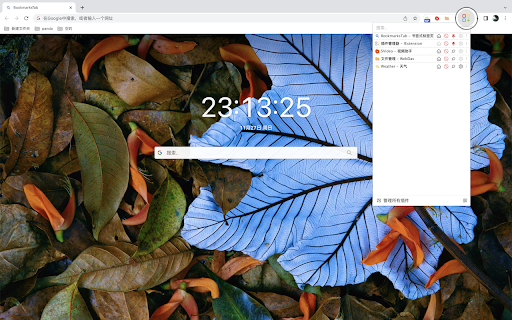
Extension Manager, conveniently manage your browser extensions "IExtension" is a browser extension that aims to provide users with more plugin management functions. It allows users to search, pin, visit the plugin homepage, enable/disable plugins, download CRX files, and configure management, etc. This makes it easier for users to organize and manage plugins in their browser. If you encounter any problems during use, please don't panic. Negative reviews cannot solve the problem. You can provide feedback via the link below and I will follow up promptly. If this has been helpful to you, can you please give me a good review? 🌹

Chrome Extension Manager | Master
Chrome extension manager chrome://extensions/, main extension name, extension list, delete extension, edit Chrome extension manager chrome://extensions/, main extension name, extension list, delete extension, edit Here's how to access and use the Chrome extension manager: Open Google Chrome: Launch the Google Chrome web browser on your computer. Click on the three vertical dots in the top-right corner of the Chrome window to open the menu. Hover your mouse over "Chrome Extension Manager logos" in the menu that appears. View and Manage Extensions: In the "Extensions" tab, you will see a list of all the extensions you have installed. You can enable or disable an extension by toggling the switch next to its name. Disabling an extension temporarily turns it off without uninstalling it. To remove an extension, click the "Remove" button under the extension you want to uninstall.

Extension Manager
A Chrome extension to manage other extensions. "Extension Manager" is a powerful Chrome extension designed to streamline your extension management experience and offer full control over the extensions installed in your browser. With this user-friendly tool, you can easily enable or disable extensions, uninstall unnecessary ones, and access the Chrome Extensions page with just a few clicks. ✅ Enable and Disable Extensions: Gain the ability to enable or disable any extension on the fly. This feature allows you to keep only the necessary extensions active, improving your browser's performance and minimizing clutter. ✅ Uninstall with Ease: Say goodbye to unwanted extensions that clutter your toolbar. Uninstall extensions effortlessly, freeing up valuable browser space and resources. ✅ One-Click Access to Extensions Page: Navigate to the Chrome Extensions page with a simple click. No need to navigate through multiple menus; this extension provides quick access to manage your extensions effectively. 🔹 Streamlined Extension Management: Managing extensions in Chrome can be time-consuming and challenging, especially when you have numerous add-ons. "Extension Manager" simplifies this process, making it a breeze to enable, disable, or uninstall extensions. 🔹 Improve Browser Performance: By selectively enabling only the essential extensions, you can significantly enhance your browser's performance, reducing load times and resource consumption. 🔹 Reduce Clutter: Keep your Chrome toolbar organized and free from clutter by easily uninstalling unwanted extensions. Enjoy a clean and efficient browsing experience. 🔹 Enhanced Control: Take charge of your browser extensions with ease. "Extension Manager" empowers you to decide which extensions stay active, allowing you to customize your browsing environment to suit your needs. 🔹 Quick Access to Extensions Page: No need to fumble through settings to access the Extensions page. This extension provides a convenient button for instant access, saving you time and effort. Don't let your browser extensions dictate your browsing experience. Install "Extension Manager" now and take control of your Chrome extensions like never before. Experience improved performance, reduced clutter, and a smoother browsing journey.

Extensions Steward
Feature: 1. Enable/disable extension 2. Disable all extensions 3. Restore disabled extensions 4. Handy search Chrome web store with omnibox 5. Handy search extensions (Support partial ASCII and pinyin)

Extension Manager
Extension that manages other extensions If you have tons of extensions but don't want to leave them all on at the same time - this extension is for you. You can use this to turn them on and off. Ctrl+L is the default keybinding to open the popup Move with arrow keys Press enter to turn toggle extensions on and off This is mostly for personal use but if you find it useful as well then great :)
