
ppbfhhgcdehhbjigifndnfmcihegokbb


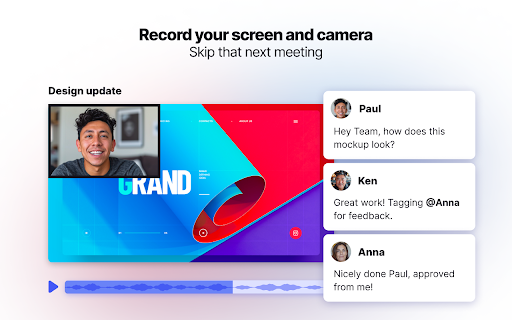
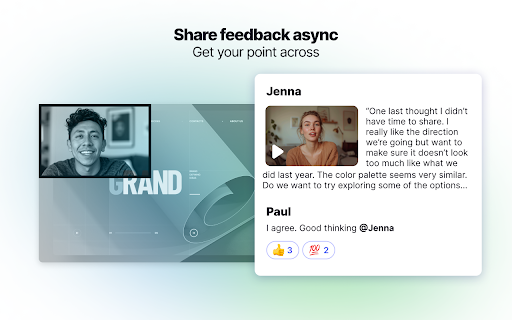

Bubbles is a free screen recorder and AI meeting notetaker to help turn conversations into actions. Use AI to record, transcribe, and summarize meetings into actions. Then eliminate live meetings by sharing feedback with screen recordings. Bring back speed and accountability to flexible async collaboration by setting a timer to async conversations. Why timers? Timers add urgency and accountability to async meetings. They enable you to get the best of both worlds: you and your team can do heads down work while keeping the ball moving in a timely manner. Get your point across with quick videos rather than hour-long meetings. 🔮 Integrates with Zoom, Google Hangouts, and Microsoft Teams 🎥 Screen Recorder for async collaboration “Bubbles re-defines async work. I use Bubbles Notetaker and core product on top of all project management / productivity platforms to streamline meetings (and to have less of them) and supercharge my team's async work.” - Aaron Cort, former VP of Operations at ClickUp 👉 Use AI to record, transcribe, and summarize meetings into actions. Bubbles is your home for after-meeting collaboration. 👉 Connect your calendar and Bubbles Notetaker will easily hop in (or out) of meetings to securely record, transcribe, and take notes. 👉 Avoid follow-up calls with rich video replies and get back to doing real work. 👉 All your meetings saved in one place. Organize recordings or share folders with coworkers and guests. 👉 Walk through your work using video, screen, and voice annotations without misinterpretation. Great for feedback on designs, copy, docs, and apps. 👉 Stay in sync. Asynchronously. Comment at specific timestamps with text, audio, or screen recordings. 👉 Share feedback visually. Asynchronously review designs, websites, and any other docs or apps. Provide context with text, video, screen, and voice annotations. 👉 Resolve ad-hoc questions without meetings. No more ‘quick questions’ turned into hour-long calls. Follow up at any time and share your desired timeframe. 1️⃣ Connect your calendar in seconds. Bubbles Notetaker will easily hop in (or out) of meetings to securely record, transcribe, and take notes so you can focus on what matters: being present. 2️⃣ Get instant actions from meetings. End meetings with immediate to-do items, and a home to collaborate on that meeting’s topic and organize feedback. 3️⃣ Skip your next meeting. Save live calls for only the most important discussions. Cover quick questions, ideas, and updates async with screen recordings. "Once you use it, it’s hard to go back." - Shaan Puri, Chairman at The Milk Road 👋 Make your meetings matter. Spend more time being present and less time taking notes. 🏠 Everything in one place. End meetings with immediate to-do items and clear next steps. ✅ Async with speed. Bring back speed and accountability to flexible async collaboration by setting a timer to async conversations. 🙌 Works with Slack, Zoom, Google Hangouts, and Microsoft Teams. Embed recordings in your Notion pages (and with 200+ other integrations) 👩🎨 Designers can automatically record design feedback so they can better guide the conversation. 🧑💼 Marketers can follow up on kickoffs and check-ins with AI action items. 👩🚒 Growth teams can troubleshoot and comment on signup flows without using screenshots. 👩🎤 Product specialists can demo products and create audio or text highlights. 🙆 Managers ensure their teams are all on the same page with post-meeting collaboration and AI-powered next steps. 👨💻 Engineers use Bubbles to get feedback on their apps and websites. Ask questions and submit feedback on our Slack: https://link.usebubbles.com/slack

AI Meeting Notes Taker & Screen Recorder
Berrycast screen recorder records, transcribes and generates AI meeting summaries for Zoom, Google Meet and MS Teams. Berrycast is an AI powered screen recording and video messaging platform (used by 100,000+ Users) Our platform allows you to automatically record and transcribe your meeting conversations, then use AI to summarize the discussion. Afterward, share a link of the video with ease via email, instant message, or in your task management tool. Even if you are not the host of the meeting. You can also use Berrycast to communicate more effectively, efficiently, and expressively with everyone using Berrycast for creating and requesting screen recorded video messages as well. Here is how the Berrycast AI meeting notes taker and screen recorder works? ➕Install Chrome extension or Desktop application ⏺️Launch recorder & select recording mode - Screen + Camera or Camera Only ⏹️Stop recording. Video gets immediately uploaded to the cloud. 🎥Now video is available with transcripts (we detect 60+ languages) to review 🤖Use AIWriter to summarize video conversation or use different prompts 🔗 Now share video via direct link, email and social media with transcripts and AI summary Berrycast also supports the following features: 🎥 Screen + Face recorder ✂️ Trim your video 📑 Transcripts (60+ languages) 🤖 ChatGPT powered AIWriter ⬇️ Download your video 📧 Email integrations (Gmail and Outlook) 👀 See who has viewed your video 📺 Video replies and comments More than 100,000 people use Berrycast every day to capture their meetings, record screen and video messages including project managers, marketers, sales people, recruiters, developers and engineers without worrying about note taking. You need to simply launch the recorder and your video will start recording with the transcript. Then once the video is recorded and available to view, you can use our AIWriter feature to do the following to generate meeting notes: 👉 Summarize Conversation - Generate a quick summary out of the entire meeting in one or two paragraphs. 👉 Define Action Items & To-dos - Summarize entire meeting conversation in the form of actions items and to-dos. 👉 Clean my transcript - Simply correct the meeting (grammar and spelling mistakes) transcripts through AI. 👉 Email ready to send - Get ready to send email draft that is pre-written and can be sent immediately. ❓ How do I record screens on Windows & Mac? 👉 You can install the Chrome extension or you can install our desktop application as well. ❓ Is Berrycast a free screen recorder tool? 👉 Yes. We offer a 14 day full feature trial. ❓ Does the Berrycast screen recorder record audio and video? 👉 Yes. Our tool records both system and microphone audio. ❓ Is it possible to record meetings without noticing anyone? 👉 Yes. Our recorder is bot free. Hence nobody would notice your video being recorded. ❓ Can I edit my screen recording videos? 👉 Yes. We offer video trim/edit functionalities. ❓ Can I edit/correct transcripts? 👉 Yes. You can edit and update the transcript to correct your mistakes. ❓ Can I download the transcripts? 👉 Yes. You can download the transcripts. ❓ Can I use AIWriter multiple times? 👉 Yes. You can use the prompts unlimited times. ❓ Can I share videos with others? 👉 Yes. You can copy the direct link, send email and embed it on an external website. ❓ Can I invite my team members to try the Berrycast tool? 👉 Yes. If you are on a pro plan. ❓ Which browsers does your online screen recorder work with? 👉 Berrycast works with Chromium based browsers & Safari.

eesel: ChatGPT document search
ChatGPT powered new tab search for Google Docs, Notion pages and other work documents Your team creates many work docs in many different apps. A project brief in Google Docs, a timeline in Notion, a mockup in Figma. It can be an exhausting game of trial and error to find the links you need, and that's where eesel comes in. 🔎 Doc search in your new tab eesel filters your browser history to show your work documents right in your new tab. It’s all easy to access and fully searchable. 📁 Self-organised Folders Get your work automatically organised into Folders. Forget about tab managers and bookmarks. 🆕 A feed of work documents Share Folders with the team and receive new pages they make, directly in the new tab. Stay in the loop without chasing for updates on Slack. 💨 Skip past spinners Fly through your work with Commands to create new docs, and a shortcut to open eesel and access your documents from any page. 🌏 Works with any app eesel works with anything you open in the browser – from that hip new product only you know about to that old school company intranet. 🤯 No setup There's no need to create an account or connect the different apps you use. Install eesel and you're done. • • • PRIVACY • • • The content of your pages never leaves your browser. In fact, by default, eesel runs entirely locally. Check that for yourself - https://eesel.app/hack

Screenshot & Screen Recorder w/ Webcam-Droplr
The Easiest All-In-One Screenshot & Screen Recorder Capture screenshots and screen recordings instantly: it's saved to the cloud with a link you can share with anyone, anywhere. Simple and easy to use. Screenshots: Capture part of your screen, the entire screen, or the full webpage: then mark it up. Screen recorder: Screen record with audio and optional webcam as a GIF or HD video. Features: * Your screenshot or screen recording automatically saves to the cloud with a link saved to your clipboard. Paste it and share it with anyone, anywhere like email or Slack. Or download your screenshot as a PNG or screen recording as a WebM right to your device. * Annotate by adding text or color highlight. Use the image editor to add shapes like lines, circles, arrows, and boxes. Have fun with over 30 emojis to add to your screenshots 😀👌💯🎉 * All your screenshots and screen recording are saved to your personal Droplr cloud account, so you can access them anytime. Add our top-rated Chrome app; used by 5 million people to share billions of screenshots and screen recordings.

Hoverify: All-in-one extension for web developers
All-in-one browser extension that helps you inspect, edit, test, debug, capture, and optimize websites faster. ⭐ Inspector: Hover to Inspect, Click to Edit • Inspect any site by hovering over the element. • Don't miss any styles. Inspect pseudo-elements and classes. • Inspect and edit styles for all screen sizes and animations in real time. • Style elements visually with our powerful visual editor in real time. • Edit HTML, styles, media queries, and animations in real-time. • View source CSS from different selectors in the code tab. • The code is syntax-highlighted for better reading and editing. • Copy or export the whole component with children to CodePen. • Edit Copy - Check how different copy looks on your page by editing the element's content in real-time. • Hide or Remove Elements - Debug page structure by hiding or removing elements. • Color Palette - Get every color from the page. • Font Viewer - Know what fonts each tag is using. • Search - Find the element through tag name, id, or classes. Even with CSS selectors! • CSS Box - Visually inspect the padding, margin, border, and size of the element. • Keyboard Shortcuts - Fully customizable shortcuts so you can work without lifting your hands off the keyboard. ⭐ Color Eyedropper: Spot, Point, and Select Colors • Pick colors from anywhere on the page, even from images and iframes. • Get RGB, OKLCH, CMYK, HSL, and hex values. ⭐ Responsive Viewer: Preview on Multiple Devices • Test your websites on multiple devices under multiple conditions in parallel. • Click or scroll on one device and other devices will follow. • Simulate modern devices with frames, frame styles, and OS. Includes iPhone 16, iPhone 15, Nothing Phone, Pixel 7 Pro, and more. • Switch between device frame styles and colors to match real-world hardware. • Works on any site - can be injected directly into the page for full compatibility. • Add new custom device profiles to fit your needs. • Test sites on viewports bigger than your display. • Toggle horizontal and vertical scrollbars per device. • Change user-agent. ⭐ Assets: Extract all the assets in one place • Extract images, videos, SVGs, PDFs, Lottie animations, and favicons from the page. • Extract assets from iframes and hidden elements. No valuable content is overlooked. • Preview video thumbnails directly in the images tab. • Filter and sort assets by type, size, and format. Find what you need quickly. • Select all or pick individual assets, then zip and save in one click. ⭐ Library: Save assets directly to the cloud • Save any extracted asset to your connected cloud storage without leaving the browser. • Access your saved assets anytime from your library. ⭐ Site Stack: Discover the tech stack behind any website • Uncover what's powering any site from frameworks and hosting to DNS and SSL, all in one place. • Technologies - Detect frameworks, libraries, CMS platforms, analytics tools, and plugins with confidence scoring and version detection. • Hosting - Identify the hosting provider, server IP address, location, and infrastructure details. • DNS - View DNS records, nameservers, and domain registrar information at a glance. • SSL - Verify the SSL certificate, issuing authority, validity period, TLS version, and key details. • WordPress - Detect WordPress sites automatically and reveal the active theme, installed plugins, and ratings. • Export - Download the full tech stack as a JSON file or generate a professionally designed PDF report. Choose exactly which sections to include, perfect for client handoffs and site audits. ⭐ SEO: Optimize your site for search engines • Run a complete SEO audit on any page, right from your browser. • Insights - Get Core Web Vitals with real user data from Chrome UX Report and lab performance scores from Google's PageSpeed API, all in one view. • Meta Tags - Audit your title, description, Open Graph, and Twitter Card tags with character count validation and social preview checks. • Headers - Visualize your H1 through H6 hierarchy. Spot duplicate headings, missing H1s, and structural issues that hurt readability and rankings. • Images - Find oversized images, compare original vs rendered dimensions, and catch missing alt text that hurts accessibility and SEO. • Links - Scan all internal and external links on a page. Filter by type, detect broken URLs with one-click status checks, and audit anchor text. • Schema - Detect existing structured data (JSON-LD, Microdata, RDFa) with validation, or generate new schema markup from ready-to-use templates. • Export - Generate a professionally designed PDF report. ⭐ Capture: Take stunning screenshots of any website • Showcase the full webpage or just any part of it with our screenshot tools. Save screenshots in JPEG, PNG, WEBP, or PDF format. • Visible Part - Capture the visible part of the viewport of the page in high resolution. • Full Page - Capture the full page and showcase the entire page in one image. • Select Area - Click and drag to select any area of the page to capture. • Select Element - Capture any component on the page by clicking on it. • Screenshot Editor - A full editing suite for your screenshots. Add gradient backgrounds, annotations, branding (your logo and text), and crop with precision. Zoom, pan, paste images from clipboard, snap annotations into place, and export in any format. Turn raw screenshots into polished visuals ready for portfolios, docs, or social media. ⭐ Debug: Optimize and debug your site with ease • Clear Browsing Data - Instantly remove browsing history, cache, cookies, local storage, and more. • Custom Code - Inject HTML, CSS, and JavaScript to tailor websites in real-time and make changes persistent. • Optimize Images - Improve loading times by optimizing images on your landing page. Please note: This is a paid extension, you can buy it from here- https://tryhoverify.com. 💡 Bug Report and Suggestions To report a bug or for a feature request, you can send an e-mail to tryhoverify@gmail.com.
